





FIX SCCM Packages are not Getting Updated on the New Site System Domain Controller
FIX SCCM Packages are not Getting Updated on the New Site System Domain Controller. I’m trying to document the issue we faced during one of my assignments.
We’d already installed Remote DP on a domain controller; however, the packages were not getting replicated. The following troubleshooting steps helped us identify the issue and resolve it.
I hope they will be helpful to others in the community.
| Index |
|---|
| FIX SCCM Packages are not Getting Updated |

FIX SCCM Packages are not Getting Updated
One of my clients had a special requirement to put a Remote DP server on a domain controller.

After some days, we noticed that the DP was not updated, and new packages were not replicated. FIX SCCM Packages are not Getting Updated on the New Site System Domain Controller.
Noticed errors in DistMgr.log
Cannot establish connection to [“Display=\\SiteServerName\”]MSWNET:[“SMS_SITE=999”]\\DPServerName\ SMS_DISTRIBUTION_MANAGER 5/18/2011 9:09:29 PM 2052 (0x0804) Error occurred. SMS_DISTRIBUTION_MANAGER 5/18/2011 9:09:29 PM 2052 (0x0804) ()
Domain controllers do not have a local Security Accounts Management (SAM) database other than the domain database. So, we can’t add the site server’s machine account to the local administrator’s group of domain controllers.
We have enabled NAL logging to get more details about the access denied error.
How to enable NAL logging – It’s enabled in the registry on the site server. For more information about NAL logging, check http://support.microsoft.com/kb/243385/
- Browse to HKLM\Software\Microsoft\NAL
- Create a new Key called Logging
- Create two new DWORD values log To with a value of 3 (decimal) and Verbosity with a 7 (decimal) value. The value 7 will give you warnings, errors and information messages.
Now, check the DistMgr.log for more details…..
NAL[2] – WARNING: failed to obtain an admin level authentication to the server. Access is denied. SMS_DISTRIBUTION_MANAGER 5/18/2011 9:09:29 PM 2052 (0x0804)
NAL[64] – Leaving CServer::_Authenticate() Access is denied. SMS_DISTRIBUTION_MANAGER 5/18/2011 9:09:29 PM 2052 (0x0804)
NAL[1] – The server is inaccessible. Access is denied. SMS_DISTRIBUTION_MANAGER 5/18/2011 9:09:29 PM 2052 (0x0804)
NAL[64] – Leaving CServer::IsAccessible() Access is denied. SMS_DISTRIBUTION_MANAGER 5/18/2011 9:09:29 PM 2052 (0x0804)
Now, it’s pretty clear that the error is due to a permission issue on the DP server. The site server doesn’t have admin access to DP (Domain Controller).
Somehow, the site system’s system account cannot get admin access on the DP server (DC). To resolve this issue, we have used a domain service account as a Site System Installation Account instead of a system account.
More details about Site System Installation Account. http://technet.microsoft.com/en-us/library/bb680552.aspx
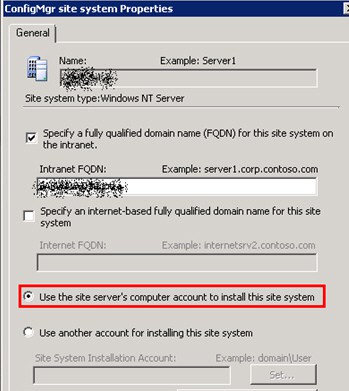
Add service account as as Site System Installation Account.
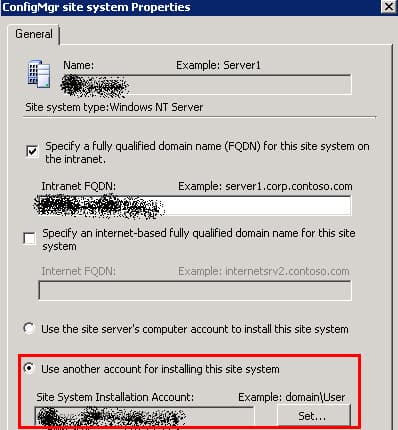
Refreshed the package and while reading DistMgr.log, I can see that the packages are started getting copied to DP server (DC).
copying D:\_S Mei4v.TMP\x86\uninstallwizard.xml to \\DPSiteSystem\\SMSPKGX$\packageID\x86\uninstallwizard.xml~ $$<sms_distribution_manager><5/18/2011 11:09:29 PM ><thread=7872 (<span=”” class=”hiddenSpellError” pre=””>0x1EC0)>
copying D:\_S Mei4v.TMP\x86\upgradewizard.xml to \\DPSiteSystem\SMSPKGX$\packageID\x86\upgradewizard.xml~ $$<sms_distribution_manager><5/18/2011 11:09:29 PM ><thread=7872 (<span=”” class=”hiddenSpellError” pre=””>0x1EC0)>
UnRegisterSignatureUsage() called for Package packageID, Version 1 with TargetPath as \\DPSiteSystem\\SMSPKGX$\packageID\~ $$<sms_distribution_manager><5/18/2011 11:09:30 PM ><thread=7872 (<span=”” class=”hiddenSpellError” pre=””>0x1EC0)>
Unpacked folder for package version packageID.1 is not being used by any user. It will be deleted now.~ $$<5/18/2011 11:09:30 PM ><thread=7872 class=”hiddenSpellError” data-mce-bogus=”1″ pre=”” (<span=””>0x1ec0)=””>
Also, I have seen similar errors “MicrosoftIISv2 . error = Access is denied” in DistMgr.log for DP site system. However, below solution didn’t work for me. Just for documentation pupose I thought of adding in this article.
CWmi::Connect() failed to connect to \\ServerName\root\MicrosoftIISv2 . error = Access is denied. SMS_DISTRIBUTION_MANAGER 4/1/2010 8:44:01 PM 22504 (0x57E8)
ERROR DPConnection::ConnectWMI() – Failed to connect to ServerName. error = 0x80070005 SMS_DISTRIBUTION_MANAGER 4/1/2010 8:44:01 PM 22504 (0x57E8)
WBEMTEST to remotely connect to the ServerName server’s namespace root\MicrosoftIISv2.
a. On the site server, run WBEMTEST.
b. Click Connect.
c. Input <\\Servername\root\MicrosoftIISv2> and click Connect.
d. Does it generate the 0x80070005 or Access Denied error?
e. On the DP server itself, if you use WBEMTEST and try to connect to “root\MicrosoftIISv2”, what happens?
Basically, for the DP server, if MicrosoftIISv2 is the only namespace that the site server cannot access, we can check this namespace’s security setting. We can try the steps below:
The steps are as follows.
1. On the DP server, run WMIMGMT.MSC.
2. Right-click WMI Control, and click Properties.
3. Click on the Security tab.
4. Expand Root. Then find the MicrosoftIISv2 namespace. Select it and click the Security button.
5. For each account listed there, what are the permissions granted?
6. As a test, you can grant the “Everyone” user “Allow” permission for all actions and test to see if this resolves the error. If this works, then it is missing certain security permission regarding this Namespace.
Reference -> TechNet Thread and Distribution Manager NAL error
Note – (Another option) You may add a domain controller system account to the local group “SMS_SiteSystemToSiteServerConnection_sitecode” on the secondary server.
We are on WhatsApp. To get the latest step-by-step guides and news updates, Join our Channel. Click here –HTMD WhatsApp.
Author
Anoop C Nair has been Microsoft MVP from 2015 onwards for 10 consecutive years! He is a Workplace Solution Architect with more than 22+ years of experience in Workplace technologies. He is also a Blogger, Speaker, and leader of the Local User Group Community. His main focus is on Device Management technologies like SCCM and Intune. He writes about technologies like Intune, SCCM, Windows, Cloud PC, Windows, Entra, Microsoft Security, Career, etc..




Anoop, thanks for posting this. It helped me. I had a similar error:
CWmi::Connect() failed to connect to \\\root\MicrosoftIISv2. error = IDispatch error #3598 SMS_DISTRIBUTION_MANAGER
ERROR DPConnection::ConnectWMI() – Failed to connect to CA-FP-C01. error = 0x8004100e SMS_DISTRIBUTION_MANAGER
I followed the steps above to verify the correct secruity on the MicrosoftIISv2 namespace and found that the MicorosftIISv2 namespace did not exist on my distribution point! I recompiled the IIS mof (see http://forums.iis.net/t/1169809.aspx) using this command:
mofcomp iiswmi.mof
I re-pushed the package to this DP and all’s well.
Many thanks for sharing !!