






How to Fix SCCM Prerequisite Errors Warnings
Let’s learn how to fix SCCM prerequisite errors/warnings. I have already noted down two prerequisites in the 2107 upgrade guide. The first one is DotNet 4.8 is the recommended version. However, DotNet 4.6.2 is still going to work fine with the 2107 version of ConfigMgr.
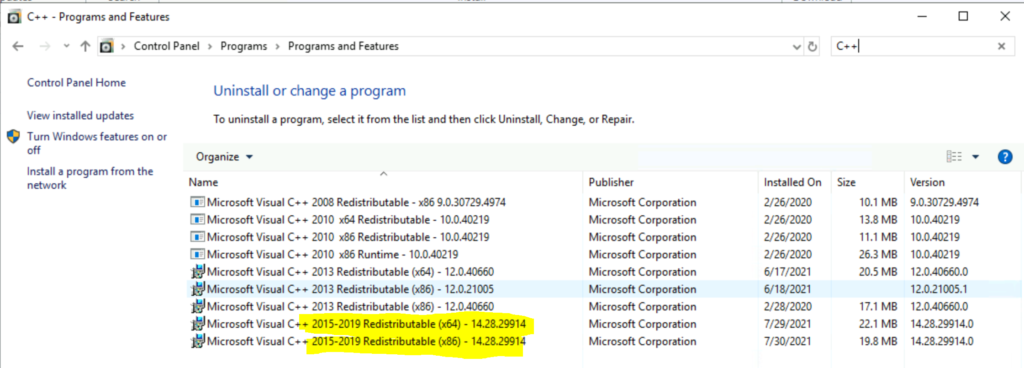
The second prerequisite is Microsoft Visual C++ 2015-2019 redistributable version should be 14.28.29914.0 for all the site servers and the site system servers (MP, DP, etc..). I recommend updating your site system servers to the latest version of Microsoft Visual C++ 2015-2019 redistributable (x64 or x86) version.
Read more about SCCM 2107 upgrade before you kick start the upgrade process. Take a good look at the list of prerequisites and checklist before the upgrade. You can check out my top 5 features of SCCM 2107.
How to Fix DotNet 4.8 Warning – How to Fix SCCM Prerequisite Errors Warnings
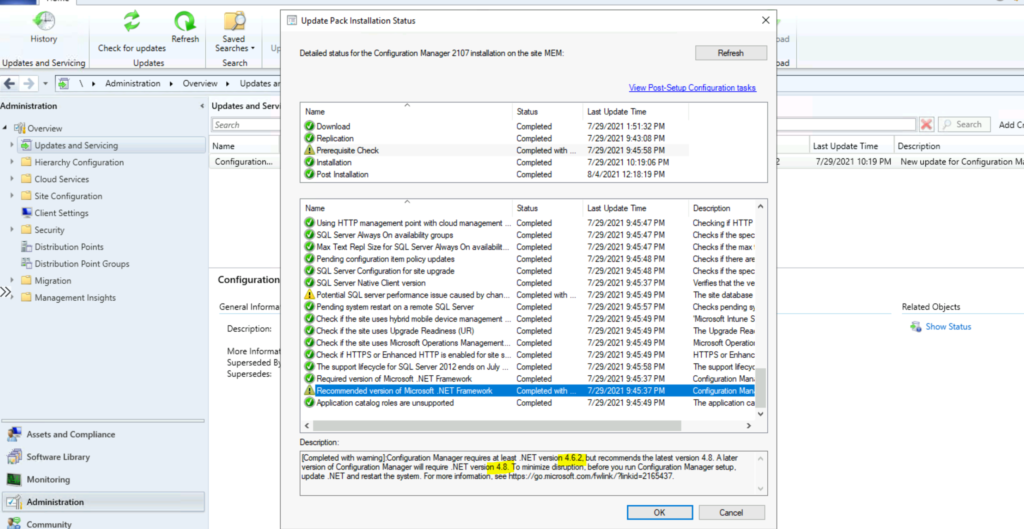
Let’s learn how to fix DotNet 4.8 warning in the prerequisite check. What did I do in the lab environment? I just ignored the warning and upgraded the primary server to 2017. The following is the warning that I had. But this is going to create a problem for the next version of ConfigMgr 2111. My recommendation is to install the 4.8 version of DotNet before the 2107 upgrade.

[Completed with warning]: Configuration Manager requires at least .NET version 4.6.2 but recommends the latest version 4.8. A later version of Configuration Manager will require .NET version 4.8. To minimize disruption, before you run Configuration Manager setup, update .NET and restart the system.
NOTE! – You can download the offline version of DotNet 4.8 from the Microsoft support site. This update helps you to fix one of the SCCM 2107 Prerequisite Errors/warnings.
A more detailed blog post on fixing Dot NET issues with the SCCM upgrade is available – Fix SCCM Dot NET Version Warning Error During Prerequisite Checks.
Management Point Failure after 2107 Upgrade – SCCM 2107 Prerequisite Errors
Mattias Melkersen Kalvåg, one of my MVP colleagues, kindly shared his experience with the 2107 upgrade and the issue he faced with the failure of management point after the upgrade? I didn’t face this issue in the lab environment because my servers were up to date with the latest Microsoft Visual C++ 2015-2019 redistributable.
The workaround that he provided was to uninstall the existing Microsoft Visual C++ 2015-2019 redistributable application, and the MP reinstall might install the latest version of Microsoft Visual C++ 2015-2019 redistributable application. This step helps you to fix SCCM 2107 Prerequisite errors with Management Point.
Other Dependencies for the 2107
Microsoft updated the documentation to list out all the updates required for version 2107 of Configuration Manager.
- Microsoft Edge WebView2 Redistributable to version 90.0.818.51
- Microsoft .NET Framework to version 4.6.2
- Microsoft Visual C++ 2015-2019 Redistributable to version 14.28.29914.0
- Xceed.wpf.avalondock.themes.metroaccent.dll to 4.1.0.0
- Xceed.wpf.themes.dll to 4.1.0.0
- Xceed.wpf.themes.metro.dll to 4.1.0.0
- Xceed.wpf.toolkit.themes.metro.dll to 4.1.0.0
- Microsoft.aspnet.odata.versioning.dll to 4.0.7242.29043
- Microsoft.aspnet.webapi.versioning.dll to 4.0.7242.29042




After installing dotnet 48 and rerunning the prerequest checker the error does still apear. Any ideas?
StaffI heard from the community that this error/warning will go away after a couple of restarts. But I have not tested this myself.
Triggered four reboots in the last two days and dotnet4.8 warning persists. I do have dotnet 4.8 installed, however not the latest one:
HKEY_LOCAL_MACHINE\SOFTWARE\Microsoft\NET Framework Setup\NDP\v4\full
version REG_SZ 4.8.03761
Cannot install latest version because I’m getting “Cannot find object or property” error. Windows Server 2019 (OS build 17763.2061)
Any ideas?
Have the same issue, even after couple of reboots the warning exists.
StaffHKEY_LOCAL_MACHINE\SOFTWARE\Microsoft\NET Framework Setup\NDP\v4\Full shows 4.8? Also is there any relevant error in prerequisite check logs on the respective servers?
yeah, dumb me…
I installed SCCM 2107 despite .net warnings and after installation I found in ConfigMgrPrereq.log that .net4.8 was missing on SQL server, not SCCM server…
All seems to work correctly now. Till the next update…
Thank You!
StaffGood to know. I thought the warnings won’t stop you from the upgrade?
thanks for the Info. I had only installed .net 4.8 on the both SCCM Server. After i install .net 4.8 on SQL Server the prerequisite check will completed.
Hi
I am stuck at Prerequisites check passed with warning at .net 4.8. I have site server on server 2016. I have installed .net 4.8 manually from the site . After installation i have rebooted the site server. I have checked at SQL through query and in the registry. .net release is 528049. But still i am getting Prerequisites warning.
I have started the service SMS_WINNT_SERVER_DISCOVERY_AGENT, it stopped automatically after some time. There is no any error in ntsvrdis.log but also didn’t find this “Look for the line “Detected .NET with the release 528449 on SCCM SERVER“. If you see the correct release version, you should not see the SCCM Dot NET 4.8 Prerequisite warning anymore.”
Please support.
Regards,
StaffHi Sarfraz – My name is Anoop and you posted the question in the wrong website? or is this correct one 😀 ? we have a post created with the help of the Microsoft engineering team https://www.anoopcnair.com/fix-sccm-dot-net-version-warning-error-upgrade/
This is what you need to check
Install .NET 4.8 version and wait for the next server discovery cycle to get the .NET version changes reflected in SQL DB.
Speed up the Server Discovery with the process explained above.