






Fix SCCM Script Approve Deny Button is Disabled Grayed Out ConfigMgr
How many use PowerShell scripts to deploy some quick fixes? Let’s find a solution to Fix SCCM Script Approve Deny Button is Disabled. More details about Fix SCCM Pre-Release Features are Grayed Out | Enable | ConfigMgr.
You can get more details about step by step guide – SCCM Run Script Deployment Step by Step Guide – Uninstall 7Zip without Package. Also, read more details about Running PowerShell Script Directly from Collection Configuration Manager ConfigMgr.
Many administrators utilize the Run Scripts feature within the SCCM console to streamline the deployment of PowerShell scripts. While Configuration Manager boasts an integrated capability to run PowerShell scripts, it is not uncommon to encounter a situation where a small missing prerequisite hinders progress.
This also applies to instances where the approve or deny button appears disabled or greyed out when creating a script in SCCM. Even if your account boasts membership in the SCCM full administrator security role, there might be instances where you lack the necessary access to approve a new script.

Let me guide you through the steps to address the issue of encountering the disabled or greyed-out SCCM script approve/deny button.
| Index |
|---|
| Problem Statement |
| Prerequisites |
| Solution – FIX SCCM Script Approve Deny Button is Disabled |
Problem Statement
I do have full admin access to Configuration Manager (a.k.a SCCM), but I still don’t have access to approve the scripts I created.
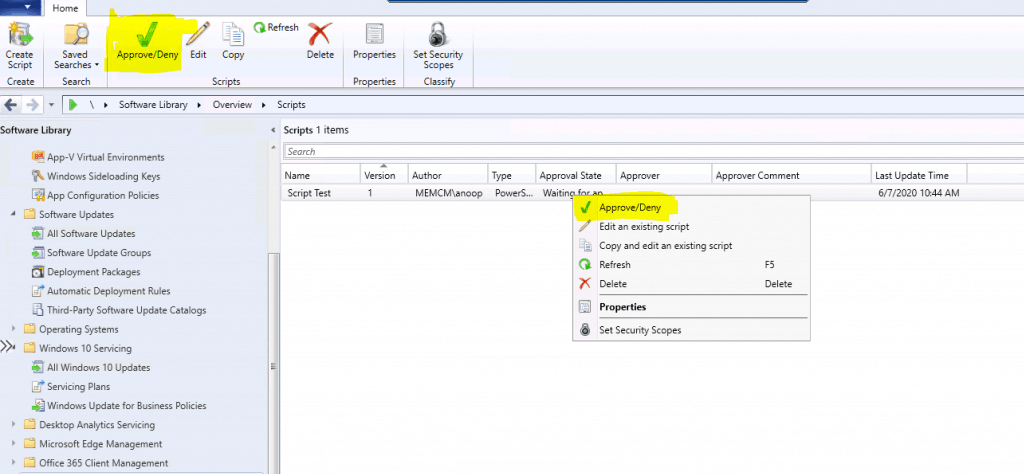
- Navigate to \Software Library\Overview\Scripts
- When you try to right-click and approve the PowerShell script, the Approve/Deny option is disabled.
- How to Approve my own scripts in ConfigMgr (a.k.a ConfigMgr)?

Prerequisites
The following prerequisites should be in place to SCCM run the script options:
- The client device must be running PowerShell version 3.0 or later.
- The client device must run with the SCCM 1706 client version or later.
- Script Runners
- Script Authors
- Script Approvers
NOTE! – More details about ConfigMgr (a.k.a SCCM) Script real-world example – https://www.anoopcnair.com/sccm-run-script-step-by-step-guide/
Solution – FIX SCCM Script Approve Deny Button is Disabled
I found there is a setting called “Script Authors require additional script approver” in the hierarchy settings of the primary site server.
- Navigate to \Administration\Overview\Site Configuration\Sites
- Select the ConfigMgr primary site server
- Click on Hierarchy Settings
- Click on the General tab from the hierarchy settings properties

Remove the check mark from “Script Authors require additional script approver” and click OK to continue.
- Navigate to \Software Library\Overview\Scripts
- Click on the script you want to approve/deny.
- Click the Approve/Deny button.
Resources
- Create and run PowerShell scripts from the Configuration Manager console
- SCCM Run Script Deployment Step-by-Step Guide
We are on WhatsApp. To get the latest step-by-step guides and news updates, Join our Channel. Click here –HTMD WhatsApp.
Author
Anoop C Nair is Microsoft MVP! He is a Device Management Admin with more than 20 years of experience (calculation done in 2021) in IT. He is a Blogger, Speaker, and Local User Group HTMD Community leader. His main focus is on Device Management technologies like SCCM 2012, Current Branch, and Intune. He writes about ConfigMgr, Windows 11, Windows 10, Azure AD, Microsoft Intune, Windows 365, AVD, etc.




Discussion