






Fix SCCM Sites that don’t have Proper HTTPS Configuration Issue ConfigMgr
Let’s find out how to fix ConfigMgr Sites that don’t have a Proper HTTPS Configuration issue. I noticed this error when I was going through management insights. I have seen this issue with the SCCM 2004 version.
Read More on SCCM Client PKI – FIX SCCM PKI Client Registration Issue Hotfix and SCCM Configure Settings For Client PKI Certificates.
ConfigMgr Management Insights will help you gain valuable insights into the current state of the SCCM environment. The Management insights are based on analyzing data in the site database.
Read More -> Best Guide To Enable ConfigMgr Enhanced HTTP Configuration and ConfigMgr HTTP-only Client Communication Is Going Out Of Support

| Index |
|---|
| Issue |
| Analysis |
| Fix ConfigMgr HTTPS Configuration Issue |
| FIX HTTPS Configuration Issue with EHTTP |
| Results |
Issue
Let’s understand the issue, and we discuss the fix later.
- Launch Configuration Manager (a.k.a SCCM) console.
- Navigate to \Administration\Overview\Management Insights
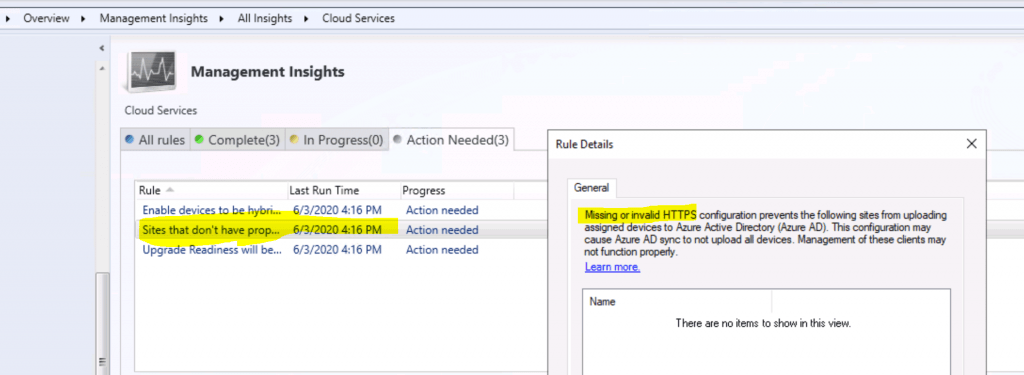
- You can see the critical error for the management insights rule called “Sites that don’t have proper HTTPS configuration.”

Critical error
| Insight Name | Group | Priority | Last Change | Status |
|---|---|---|---|---|
| Sites that don’t have proper HTTPS configuration | Cloud Services | Critical | 6/3/2020 4:16:00 PM | Action Needed |
Analysis
ConfigMgr Sites that don’t have proper HTTPS configuration rules list sites in your hierarchy that are not properly configured for HTTPS.
This critical error can cause two issues:
- Prevents the site from synchronizing collection membership results to Azure Active Directory (Azure AD) groups.
- Tenant attaches Azure AD sync not to upload all devices. Management of these clients may not function properly.
NOTE! – Missing or invalid HTTPS configuration prevents the following sites from uploading assigned devices to Azure AD. This configuration may cause Azure AD sync not to upload al devices.
Fix ConfigMgr HTTPS Configuration Issue
Most of the SCCM customers I work with don’t use PKI for SCCM client communication.
However, Microsoft recommends using HTTPS communication for all ConfigMgr (a.k.a. SCCM) communication paths. Hence, Microsoft introduced “Enhanced HTTP” with the SCCM 1806 version.
EHTTP helps to:
- Secured client communication without the need for PKI server authentication certs.
- The client can access the content securely from DP without a network access account, client PKI certificate, or Windows authentication.
FIX HTTPS Configuration Issue with EHTTP
Let’s see how to fix the HTTPS issue with eHTTP.
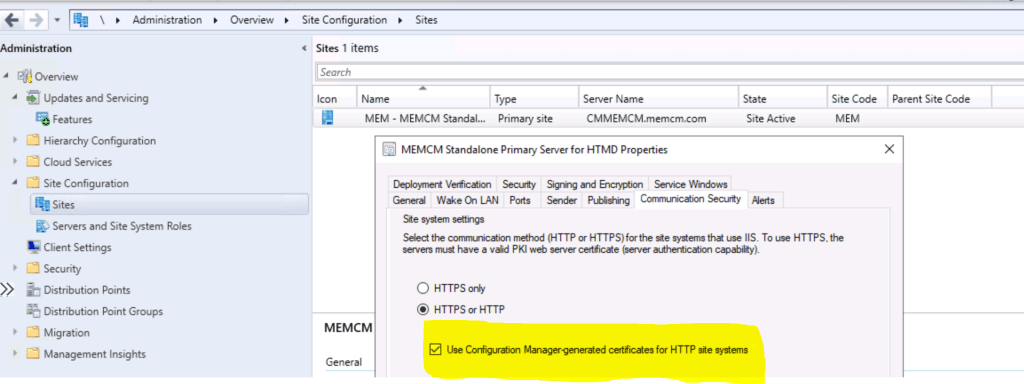
- Navigate to \Administration\Overview\Site Configuration\Sites
- Right-click on the primary site and click on properties.
- Click on the Communication Security tab.
- Checkmark the option “Use Configuration Manager generated certificates for HTTP site systems.”
Results
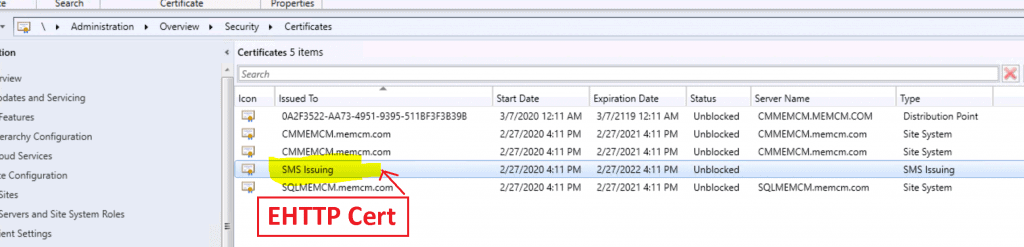
EHTTP certificate details from \Administration\Overview\Security\Certificates
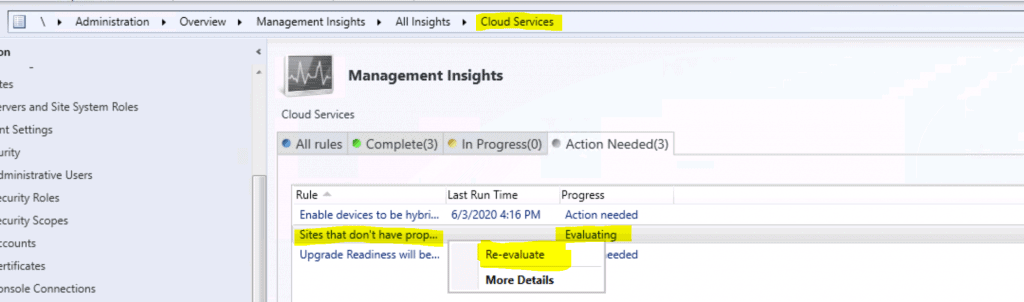
Completed the Management Insights task successfully. So the issue is resolved.

Resources
- Management insight rules for proper HTTPS configuration
- SCCM Enhanced HTTP
- SCCM Management Insights – Healthy SCCM Infra
We are on WhatsApp. To get the latest step-by-step guides and news updates, Join our Channel. Click here –HTMD WhatsApp.
Author
Anoop C Nair is Microsoft MVP! He is a Device Management Admin with more than 20 years of experience (calculation done in 2021) in IT. He is a Blogger, Speaker, and Local User Group HTMD Community leader. His main focus is on Device Management technologies like SCCM 2012, Current Branch, and Intune. He writes about ConfigMgr, Windows 11, Windows 10, Azure AD, Microsoft Intune, Windows 365, AVD, etc.




Discussion