






FIX: SCCM Setup will not continue because of WARNING in Prerequisite Check Issue
Let’s check how to fix the SCCM Setup will not continue because of WARNING in prerequisite check Issue. I have seen an issue recently where the SCCM CB upgrade sits forever at the installation phase.
During the SCCM (aka ConfigMgr) upgrade, it’s normal to have warning messages in prerequisite checks. The logic of the warning message is to warn or alert you about a potential issue, but normally there should not be any hard block on the SCCM upgrade.
The SCCM upgrade got stuck in the Installation = Progress stage for many hours in this specific scenario. Normally the warning should not stop the SCCM upgrade process. But this time, it stopped with the following message Setup will not continue because of a WARNING in prereq check.
The only scenario where the SCCM upgrade will get a hard block is when you have ERRORS in the prerequisites check. Deepak explained about the Prerequisite check failed errors and fixes in another post.

SCCM Update Pack Installation Status Check
You can monitor the upgrade of the SCCM upgrade using the console and CMUpdate.log file. Let’s check the console’s monitoring node to confirm the progress of the SCCM in-console update.
You can the SCCM Update Pack Installation Status from the following path – \Monitoring\Overview\Updates and Servicing Status\Configuration Manager 2111 for version upgrade.
Check the installation status of hotfix install Navigate to \Monitoring\Overview\Updates and Servicing Status\Configuration Manager 2111 Hotfix Rollup (KB12896009).
- Click on the Show Status ribbon button to confirm the status.
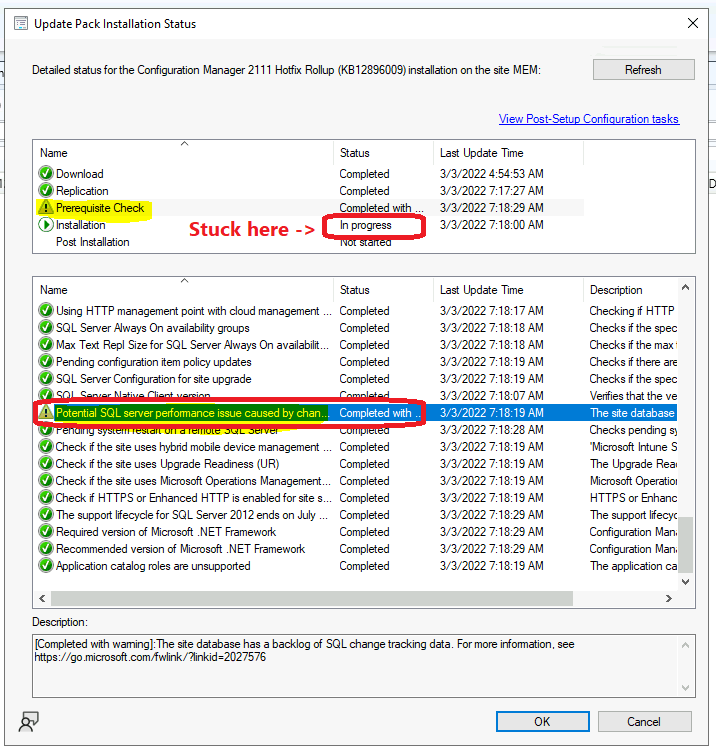
- As you can see in the below screenshot the status shows the prerequisite check is completed and installation stage is in progress.
The upgrade or hotfix install process of SCCM got stuck in the installation stage forever. It’s also been noticed that none of the sub-components under the installation phase is getting completed.
- Next option is to check the log file called the CMUpdate.log file to get more details.
In the following example, the prerequisite check warning was with a potential SQL server performance issue caused by the change tracking retention period.
CMUpdate.Log @ SCCM Primary Server
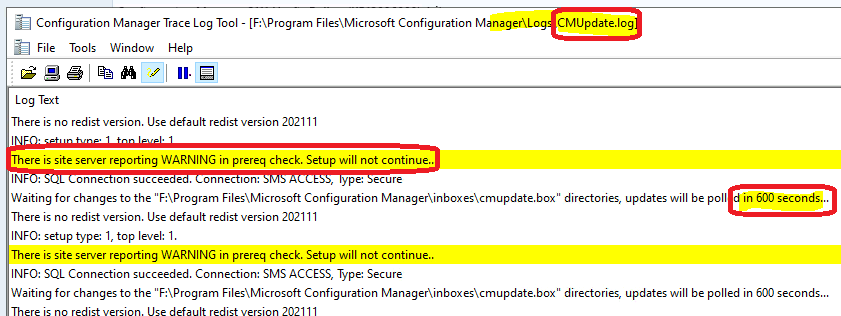
You can check CMUpdate.log at SCCM primary server to check as explained in the SCCM logs post. Folder details of the log file – F:\Program Files\Microsoft Configuration Manager\Logs.
Every 10 minutes (600 seconds) CM Update component will recheck whether the warning issues are resolved or not. It should continue with the ConfigMgr CB upgrade process if it’s fixed.
There is site server reporting WARNING in prereq check. Setup will not continue..
INFO: SQL Connection succeeded. Connection: SMS ACCESS, Type: Secure
Waiting for changes to the “F:\Program Files\Microsoft Configuration Manager\inboxes\cmupdate.box” directories, updates will be polled in 600 seconds…
There is no redist version. Use default redist version 202111
FIX: SCCM Setup will not continue because of WARNING in Prerequisite Check Issue
Let’s check how to fix the SCCM Setup will not continue because of a WARNING in the Prerequisite Check Issue. So that SCCM hotfix installation or upgrade can continue. The prerequisite check warning was because of a potential SQL server performance issue caused by a change tracking retention period.
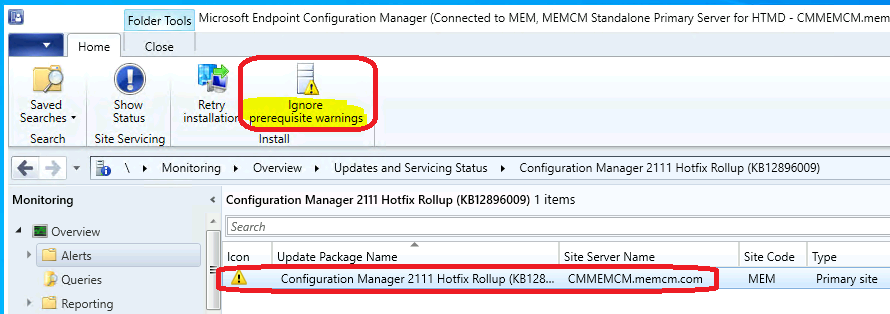
To fix or ignore the warning, I have navigated to \Monitoring\Overview\Updates and Servicing Status\Configuration Manager 2111 Hotfix Rollup (KB12896009) node in the SCCM console.
You have clicked on Ignore prerequisite warnings button from the ribbon menu to make the SCCM prerequisite check to ignore the warning and continue with SCCM Upgrade (or hotfix installation).
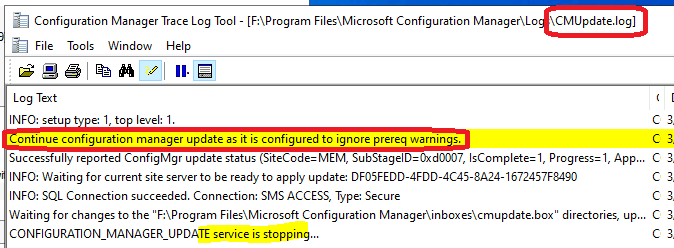
Check the CMUpdate.log after clicking on Ignore prerequisite warnings to confirm whether the SCCM upgrade or hotfix installation is progressing or not. The CONFIGURATION_MANAGER_UPDATE service component gets restarted, and then the upgrade process will continue.
Continue configuration manager update as it is configured to ignore prereq warnings.
Successfully reported ConfigMgr update status (SiteCode=MEM, SubStageID=0xd0007, IsComplete=1, Progress=1, Applicable=1)
CONFIGURATION_MANAGER_UPDATE service is stopping…
CONFIGURATION_MANAGER_UPDATE service is starting…
Results
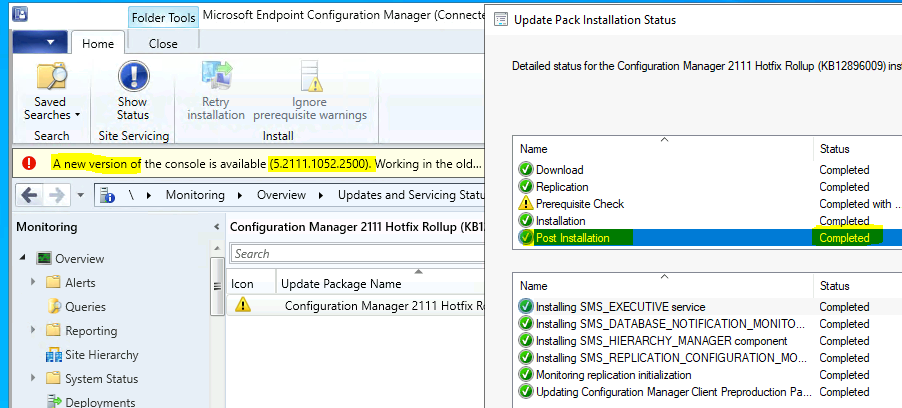
SCCM hotfix installation got completed without any issues. As shown in the below screenshot, a new version of the console is available banner notification.
You can confirm this from \Monitoring\Overview\Updates and Servicing Status\ node and click on Show Status from the ribbon menu.
Conclusion
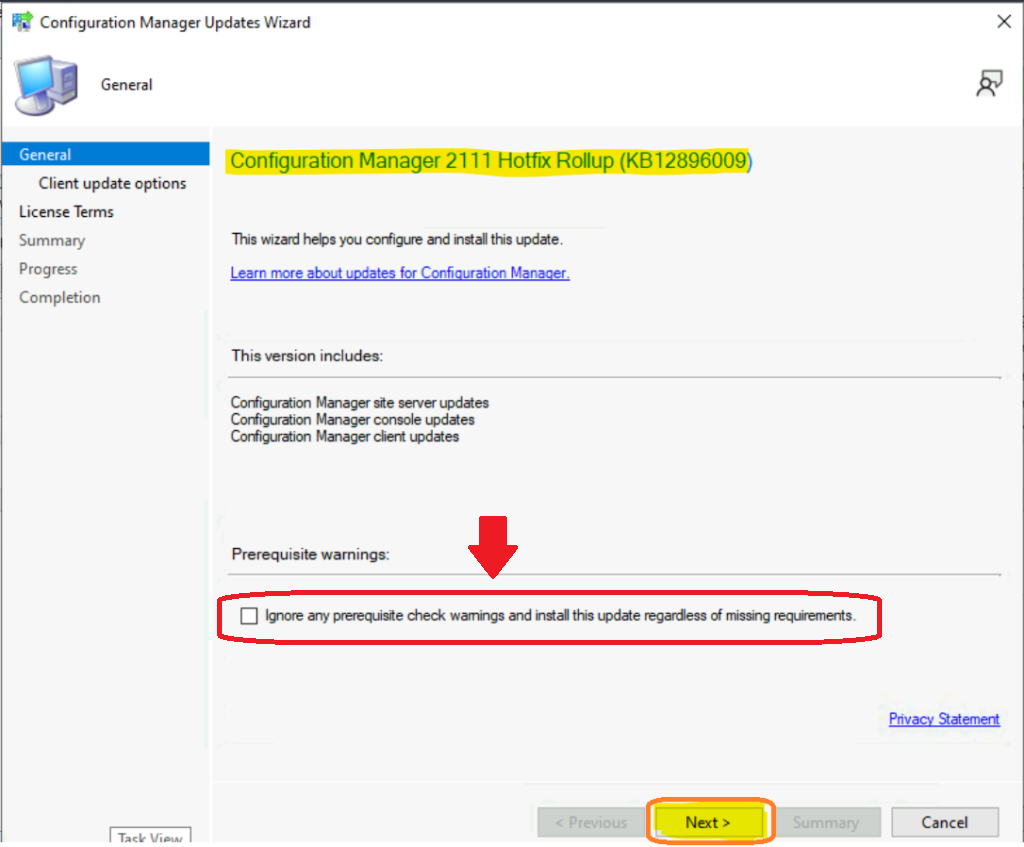
You can avoid this issue “Setup will not continue because of WARNING in prereq check” issue during the Configuration Manager Update wizard itself.
You can check the following option from Ignore any prerequisite check warnings and install the update regardless of missing requirements option from Configuration Manager Updates Wizard.




Discussion