






Workaround to FIX SSO Issue with Citrix and Windows 11 24H2
Let’s discuss the workaround to FIX SSO Issue with Citrix and Windows 11 24H2. SSO stands for Single Sign-On. It is an authentication facility that allows users to open multiple applications with one set of sign-in identification.
An issue is encountered with SSO and Windows 11 24H2 workstations that are not passing credentials into Epic servers with Citrix. It would allow MPR (Multi Provider Router)Notifications for SSO and passed credentials before 24H2.
Now, when not configured, it disallows MPR notifications. SSO will still pass credentials with a blank password, which causes authentication failures on solutions like Citrix, Imprivata, Parallels, and more.
Through this post, I would like to explain the solution to the above mentioned issue and how it was solved. Let’s start with a workaround to fix the SSO Issue with Citrix and Windows 11 24H2.

Table of Contents
What is MPR (Multi Provider Router)Notifications?
FIX SSO Issue with Citrix and Windows 11 24H2
To support the SSO authentication feature on Windows 11, the MPR notification for the system policy should be enabled in the Group Policy Object (GPO) template. In Windows 11 24H2, it is disabled by default. To enable MPR notifications for the System policy, you should upgrade the system to Windows 11 24H2.
When enabled, single sign-on caches the credentials so you can connect to other Citrix applications without signing in each time.
- Top 83 Windows 11 Desktop Admin Interview Questions
- Intune Enrollment Using Group Policy | Automatic Enrollment AVD VMs
- Step by Step Guide to Deploying Windows 11 24H2 Using SCCM Task Sequence
Enable MPR Notification
Setting the GPO “Configure the transmission of the user’s password in the content of the MPR Notifications sent by Winlogon” to “enabled” to reenable MPR notifications solves this issue.
To enable MPR notification, first launch gpedit. msc (Win+R). or Edit Group Policy from the Start Menu,
- Navigate to Computer Configuration > Administrative Templates > Windows Components > Windows Logon Options
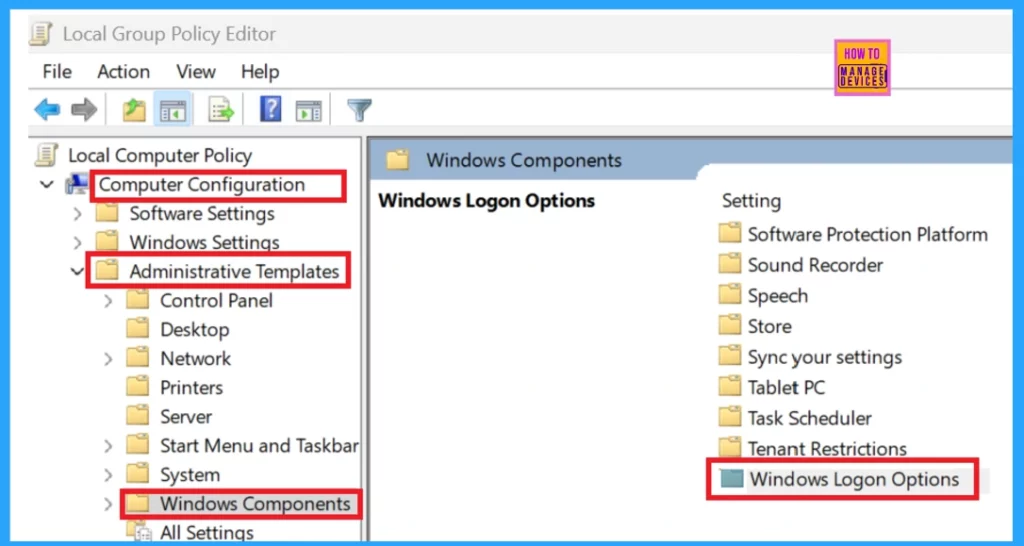
Under the Windows Logon Options, select “Configure the transmission of the user’s password in the content of MPR notifications sent by Winlogon“.
Now, you will enter into a new window where you can see Not configured, Enabled and Disabled.
- Select Enabled
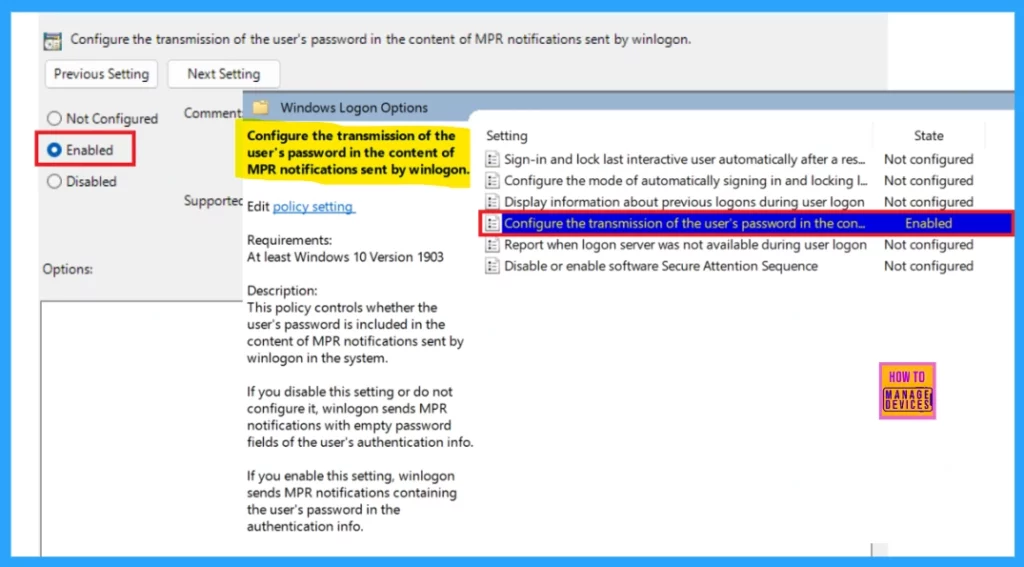
“Configure the transmission of the user’s password in the content of the MPR Notifications sent by Winlogon” is Enabled.
Enable SSO (single sign-on) with Citrix Gateway
The following steps are to enable SSO (single sign-on) with Citrix Gateway using the GPO administrative template. It is important to ensure that you have enabled basic authentication and single-factor (nFactor with 1 Factor) authentication on the Citrix Gateway.
| Steps to enable SSO with Citrix Gateway using the GPO administrative template |
|---|
| Open the Citrix Workspace app GPO administrative template by running gpedit.msc. |
| Click the Computer Configuration node |
| Then go to Administrative Template > Citrix Components > Citrix Workspace > User Authentication, and select Single Sign-on for Citrix Gateway policy. |
| Select Enabled. |
| Click Apply and OK. |
| After hitting OK, you should Restart the Citrix Workspace app for the changes to take impact. |
Resources
Need Further Assistance or Have Technical Questions?
Join the LinkedIn Page and Telegram group to get the latest step-by-step guides and news updates. Join our Meetup Page to participate in User group meetings. Also, Join the WhatsApp Community to get the latest news on Microsoft Technologies. We are there on Reddit as well.
Author
Anoop C Nair has been Microsoft MVP for 10 consecutive years from 2015 onwards. He is a Workplace Solution Architect with more than 22+ years of experience in Workplace technologies. He is a Blogger, Speaker, and Local User Group Community leader. His primary focus is on Device Management technologies like SCCM and Intune. He writes about technologies like Intune, SCCM, Windows, Cloud PC, Windows, Entra, Microsoft Security, Career, etc.




Has this issue been sorted with the Microsoft patches or is this still a known issue ?