






Microsoft Is Forcing The Use of Bing As The Default Search Engine In The Microsoft Edge Browser
Do you know whether Microsoft is forcing the use of Bing as the default search engine in the Microsoft Edge browser? I received a new notification today. It says Assistance from Microsoft Edge and asks users to use the recommended settings.
I have not seen this behavior recently. So, it seems the Microsoft Edge team is not forcing people to move the search engine from Google to Bing.
The pop-up’s wording is pretty interesting. It says, “Get world-class performance, privacy, and productivity as you browse with the latest Microsoft Edge—the best browser for Windows 10.”
I have seen updated documentation (the latest update on this document is 25 August 2021) related to Microsoft Search in Bing for Microsoft 365 Apps for the enterprise.

Bing As The Default Search Engine
Well, this new popup comes with two options:
- Use Microsoft recommended browser settings
- Default search engine: Microsoft Bing
- Don’t update your browser settings (the option that I have selected)
NOTE: This change seems to happen only for personal devices. I have not seen anything related to this in managed devices.

I don’t think Microsoft is forcefully changing the default search engine of Microsoft Edge to Bing. However, I don’t think creating a pop to change the default search engine from Google to Bing was a good idea. That is only one setting that I changed in the Microsoft Edge Browser.
I have a post to help you help you understand the process of changing the default search engine to Google. The section below provides more details on how to do this.
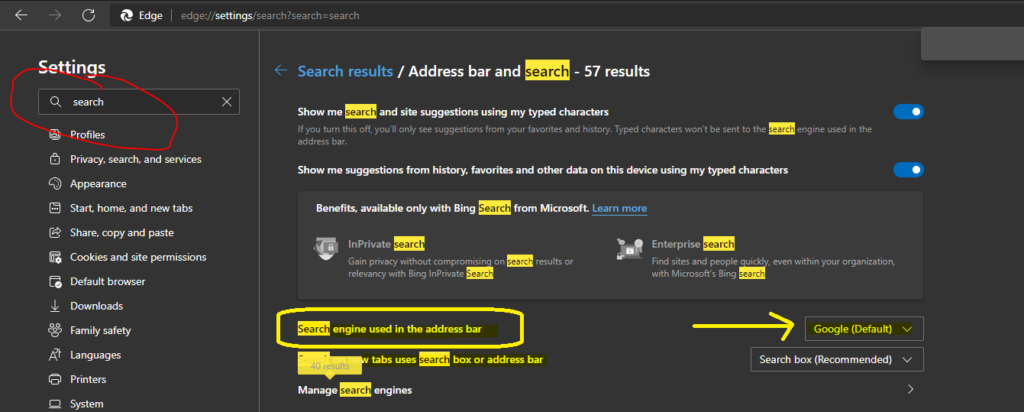
- Go to Settings – from Microsoft Edge Browser.
- Use the Search option to search “Search”.
- Open a new tab from edge and copy-paste the following edge://settings/search?search=search
Go to the Address bar -> search Engine used in the address bar option from the results. You can ensure that Google (Default) is the default search engine.
We are on WhatsApp. To get the latest step-by-step guides and news updates, Join our Channel. Click here –HTMD WhatsApp.
Author
Anoop C Nair has been Microsoft MVP for 10 consecutive years from 2015 onwards. He is a Workplace Solution Architect with more than 22+ years of experience in Workplace technologies. He is a Blogger, Speaker, and Local User Group Community leader. His primary focus is on Device Management technologies like SCCM and Intune. He writes about technologies like Intune, SCCM, Windows, Cloud PC, Windows, Entra, Microsoft Security, Career, etc.



Microsoft tries a lot of tricks to get the user to revert back to defaults. Same happens on top of Settings page where Microsoft ask you to click to get more out of Windows. Like sign you into a Microsoft account and change settings to what Microsoft determines as default. Yeah, it’s frustrating to think you PC is not yours to decide what to use as default apps and services. Hey, I don’t have anything personally against Bing but if I want my search engine to be Google, DuckDuckGo or whatever I don’t expect Microsoft to try and make me switch back to Bing. That to me creates distrust in a company that tries trickery in order to benefit themselves not you the end user.
it still forces you to use bing in the search box.. even with google as default.. so annoying!