






Enhanced Hardware Inventory Information for macOS iOS iPadOS and Android Devices
Let’s discuss Enhanced Hardware Inventory Information for macOS iOS iPadOS and Android Devices. With the November update of Intune, the hardware tab in the device monitor show the information for fully managed or enterprise-dedicated devices.
Starting early next year, users can expect to see improved and more detailed hardware inventory information for devices running macOS, iOS/iPadOS, and Android devices. This allows IT professionals to access the data in Intune.
IT professionals who used to rely on many tools to collect information about their devices will find this helpful. It will save them time and reduce their workload. The Subscriber carrier and ICCID are now part of the hardware information.
Additionally, ICCID numbers help set up multifactor authentication (MFA) for added security. In this blog post, I will explain how the Enhanced Hardware Inventory Information for macOS iOS iPadOS and Android Devices works and affects IT professionals.


Table of Contents
What is the Roll of Intune Inventory Features in an Organization?
Enhanced Hardware Inventory Information for macOS iOS iPadOS and Android Devices
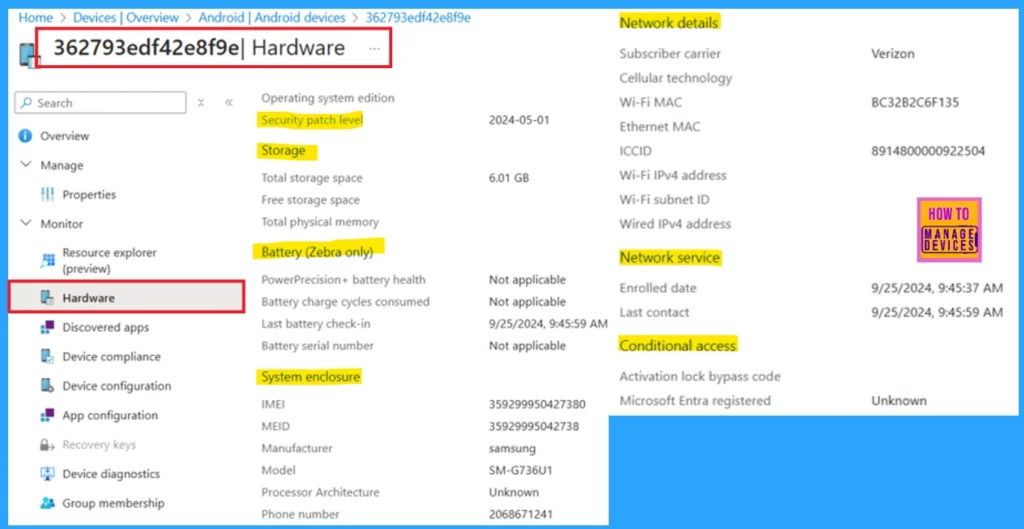
Android devices require management of carrier contracts and billing. Previously, Intune did not collect information about the carrier or the Integrated Circuit Card Identifier (ICCID) for these devices. In the November release, the Hardware tab in the Device monitor will now show this information for fully managed or enterprise-dedicated devices.
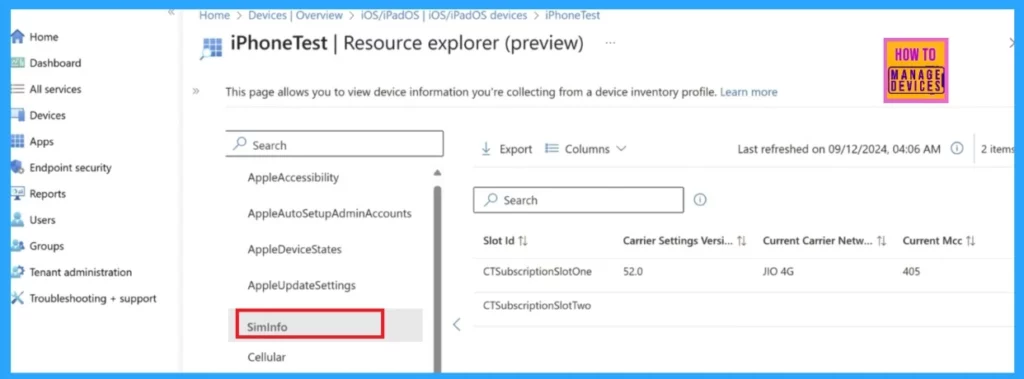
- The Resource Explorer provides an expanded range of hardware details for an iOS device.
- Intune App Inventory For Android Devices
- Sign-in To Microsoft Apps With Passkey On Android Using Authentication Broker Intune Company Portal
- Disable MFA option for Microsoft Azure Entra and Intune Admin Centers is not available starting 15 October 2024
Hardware Device Details
You cannot report phone numbers from Android Enterprise corporate-owned work profile devices. However, you can report phone numbers from Android Enterprise, which is a fully managed and dedicated device. Some SIM cards may not write the data, so the phone number might not be reported.
The hardware tab in the device monitor displays information for fully managed or enterprise-dedicated devices.
For iOS and iPadOS devices that use multiple SIM cards, Intune cannot control which SIM data is used to the Service Subscription slots on the divice for the ICCID, IMEI, MEID, and phone number value.
Intune only shows the first values it receives from the device. It reports these values in a specific order, as indicated in the table below.
| Intune Values |
|---|
| CT Subscription Slot One > – CT Subscription Slot Two > – Top-level ICCID, IMEI, MEID, and Phone number properties (deprecated) |
Resources
Need Further Assistance or Have Technical Questions?
Join the LinkedIn Page and Telegram group to get the latest step-by-step guides and news updates. Join our Meetup Page to participate in User group meetings. Also, Join the WhatsApp Community to get the latest news on Microsoft Technologies. We are there on Reddit as well.
Author
Anoop C Nair has been Microsoft MVP for 10 consecutive years from 2015 onwards. He is a Workplace Solution Architect with more than 22+ years of experience in Workplace technologies. He is a Blogger, Speaker, and Local User Group Community leader. His primary focus is on Device Management technologies like SCCM and Intune. He writes about technologies like Intune, SCCM, Windows, Cloud PC, Windows, Entra, Microsoft Security, Career, etc.


Hi there,
We are looking for booking ad banners on your website anoopcnair.com .
I noticed your website’s potential for higher ad revenue through our PreBid or oRTB demand/banners. Cineweb Media can help you maximize your earnings through our premium banners/demand..
Key Benefits:
– Direct campaigns from premium global bran
– Simple integration with just 2 ads.txt lines
– Guaranteed higher CPMs and fill rates
– Immediate revenue boost with minimal setup
We’re currently working with top publishers who have seen 30-40% revenue increases after integration.
Please let me know who I shall contact to discuss placing ad units on your site?
Best,