






How to Add Regional Language Pack Keyboard Typing Support in Windows 10 Malayalam Typing
How to Add Regional Language Pack Keyboard Typing Support in Windows 10. Windows 10 makes it easy to use regional languages.
In this “How to” post, I will walk through adding regional language support in Windows 10. Microsoft has made it very easy. I’m trying to share my experience with Windows 10 Malayalam language in this post.
Check out the Windows 10 you use before trying regional languages like Malayalam.
You can install your regional language support on a Windows 10 machine in 5 minutes. I would like to know about other features of Windows 10; refer to the previous post, “Latest Features Included in Windows 10 New Build.”

| Index |
|---|
| How to Add Regional Language Pack Keyboard Typing Support in Windows 10 |
- How to Change Location and Language in the Copilot
- How Good Notepad Spell Check for Regional Languages such as Malayalam
How to Add Regional Language Pack Keyboard Typing Support in Windows 10
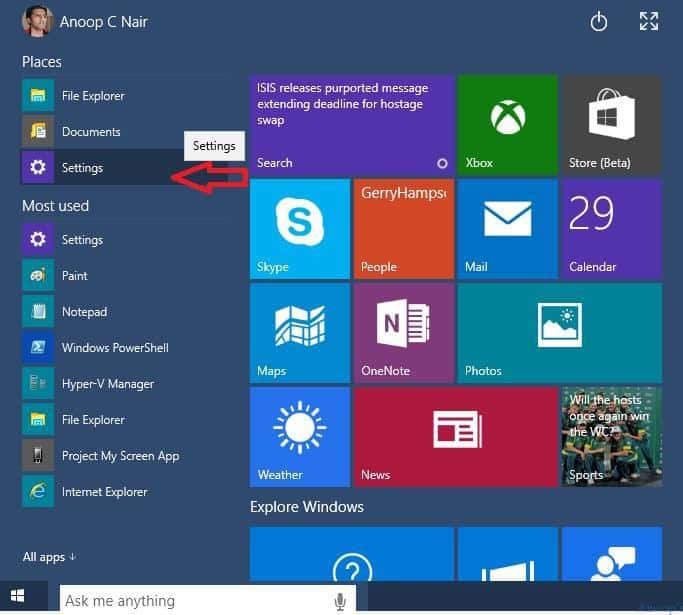
In this post, I’ll use Malayalam, my regional language and mother tongue, as an example. 1) Go to settings options from the Windows 10 start menu.
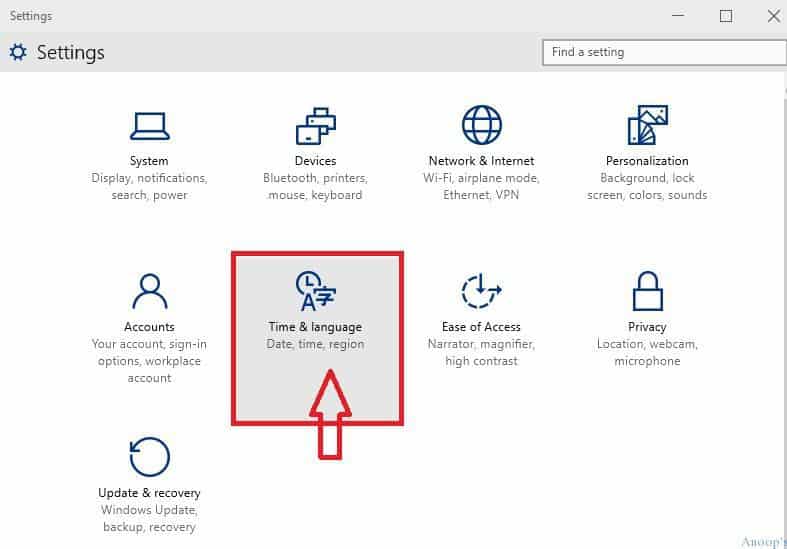
2) In the settings window, click or tap on the Time and Language icon.
| Settings |
|---|
| Time and Language |
| Date, Time, Region |
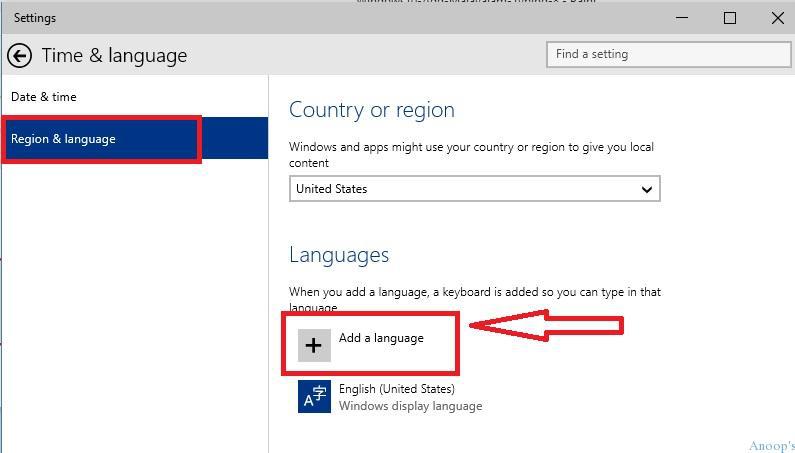
3) In the Time and Language windows, click/tap on Region and Language.
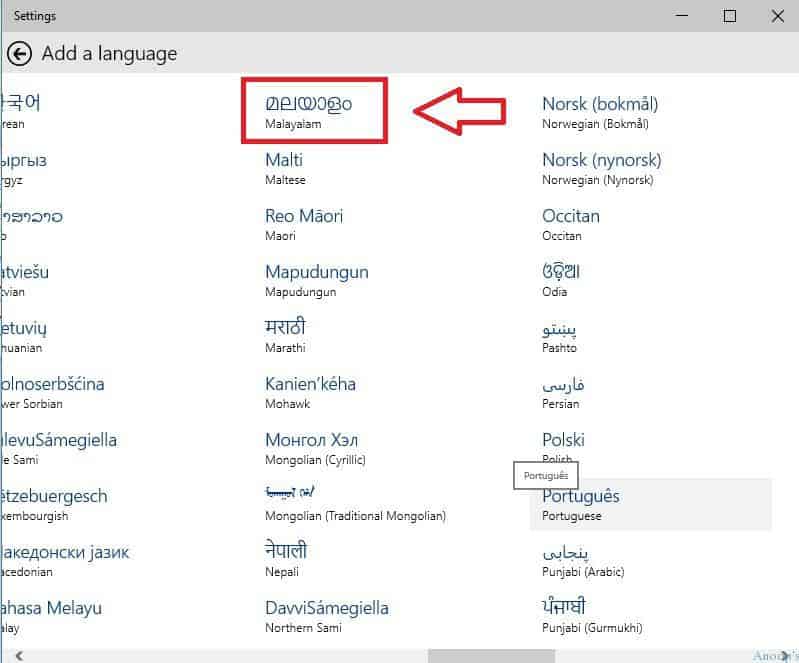
4) On the adding a language page, click or tap on Malayalam (or any other language like Hindi, Tamil, Kannada, etc.).
5) Come back to the Time and Language page, click on Region and Language, and you will see Malayalam selected there!
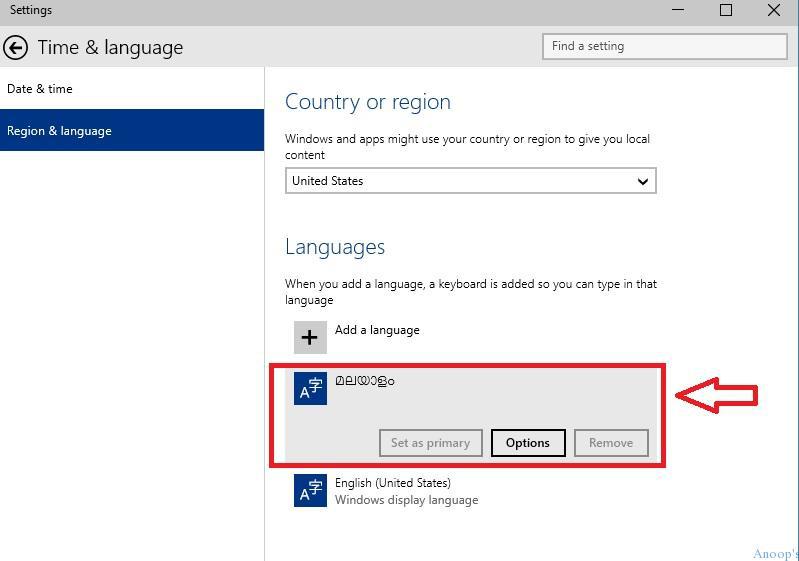
6) Log off and log back; this will automatically set the default language as Malayalam. Otherwise, follow the below steps. I don’t have a Regional language keyboard; I use the virtual keyboard, which is in-build in Windows 10. Click or Tap the virtual keyboard icon in the taskbar.

7) Once you launch the virtual keyboard, select Malayalam Keyboard !
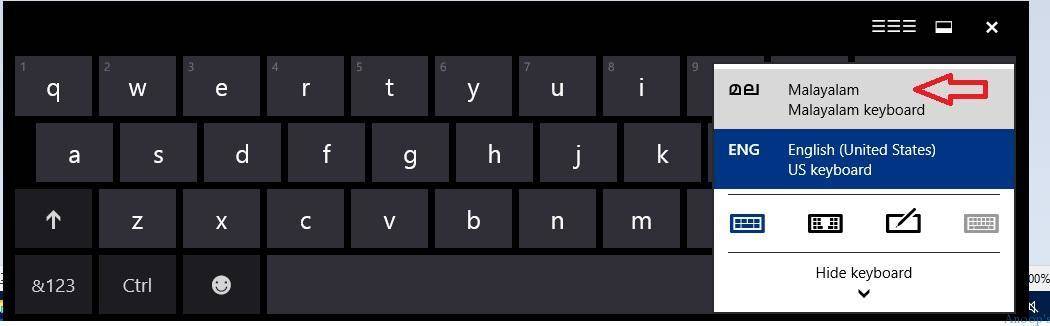
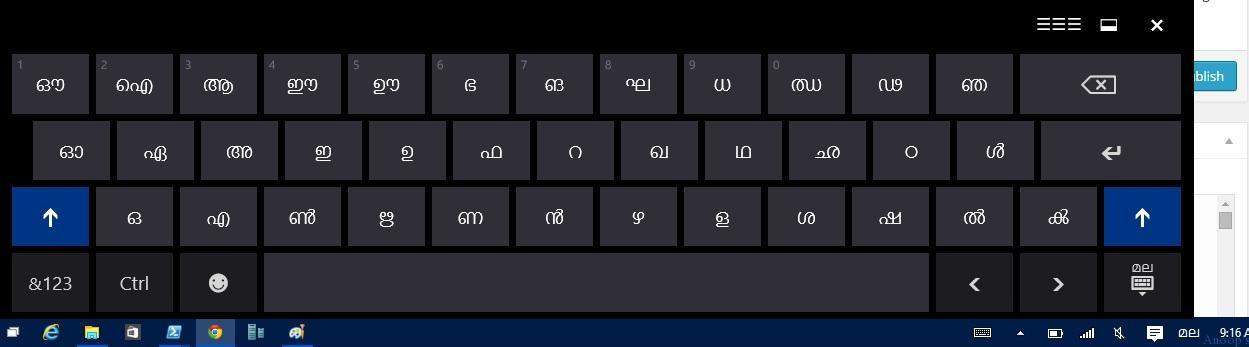
8) Once you select the Malayalam Keyboard, as mentioned in step 7, you can see the Malayalam keyboard. Now, start using this keyboard.
9) I tried Cortana (rather than search). I know it’s supported, but I just wanted to try. In the following picture, you can use the Malayalam keyboard to type in Windows 10 (Windows 10 Malayalam language).
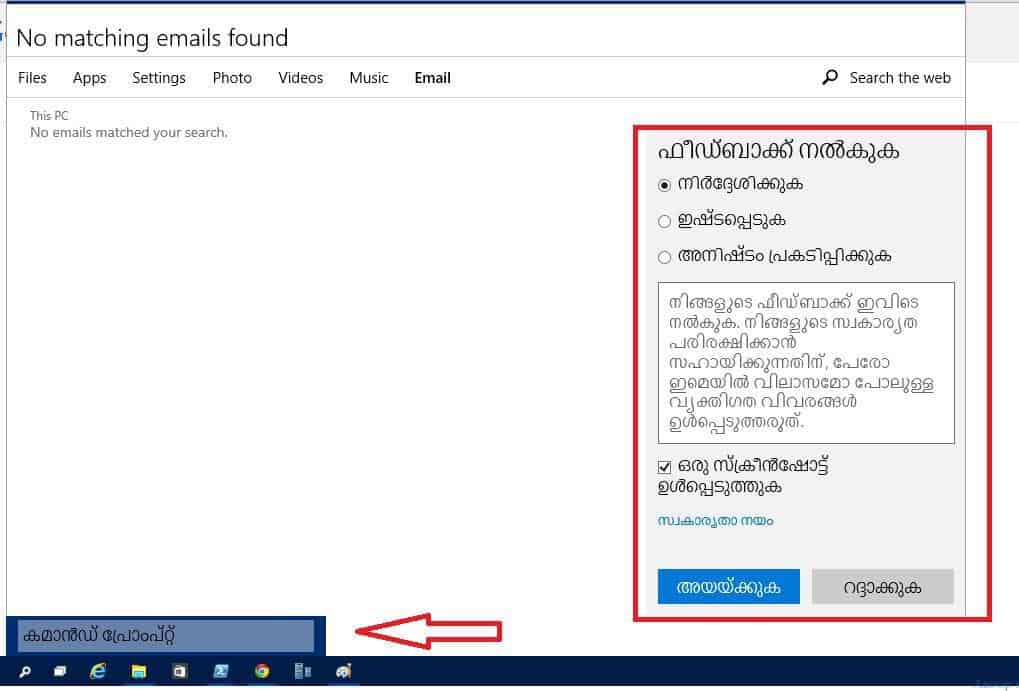
However, the default Windows commands won’t work in this. This is only for typing Malayalam letters on Windows 10 machines.
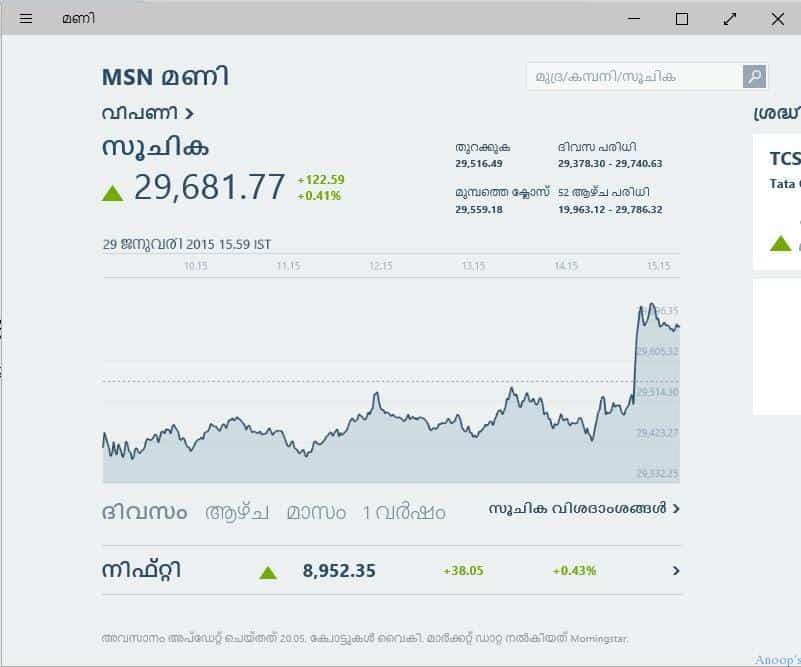
10. I am happy to see the regional language (Malayalam) works for Money and Xbox applications.
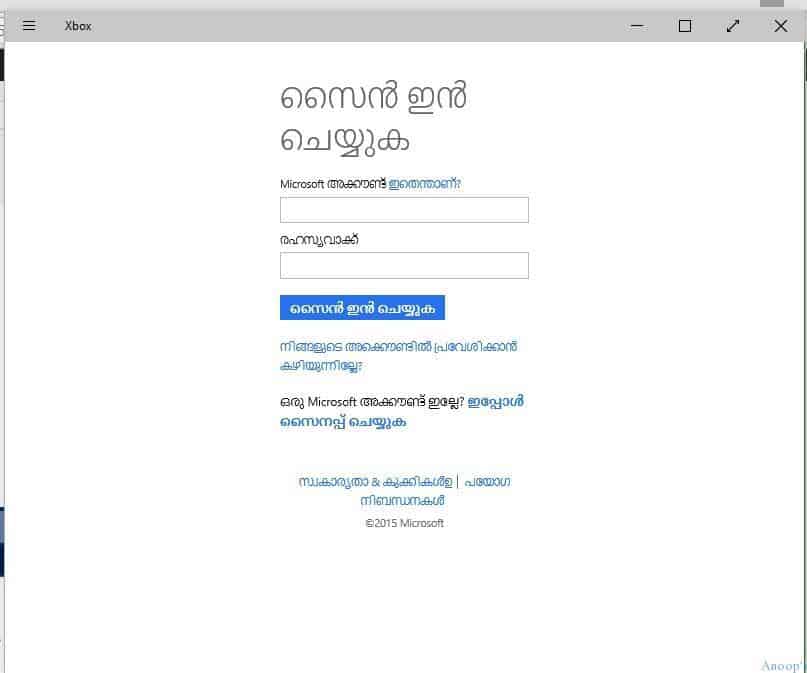
മലയാളം വളരെ എളുപ്പമാണ് അല്ലേ? (Malayalam is straightforward. :)) Windows 10 Malayalam language.
Resources
Windows 10 Latest Version Of Client Operating System From Microsoft (anoopcnair.com)
We are on WhatsApp now. To get the latest step-by-step guides, news, and updates, Join our Channel. Click here. HTMD WhatsApp.
Author
Anoop C Nair is Microsoft MVP! He is a Device Management Admin with more than 20 years of experience (calculation done in 2021) in IT. He is a Blogger, Speaker, and Local User Group HTMD Community leader. His main focus is on Device Management technologies like SCCM 2012, Current Branch, and Intune. He writes about ConfigMgr, Windows 11, Windows 10, Azure AD, Microsoft Intune, Windows 365, AVD, etc.



Malayalam reading is still not perfect even after installing the pack. Example: http://imgur.com/UAVxbPx Is there any way we can fix it.
did work, thank you very much
Will this works in Windows 8.10 phone ?
Nope
हिंदी के बारे में बताओ गुरु…
Staffज़रूर अगली बार
Hi, i am using KeyMagic in Win10 64 bit. The program is working but i can’t type Malayalam in win 10 with KeyMagic. As you know, KeyMagic is an input method editor. How to fix this problem ?
Dear Mr Anoop,
I’d like to type malayalam (transiliteration tool) as I have done in windows 7 using English keys. (Manglish). Can I do this in Windows 10. If so, how?
Sir, I have a Lumia XL650. I had been using Malayalam phonetic keyboard in my Mobile. A few days back I reset my phone. Now, even though I can see the keyboard in settings, i am not able to use it. Please advise
Hey all.
In case you are looking for various methods to type in Malayalam, I have compiler a list of methods a href=”https://geeksframework.com/how-to-type-malayalam/”>here. Do check it out.
Thanks
Thanks bro. Its wrok 😉
but deafult mal font is too ugly on some sessions, how could i change?
Is There any option to install manglish typing in windows 10 with 24 bit laptop
StaffI’m not aware of any 🙁
download google input tools for windows
how to get the phonetics keyboard
Can hinglish tool work in window 10 ?
StaffIt’s Windows 10 support !
In Windows 10, nte “ൻറെ” is not displayed and printed properly.
Staffwhich version of Windows 10?
how to type “ente” “ninte” “kambam” “pampa” etc….
home edition of windows 10….
StaffI mean which release Windows 1809 or Windows 1803 ?
Windows 10 Pro Version 1803
Mine is Windows 10 Pro Version 1803
എനിക്ക് ടെെപ് ചെയ്യാന് സാധിച്ചു. വളരെ നന്ദി.
I have installed Google Input tools, but its not working now. Why is it?
StaffI normally use this for Malayalam tying from Desktop, Laptop, and Mobile systems https://www.google.com/intl/ml/inputtools/try/
in windows ninte ente എന്നിവ ശരിയായി കാണിക്കുന്നില്ലാ
Staffഎവിടെയാ ടൈപ്പ് ചെയ്യുന്നേ
മലയാളം കീബോര്ഡ് ട്രൈ ചെയ്തോ ? അതോ ഇംഗ്ലീഷ് കീബോര്ഡ് ആണോ ട്രൈ ചെയ്തതെ
StaffMore details in the description of the video https://www.youtube.com/watch?v=bfZcBn3H9eo
മാഷെ,
എനിക്കു മലയാളം ടൈപ്പു ചെയ്യാന് പറ്റുന്നുണ്ട് പക്ഷെ മലയാളം ഫോണ്ട് ഒന്നും തന്നെ സപ്പോറ്ട് ചെയ്യുന്നില്ല എന്നതാണ്. വെര്ഡിലൊ ഇലസ്റ്റ്രേറ്ററിലൊ ഒന്നിലും സപ്പോറ്ട് ചെയ്യുന്നില്ല. വിന്ഡോസ് 10 ആണ്. ഇത് വിന്ഡോസിന്റെ പ്രൊബ്ലെം ആണോ. ഒരു സൊല്യുഷന് പറഞഞു തരാമോ?
Staffഅതെ എനിക്കെ അറിയാം കുറച്ചെ ബുദ്ധി മുട്ട് ആണ് ടൈപ്പ് ചെയ്യാൻ മലയാളം കീബോര്ഡ് ഇല്ലെങ്കിൽ നല്ല പ്രശ്നമാണ്
സൊല്യൂഷൻ അറിയില്ല
ട്രൈ ചെയ്യൂ https://www.google.com/intl/ml/inputtools/
20 ല് കൂടുതല് ഫോണ്ട്സ് already Install ചെയ്തിട്ടുണ്ട്. പക്ഷെ Karthika എന്നൊരു ഫൊണ്ട് അല്ലാതെ മറ്റൊന്നും സെലക്റ്റ് ആവില്ല. ഞാന് പല keyboard ഉം try ചെയ്തു നോക്കി. അതുകൊണ്ട് ഒന്നും ഫോണ്ട് സപ്പോര്ട് ചെയ്യുന്നില്ല.
StaffAlso have you tried to download different fonts from internet please ?
എനിക്കും കാർത്തിക ഫോണ്ട് മാത്രം ആണ് ഉപയോഗിക്കുവാൻ പറ്റുന്നത്. ML, FML ഫോണ്ടുകൾ എല്ലാം ഡൌൺലോഡ് ചെയ്തു ഇൻസ്റ്റാൾ ചെയ്തു നോക്കി. പക്ഷെ കോംപ്ലക്സ് സ്ക്രിപ്റ്റ് ഫോണ്ടുകളായ കാർത്തിക, മീര, ജനമലയാളം, നോട്ടോ സാൻസ് മലയാളം എന്നിവ മാത്രമേ ഉപയോഗിക്കാൻ പറ്റുന്നുള്ളു.. പഠിച്ച പണി 18 ട്ടും നോക്കി. വല്ല പോംവഴി ഉണ്ടോ? എന്താണ് ശെരിക്കും ഇഷ്യൂ ?
Sir,
Am trying to see a movie with malaylam subtitles and the characters are kind of charred or appearing in some strange way.
After some research, understood I need to select Malayalam as the language for non unicode programmes in windows control panel – Regional – Admin part.
However, in the drop down list there is no Malayalam to be selected.
Please could you advise, how I can add Malayalam to this list.
I am not looking to type in Malayalam or anything. Very rarely, for some international movies, only Malayalam subs are available and I need this.
Thank you.
B regards
Rajesh
ഹൈ,
ഞാൻ ഇപ്പോൾ ഉപയോഗിച്ചിരിക്കുന്നത് വിൻഡോസിൻറെ ഓൺസ്ക്രീൻ കീബോർഡ് ഉപയോഗിച്ചുള്ള ടൈപ്പിംഗ് ആണ്.
1. Ramante -രാമൻറെ ഇത് അത്ര ശരിയല്ലെന്നു തോന്നുന്നു
Staffhttps://www.google.com/intl/ml/inputtools/try/
ഞാൻ മംഗ്ലീഷ് കീബോര്ഡ് യൂസ് ചെയ്യുന്നത്
In case you are looking for various methods to type in Malayalam this is nice platform