






How to Manage Multiple Channels in Teams Phone Extensibility for Dynamics 365 Contact Center
Let’s discuss How to Manage Multiple Channels in Teams Phone Extensibility for Dynamics 365 Contact Center. Microsoft brings Teams Phone extensibility for Dynamics 365 to help customers benefit from and extend their existing telephony investment with Teams Phone into the contact center.
Starting from the Next month customers with Teams Phone and Dynamics 365 Contact Center will be able to leverage Teams Phone as a single. It is an integrated solution to power calling across their unified communications as a service (UCaaS) and contact center as a service (CCaaS) solutions.
It streamlines the deployment, management, and billing of their telephony infrastructure. To increase the growth of the business, Contact centers are key to exceptional customer support. With the integration of Dynamics 365 Contact Center with Teams communication is easier.
As you know, Dynamics 365 Contact Center is a cloud-based, AI-driven solution designed to enhance customer service experiences across various communication channels. In this blog post, I will help you learn more about Teams Phone Extensibility for Microsoft Dynamics 365 Contact Center.

Table of Contents
Teams Phone Extensibility for Microsoft Dynamics 365 Contact Center
With this feature Teams Phone extensibility is also supported by ISV solutions that leverage Azure Communication Services for this integration. A wide range of options is offered by Teams Phone to their preferred contact center app of choice.
Experience Teams Phone extensibility with Dynamics 365 Contact Center when the capability enters public preview in April. Teams Phone extensibility for certified contact center solutions will be available in public preview shortly thereafter.
| Features |
|---|
| You can easily enable telephony for Dynamics 365 Contact Center users by apply Existing Phone licenses |
| A separate phone system for contact center deployments to Alleviate the need to configure and administer |
| Broad geographic availability of team phone numbers can be leveraged |
| Teams Phone enterprise features has advantages and it including the familiar Teams management interface. |
- Microsoft Teams Introduces Super Resolution AI-Enhanced Video Quality
- New Teams and Outlook Calendar Enhanced Displays Personalization and Scheduling Efficiency
- Upgrade MS Teams Rooms to Windows 11 by October 14 2025 for Enhanced Features and Security
Benefits of Teams Phone Extensibility for Microsoft Dynamics 365 Contact Center
Teams Phone extensibility with Dynamics 365 Contact Center, participating customers anticipate a reduction in integration service fees and telephony consumption costs. Other benefits are shown on the list below.
- Unified Telephony Management
- Advanced AI Features
- Cost and Time Efficiency
How to Manage Multiple Channels
The flexibility in Teams Phone Extensibility ensures that customers can select the best solutions for their unique requirements, further enhancing the value and functionality of their Teams Phone platform. ISV solutions that will be certified for Teams Phone extensibility include Anywhere365, AudioCodes, ComputerTalk, Enghouse, IP Dynamics, Landis, and Luware.
Using Dynamics 365 you can easily manage channels for Teams Phone Extensibility. To do this Open Dynamic 365 portal. Then go to the Channels option on the left side of the Portal. The screenshot below will help you.
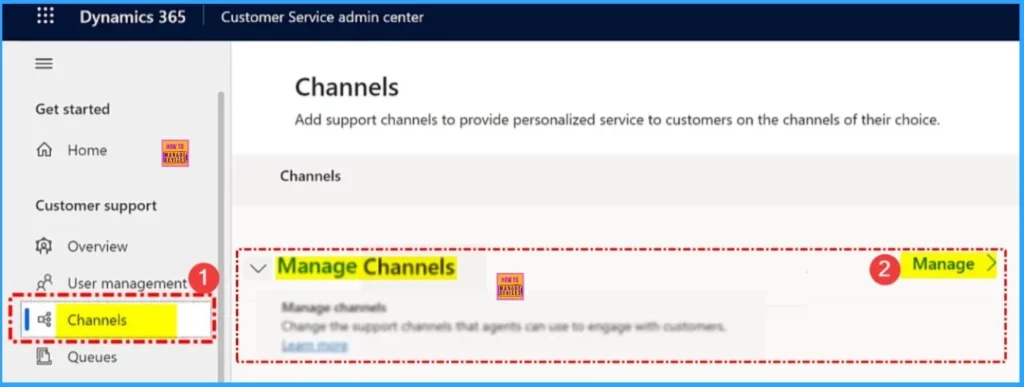
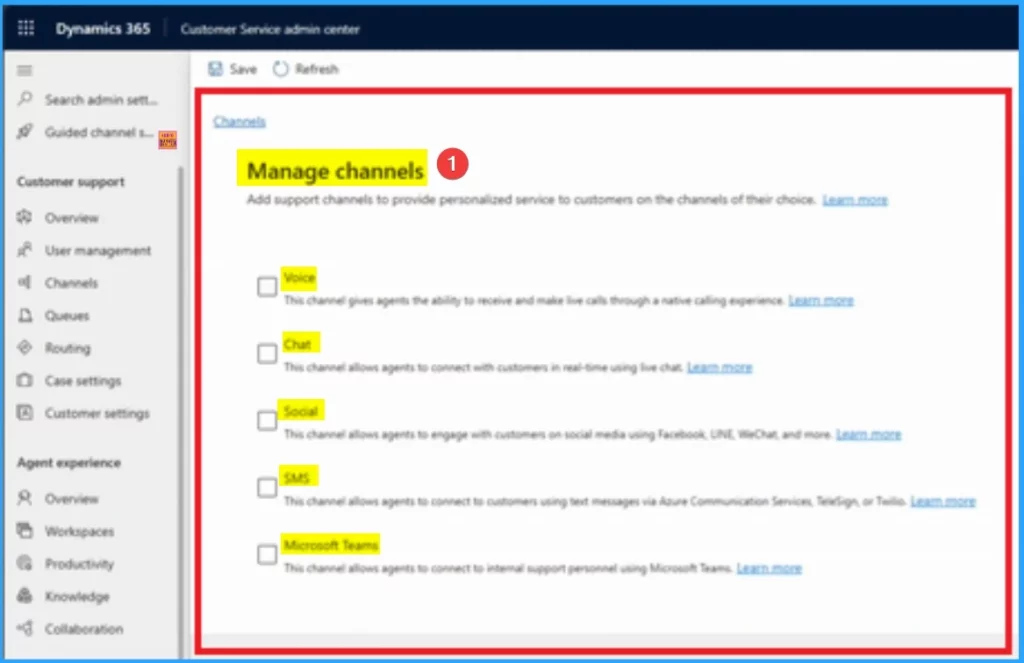
From the channels window click on the Manage hyperlink. Then you will get different channel options to manage Teams Phone Extensibility. The table below shows the options available on the manage channel.
| Manage Channels | Used to |
|---|---|
| Voice | This channel gives agents the ability to receive and make call through a native calling experience |
| Chat | This channel allows agents to connect with customers in real-time using the chat |
| Social | This channels allows agents to engage with customers on social media using Facebook, UNE, Webchat and more |
| SMS | This channel allows agents to connect to customers using text messages via Azure Communication Services, Television, or Twillio, |
| Microsoft Teams | This channel allows agents to connect to internal support personnel using Microsoft Teams |
Need Further Assistance or Have Technical Questions?
Join the LinkedIn Page and Telegram group to get the latest step-by-step guides and news updates. Join our Meetup Page to participate in User group meetings. Also, Join the WhatsApp Community to get the latest news on Microsoft Technologies. We are there on Reddit as well.
Resource
Teams Phone extensibility for Dynamics 365 Contact Center and certified ISV solutions
Author
Anoop C Nair has been Microsoft MVP for 10 consecutive years from 2015 onwards. He is a Workplace Solution Architect with more than 22+ years of experience in Workplace technologies. He is a Blogger, Speaker, and Local User Group Community leader. His primary focus is on Device Management technologies like SCCM and Intune. He writes about technologies like Intune, SCCM, Windows, Cloud PC, Windows, Entra, Microsoft Security, Career, etc.




Discussion