






How Windows 365 Enables Autonomous Agentic AI to Detect Issues Launch Environments and Execute Diagnostics Automatically
How Windows 365 Enables Autonomous Agentic AI to Detect Issues Launch Environments and Execute Diagnostics Automatically. Windows 365 is no longer just a virtual PC it becomes the secure digital body where these AI agents run and perform work like virtual employees. The new Windows 365 for Agents provides a safe environment for them, while Windows 365 Link adds a trusted hardware device to support secure connections.
Copilot Studio introduces a new economic model using “Copilot Credits,” which act as the currency for AI compute. Features like User Experience Sync fix long-standing issues for frontline workers, creating consistent experiences across devices.
And on top of everything, Agent 365 delivers the governance layer needed to manage the identities, permissions, and behavior of these AI agents. While this vision is powerful, it also brings new challenges in licensing and management, as IT teams must now govern not just devices but the cognitive operations of AI agents working alongside humans.
In this post, you will get a clear and complete breakdown of how Microsoft is moving from Copilot to fully autonomous Agents, and how Windows 365 is becoming the core platform for this new Agentic AI era.

Table of Contents
How Windows 365 Enables Autonomous Agentic AI to Detect Issues Launch Environments and Execute Diagnostics Automatically
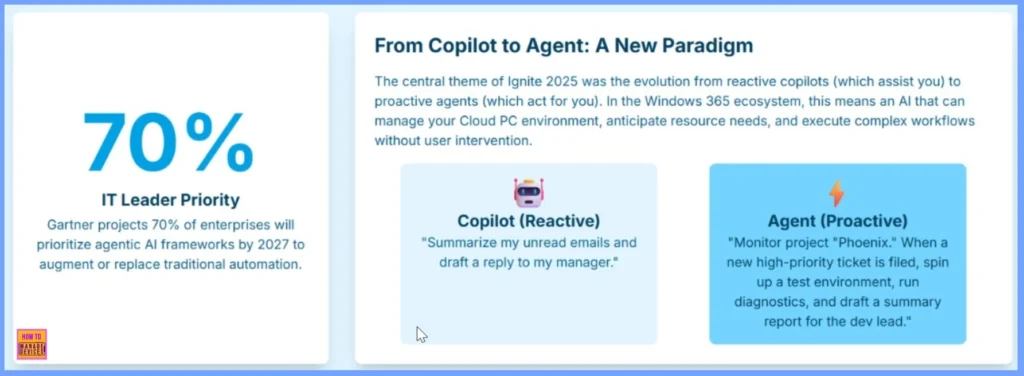
By 2027, Gartner predicts that 70% of companies will prioritize Agentic AI because it can go far beyond traditional automation. Microsoft Ignite 2025 reflects this shift by moving from Copilots, which only respond after you give a command, to fully proactive Agents that can take action on their own.
In Windows 365, AI will no longer wait for instructions but will continuously watch for important events, make decisions, and complete tasks independently. For example, while a Copilot might help by summarizing your emails when you ask, an Agent can automatically monitor a project, detect when a new high-priority issue appears, create a test environment, run diagnostics, and prepare a report all without human involvement.
| Copilot (Reactive) | Agent (Proactive) |
|---|---|
| “Summarize my unread emails and draft a reply to my manager.“ | “Monitor project “Phoenix.” When a new high-priority ticket is filed, spin up a test environment, run diagnostics, and draft a summary report for the dev lead.” |
- How Windows 365 for Agents Performs Intelligent PowerPoint Editing in Cloud PC
- AI Agent Tool that Brings the Power of Microsoft Graph and MS Entra
- Understanding Entra Agentic AI in Security From Manual Work to Fully Autonomous Agents
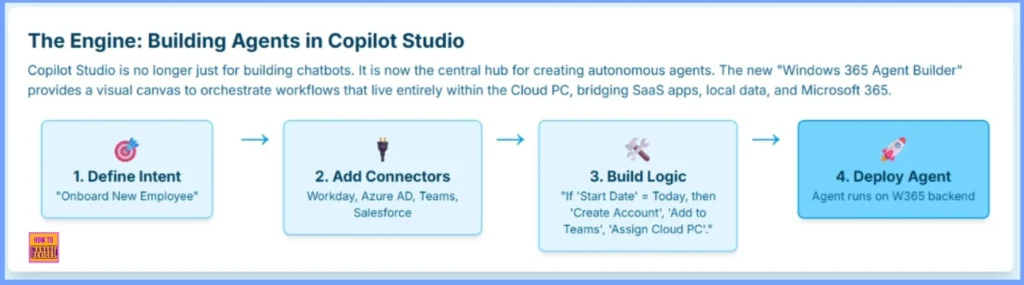
How Copilot Studio Becomes the Engine for Building Autonomous Windows 365 Agents
Copilot Studio has evolved from a basic chatbot builder into the main engine for creating fully autonomous agents. With the new Windows 365 Agent Builder, IT teams can design intelligent workflows using a visual, drag-and-drop interface. These agents operate directly inside the Cloud PC and can connect to SaaS apps, Microsoft 365 services, and local resources.
| Define Intent | Add Connectors | Build Logic | Deploy Agent |
|---|---|---|---|
| Onboard New Employee | Workday, Azure AD, Teams, Salesforce | “If ‘Start Date’ = Today, then ‘Create Account“, ‘Add to Teams’, ‘Assign Cloud PC’.” | Agent runs on W365 backend |
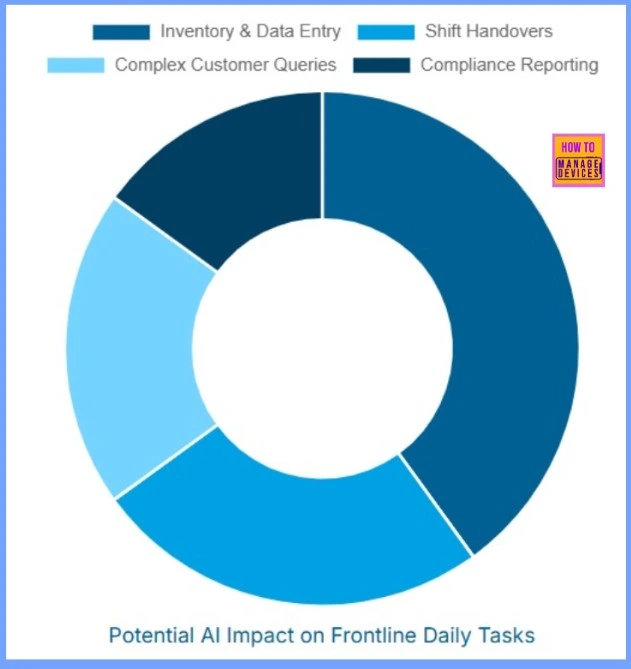
Potential AI Impact on Frontline Daily Tasks
AI can make frontline work much easier by taking over routine tasks and improving accuracy. It helps the most in inventory and data entry by automatically collecting information, reducing mistakes, and saving staff time. AI also supports employees during customer interactions by quickly giving clear answers to difficult questions.
During shift handovers, it creates simple summaries and highlights pending tasks so teams can continue work smoothly. For compliance reporting, AI prepares reports, alerts staff about missing details, and keeps records organized.
Next Major Evolution of Artificial Intelligence (AI) in the Enterprise
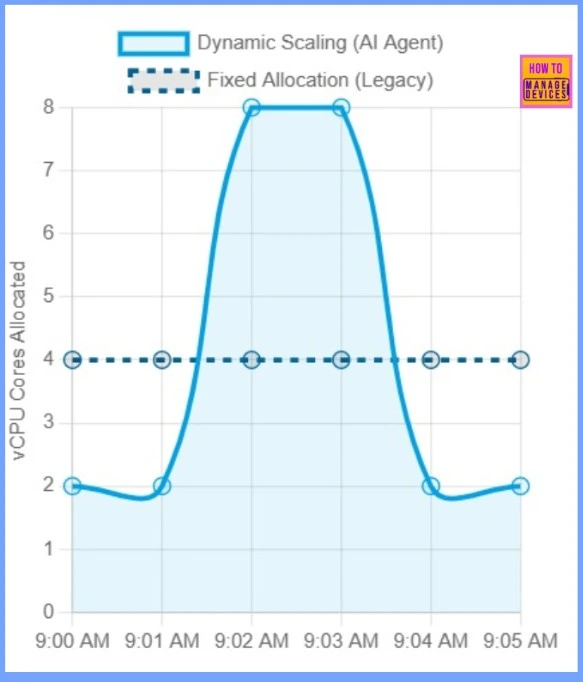
This diagram illustrate the next major evolution of Artificial Intelligence (AI) in the enterprise, moving from simple human assistance to autonomous operational management, and highlight the strategic and resource-optimization benefits of this shift.
Need Further Assistance or Have Technical Questions?
Join the LinkedIn Page and Telegram group to get the latest step-by-step guides and news updates. Join our Meetup Page to participate in User group meetings. Also, Join the WhatsApp Community to get the latest news on Microsoft Technologies. We are there on Reddit as well.
Author
Anoop C Nair has been Microsoft MVP from 2015 onwards for 10 consecutive years! He is a Workplace Solution Architect with more than 22+ years of experience in Workplace technologies. He is also a Blogger, Speaker, and Local User Group Community leader. His primary focus is on Device Management technologies like SCCM and Intune. He writes about technologies like Intune, SCCM, Windows, Cloud PC, Windows, Entra, Microsoft Security, Career, etc.




Discussion