





How to Identify AI Agents in Entra Tokens using Facet Claims
Key Takeaways
- Adds extra identity details without changing core claims like tid, sub, azp.
- Clear identity breakdown
- xms_tnt_fct > Tenant info
- xms_sub_fct > Subject (user)
- xms_act_fct > Actor (app/agent)
- Helps determine whether actions are from a user, an app, or an AI agent.
- Useful for logs, auditing, and SOC investigations.
- Ideal for agent-based and on-behalf-of access flows.
How to Identify AI Agents in Entra Tokens using Facet Claims! The new “facet” claims in Entra Agent ID tokens provide additional context without changing the existing core claims, such as tid, sub, and azp. Organisations can continue using their current token validation logic while gaining deeper visibility into identity relationships within each token.
Table of Content
How to Identify AI Agents in Entra Tokens using Facet Claims
These claims simply help you understand who is involved in a request in a clearer way. The xms_tnt_fct tells you about the organization (tenant), the xms_sub_fct tells you which user or identity the token belongs to, and the xms_act_fct shows which app or agent is actually acting. This makes it easy to see both who the request is for and who is actually doing it, especially when apps or AI agents act on behalf of users.
| Note |
|---|
| Facet claims are multivalued, meaning a single claim can contain multiple values separated by spaces. |
- Learn Course AB-900T00-A Introduction To Microsoft 365 And AI Administration
- How Entra Agent IDs and UEBA Updates Improve Threat Detection in Microsoft Defender
- Understanding Entra Agentic AI in Security From Manual Work to Fully Autonomous Agents
- AI Agent Tool that Brings the Power of Microsoft Graph and MS Entra
- Best Guide to Invite B2B Guest Users to Entra ID using Intune
Facet Claim Values and Parent App Insight
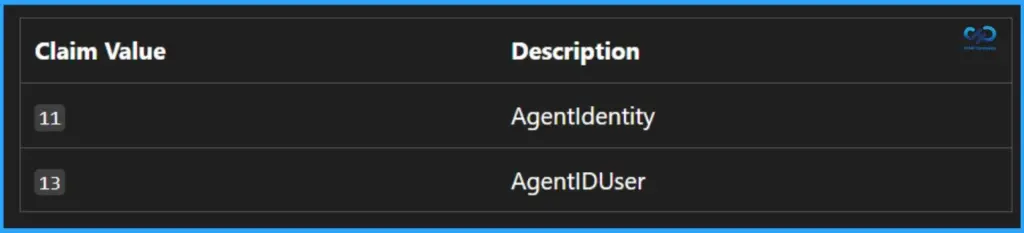
The facet claim values follow a specific pattern: they are always odd numbers starting from 1. Each value represents a particular identity context. It is important to note that you should only validate the values relevant to your scenario, avoid assuming any order, and safely ignore values that don’t apply to your application.
- Current Relevant Values
- 11 = AgentIdentity
- 13 = AgentIDUser
- Additional Claim to Note
- xms_par_app_azp
- Identifies the parent application of the authorized party (azp or appid)
- Useful for understanding application hierarchy and relationships in complex scenarios
Key Guidance – Parent Application Claim (xms_par_app_azp)
When working with the parent application claim, it’s recommended to log the parent application ID for auditing purposes. This information is already included in Entra sign-in logs (when available), and resource applications should also capture it to improve visibility and traceability.

However, this claim should not be used for authorization decisions. Relying on it for access control can introduce risk, as it may unintentionally grant broader access across multiple agents or applications.
Need Further Assistance or Have Technical Questions?
Join the LinkedIn Page and Telegram group to get the latest step-by-step guides and news updates. Join our Meetup Page to participate in User group meetings. Also, join the WhatsApp Community and the Whatsapp channel to get the latest news on Microsoft Technologies. We are there on Reddit as well.
Author
Anoop C Nair is a Workplace Technology solution architect with 25+ years of experience. Microsoft Certified Trainer. Microsoft MVP from 2015 onwards for consecutive 11+ years! He is a blogger, Speaker, and Founder of HTMD Community and HTMD Conference. His main focus is on Device Management technologies like Intune, Windows, and Cloud PC. He writes about technologies like Intune, SCCM, Windows, Cloud PC, Entra, and Microsoft Security.




Discussion