






Intune Agentic AI Enablement Roadmap for 2026
Intune Agentic AI Enablement Roadmap for 2026! Microsoft is introducing three powerful new Intune agents such as Policy Configuration, Change Review, and Device Offboarding to automate and strengthen endpoint management.
These agents, now rolling out in preview, will appear under the “Agents” section in the Intune portal once enabled. By translating natural language into policy, validating changes for risks, and identifying devices no longer in use, they help IT teams maintain a secure and compliant environment with greater efficiency.
Microsoft Ignite announced that Intune is getting powerful new AI features to make IT management easier. Security Copilot chat and new AI agents will help admins complete tasks faster, get clearer insights, and automate routine work.
Since Security Copilot is now included with Microsoft 365 E5, more organizations can start using these capabilities. Intune is also adding platform improvements to reduce rollout risks, centralize key actions, and improve recovery controls, helping IT teams manage their environment more safely and efficiently.

Table of Contents
Intune Agentic AI Enablement Roadmap for 2026
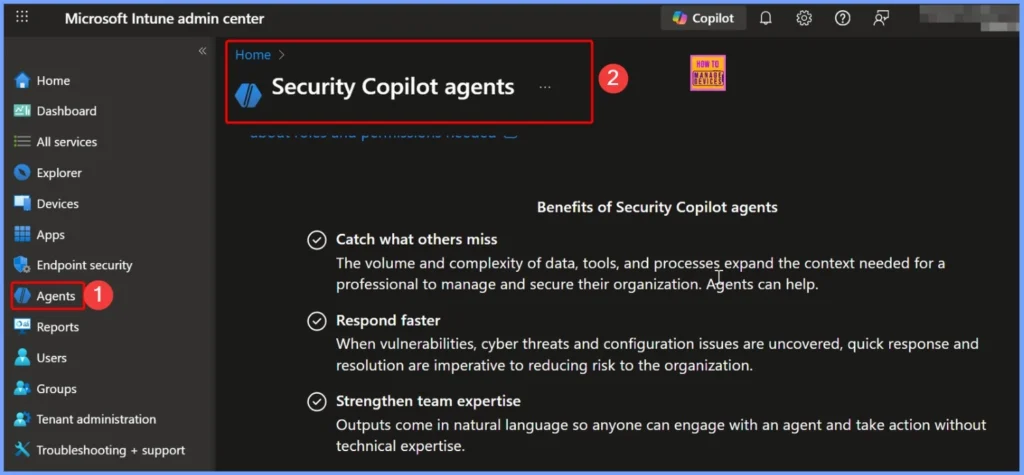
Intune 3 new agents, such as Policy Configuration, Change Review, and Device Offboarding, are run on Security Copilot’s AI engine. Since these agents rely on Security Copilot to guide decisions, check risks, and automate tasks, Microsoft is making Security Copilot available to all Microsoft 365 E5 customers. This ensures that more organizations can immediately benefit from these new Intune AI agents as they become available.
| Intune AI Agent | Purpose |
|---|---|
| Policy Configuration Agent | Converts natural-language requirements into Intune policies and checks compliance alignment. |
| Change Review Agent | Reviews and analyzes configuration changes for risks, conflicts, and compliance issues before rollout. |
| Device Offboarding Agent | Identifies and removes unused or outdated devices to maintain environment hygiene and reduce security risk. |
- Effective Vulnerability Remediation Agent Strategies and Best Practices with Microsoft Intune
- How to Fix Intune Agent Crash Access Violation Error 0xc0000005
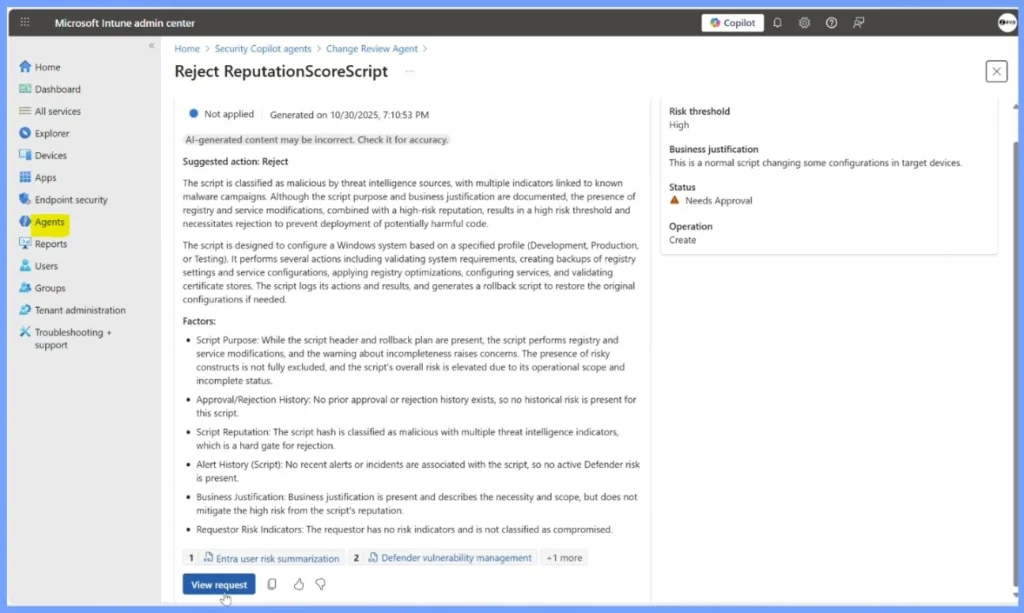
Change Review Intune Agent AI-Powered Validation for Safer Smarter IT Changes
The Change Review Agent in Intune uses advanced Security Copilot intelligence. It helps IT admins make safer, more informed decisions before rolling out any change. Whether it’s an app deployment, a policy update, or a configuration adjustment, the agent automatically analyzes the full context, checking for risks, conflicts, and compliance issues.
- It provides clear insights and actionable recommendations so admins can proceed confidently without disrupting productivity or security.
- The Change Review Agent can only check scripts that require Multi-Admin Approval (MAA).
- These are scripts that need more than one admin to approve before they run.
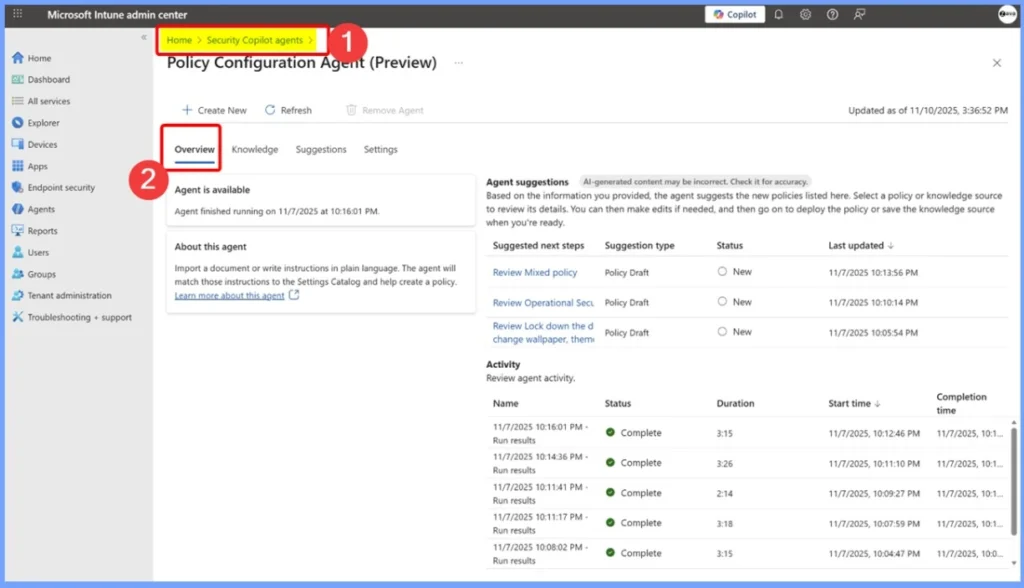
Create and Validate Intune Policies Effortlessly with the Policy Configuration Agent
The Policy Configuration Agent streamlines the process of creating and managing Intune policies by converting natural-language requirements into clear, accurate configurations. It provides guidance on settings, helps validate policies, and ensures they align with your organisation’s security and productivity goals.
For environments that must meet strict standards such as PCI, HIPAA, or DISA STIG, the agent adds a layer of assurance by checking compliance alignment and continuously auditing for deviations.
Device Offboarding Agent – AI-Powered Cleanup to Reduce Risk and Improve Device Hygiene
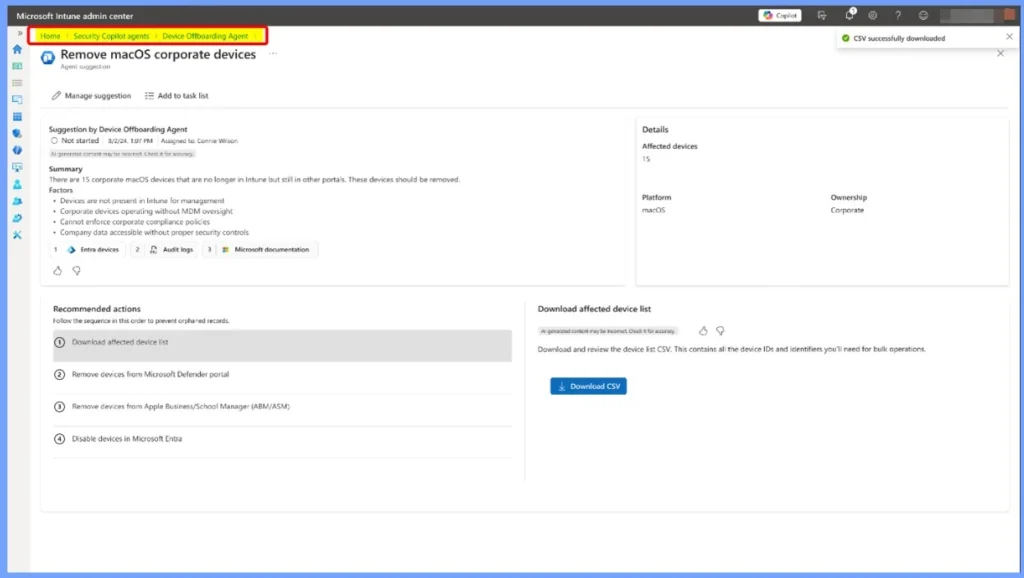
The Device Offboarding Agent helps IT teams quickly identify and remove unused, outdated, or unmanaged devices that can pose security and compliance risks. By scanning your entire digital estate, the agent highlights devices that no longer belong and streamlines the offboarding process.
| Agent Details | Details |
|---|---|
| Name of the Agent | Device Offboarding Agent |
| Purpose | Removes outdated, unused, or unmanaged devices from the environment |
| How It Works | Scans the entire digital estate to identify devices that no longer belong |
| Benefits | Reduces attack surface, improves security, strengthens compliance |
| Outcome | Cleaner, safer, and more manageable device environment |
| Value to IT Teams | Saves time, eliminates manual cleanup, reduces risk |
- Free Intune Training 2025 for Device Management Admins
- Intune Training Course 2023
- Intune Design Decisions Free Training | Version 1 Starter Kit | Basic
- Intune Management Extension Health Evaluation | IME Health Issue | ClientHealthEval.exe | Task Scheduler
Need Further Assistance or Have Technical Questions?
Join the LinkedIn Page and Telegram group to get the latest step-by-step guides and news updates. Join our Meetup Page to participate in User group meetings. Also, Join the WhatsApp Community to get the latest news on Microsoft Technologies. We are there on Reddit as well.
Author
Anoop C Nair has been Microsoft MVP from 2015 onwards for 10 consecutive years! He is a Workplace Solution Architect with more than 22+ years of experience in Workplace technologies. He is also a Blogger, Speaker, and Local User Group Community leader. His primary focus is on Device Management technologies like SCCM and Intune. He writes about technologies like Intune, SCCM, Windows, Cloud PC, Windows, Entra, Microsoft Security, Career, etc.


Discussion