






How RDS AAD Auth Transforms SSO for Windows 365 CloudPC and Azure Virtual Desktop
How RDS AAD Auth Transforms SSO for Windows 365 CloudPC and Azure Virtual Desktop! The new RDS AAD Auth protocol provides a modern authentication approach for Windows 365 Cloud PCs and Azure Virtual Desktop, integrating directly with Microsoft Entra ID.
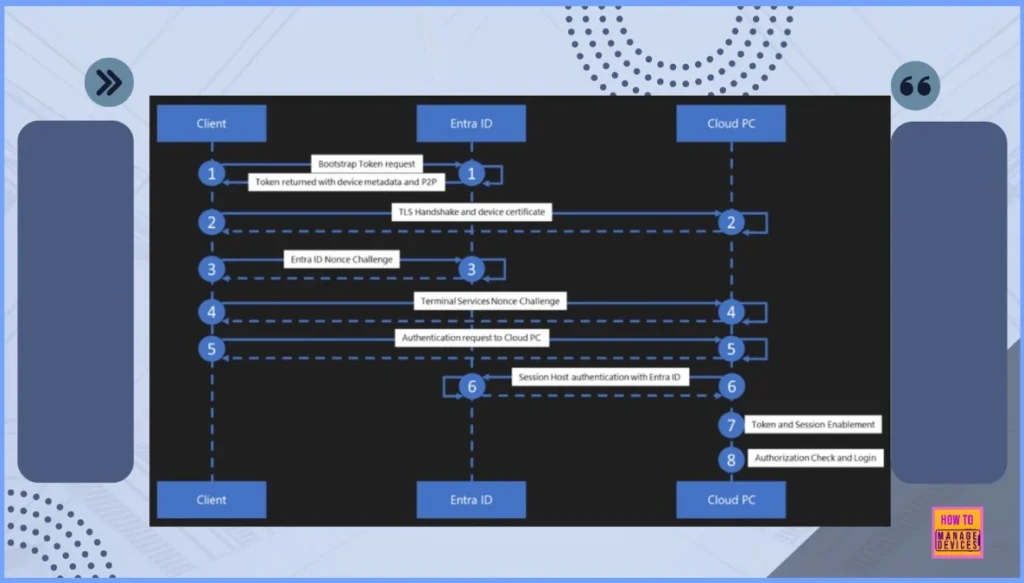
This enhancement simplify secure access by moving away from legacy authentication flows and enabling a consistent, token-based sign-in experience across cloud desktops. Microsoft has now published the full token flow and authentication model. It gives IT admins better visibility into how credentials, tokens, and session security work end-to-end.
To use the new RDS AAD Auth protocol, all 3 components such as the client operating system, the Windows App client, and the VM operating system must support this authentication method. If any one of them is outdated or not compatible, the secure token-based sign-in process will fail and the connection cannot be established.
A major benefit of RDS AAD Auth is that it works on both types of Cloud PCs such as fully Entra joined (AADJ) and those that are hybrid joined (connected to both Entra ID and on-prem AD). In this post, you will discover, the full details behind how RDS AAD Auth modernizes and strengthens SSO for Windows 365 CloudPC and Azure Virtual Desktop.

Table of Contents
How RDS AAD Auth Transforms SSO for Windows 365 CloudPC and Azure Virtual Desktop
When CloudPC and AVD use Microsoft Entra ID for authentication, everything becomes more secure and easier to manage. IT teams get stronger protection, better conditional access controls, and smoother single sign-on for users. It also removes the need for old authentication methods.
- Overall, RDS AAD Auth helps Cloud PCs and AVD follow Microsoft’s modern security standards (like Zero Trust) and makes the login experience simpler and safer for everyone.
| Component | Requirement |
|---|---|
| Client OS | Must support the new RDS AAD Auth protocol for initiating secure sign-in. |
| Windows App Client | Needs to be updated to the latest version to handle modern authentication tokens. |
| Virtual Machine (VM) | The Cloud PC or AVD VM must have OS support for RDS AAD Auth to complete the authentication flow. |
- Workaround to FIX SSO Issue with Citrix and Windows 11 24H2
- Enable Entra Website SSO using Configuration Profiles for Edge Browser using Microsoft 365 Admin Center
- New Entra SSO and Device Management Dialog – Allow my Organization to Manage this Device Option is Enabled
- Create Microsoft Entra ID Users with PowerShell Script
- What is Entra ID One Person One License Details
- Optimize Entra License with New Entra License Utilization Feature
Need Further Assistance or Have Technical Questions?
Join the LinkedIn Page and Telegram group to get the latest step-by-step guides and news updates. Join our Meetup Page to participate in User group meetings. Also, Join the WhatsApp Community to get the latest news on Microsoft Technologies. We are there on Reddit as well.
Author
Anoop C Nair has been Microsoft MVP from 2015 onwards for 10 consecutive years! He is a Workplace Solution Architect with more than 22+ years of experience in Workplace technologies. He is also a Blogger, Speaker, and Local User Group Community leader. His primary focus is on Device Management technologies like SCCM and Intune. He writes about technologies like Intune, SCCM, Windows, Cloud PC, Windows, Entra, Microsoft Security, Career, etc.


Discussion