






Beginners Guide Intune Android for Work Google Play for Work Setup
Beginners Guide Intune Android for Work Google Play for Work Setup? Android for work has always been an exciting topic for me. I’m a fanboy of Android devices 🙂 I started testing Intune + SCCM MDM management with Android devices in 2014. I was eagerly waiting for “Android for Work” support with Intune.
Microsoft announced Intune’s supportability for Android for Work (A4W) a few months back. Since then, I have been waiting for an A4W-supported device. Yes, that means all Android devices are not supported by A4W. Here is Google’s list of A4W-supported devices.
In our article, we guide you through configuring the Android Enterprise platform for use with Intune Device Management. You can easily set up Intune Enrollment to manage Android Enterprise devices. With Microsoft Endpoint Manager Intune, you can manage corporate-owned Android Enterprise devices easily.
The Android work profile feature allows users to have a single device for personal and work purposes. Our guide simplifies the process so that you can efficiently manage these devices using Intune.

- Understanding Android Management with Intune | Android Enterprise
- Enroll Android Devices To Android for Work in Intune
- Configure Enrolment Notifications For New Enrolled Android Devices in Intune
- Block Personal Windows Devices Enrollment Enrollment restrictions Options
- How To Add Android Managed Google Play App In Intune
Table of Contents
Intune Android for Work MDM – Admin Config Enrollment Removal
Let’s talk about managing Intune Android for Work MDM (Mobile Device Management) and how to configure enrollment removal for administrators. The video below explains all the details about Intune Android for Work MDM.
Beginners Guide Intune Android for Work Google Play for Work Setup
In this post, I will try to cover the prerequisites of Android for Work, Intune portal admin configurations, Adding Google Play apps to Google for Work, Android for Work Device enrollment, Work profile creation, and Removal of Android for the work profile.
First of all, you need to create a baseline of Android devices that you want to support in your environment. Following are some of the points that we need to take care of as part of the Android for Work implementation:-
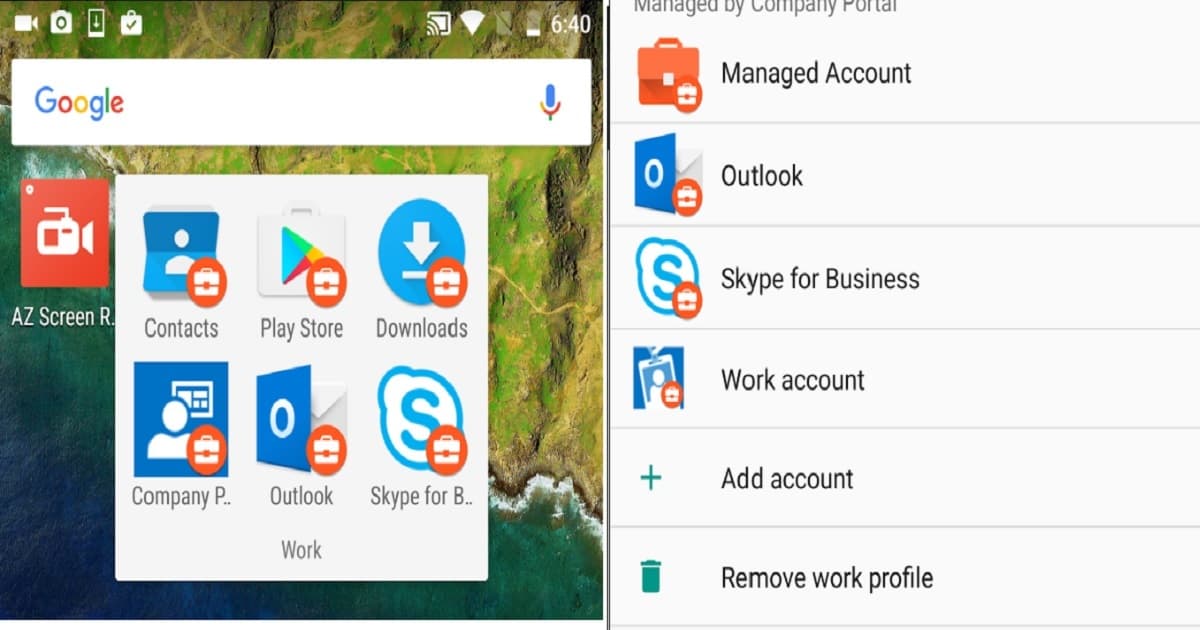
Preparation Work – Android for Work Admin Configurations
Devices with Android 5.0 Lollipop will later only have a work profile and Android for work support as per Google. This has nothing to do with Microsoft and Intune. Some Android for Work settings are available only for Android 6.0 and later.
- It’s essential to understand Android for Work does NOT support all android devices in the market- a list of supported devices -is here.
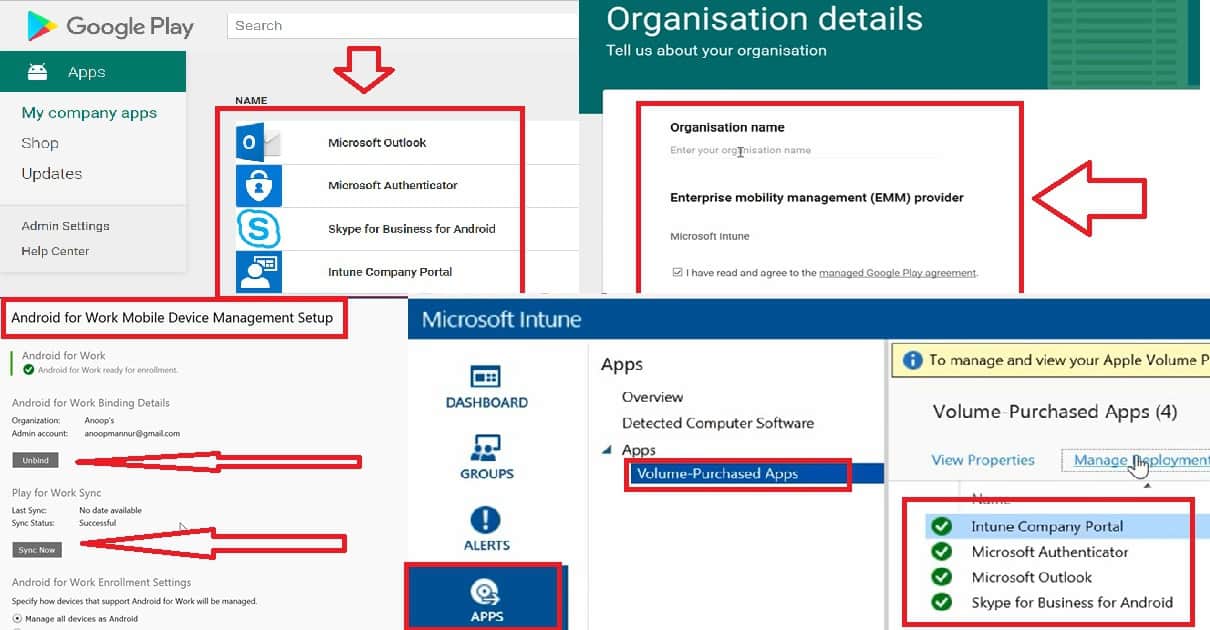
- Bind your Intune and Google for Work accounts from the Silverlight Intune portal because this feature is not yet enabled in the Azure Intune blade.
- Create a Google account or use an existing account to sign up for Android for Work with the EMM provider.
- Add applications from Google Play to the Google for Work store and then sync these apps to Intune. To initiate a new sync between Intune and the Google for Work store, click on the Sync button in the Intune console.
- Sync the apps from the Intune console – Admin > Mobile Device Management > Android for Work. After Sync, the apps will be visible under – Intune console – Apps – Volume Purchased app
- I recommend using the following option after the pilot testing in your production environment. Enable the option “Manage supported devices as Android for Work – (Enabled) All devices that support Android for Work are enrolled as Android for Work devices. Any Android device not supporting Android for Work is enrolled as a conventional Android device”.
- The only caveat is that we don’t have the option to restrict the devices that are NOT supported by Android for Work from enrolling into Intune. Beginners Guide Intune Android for Work Google Play for Work Setup Endpoint Manager | MEM?
Notes from the Field – Android for Work Security Policies
As an initial release, Intune is out of the box: “Security and Work profile policies are very limited for A4W”. I suppose you have to combine A4W and Android policies to support Android devices in your organization.
- OMA URI custom policies are supported with A4W. However, custom policies, along with Intune, support only a few options. I know only 2 policies supported by this feature, which are WiFi and VPN profiles.
- To upload LOB apps to Google Store for Work – we need to have access to the developer console $25 – https://play.google.com/apps/publish/signup/
End-User Experience – Android for Work
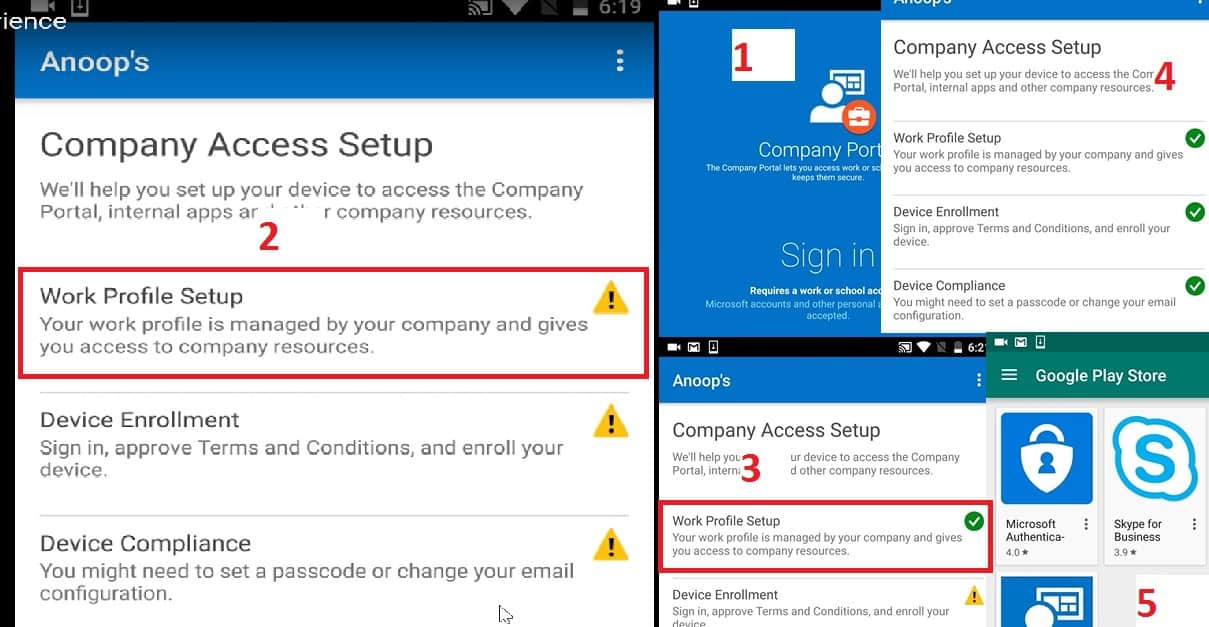
Enrollment of Android for work devices is as straightforward as the normal Android device enrollment for the first part of it. The second part is more towards logging into the Intune company portal from the Android for Work context and continuing the enrollment process.
| End-User Experience – Android for Work |
|---|
| Work profiles on Android devices will get be created via Intune company portal enrollment. |
| This will happen only for Android for Work supported devices. |
| If you have a device that is not supported for Android for Work by Google, then the enrollment won’t create a work profile, etc… it will be normal enrollment. |
We are on WhatsApp now. To get the latest step-by-step guides, news, and updates, Join our Channel. Click here. HTMD WhatsApp.
Author
Anoop C Nair is Microsoft MVP! He is a Device Management Admin with more than 20 years of experience (calculation done in 2021) in IT. He is a Blogger, Speaker, and Local User Group HTMD Community leader. His main focus is on Device Management technologies like SCCM 2012, Current Branch, and Intune. He writes about ConfigMgr, Windows 11, Windows 10, Azure AD, Microsoft Intune, Windows 365, AVD, etc.


Sounds exciting. Do all Android devices still need a GMail account when they are first configured out the box?