






Intune Application Policy Manager RBA Controls In MEM Portal | Endpoint Manager Role-Based Access
Intune Application Policy Manager RBA Controls In MEM Portal | Endpoint Manager Role-Based Access? We will discuss the access rights of the built-in Intune RBA role, Intune Application Manager.
Ideally, this role should have access to Manage mobile apps and read device information, depending on the scope of users/devices assigned to it.
Do you know what the scope is? “The users or devices that a specified person (the member) can manage.” If you are an SCCM admin, the SCOPE option is already in SCCM 2012 and the CB console. I have another post that discusses the details of Configuration Manager RBAC.
This post will examine the permissions associated with the Intune application manager build-in role. According to Microsoft documentation, this role ” Manages and deploys applications and profiles.”

- Intune Application Deployment using MSI EXE IntuneWin Formats
- Protect Corporate Data using Data Loss Protection Policies with the Microsoft Purview Portal
- Create Custom Roles RBAC in Intune
- Duplicate Intune RBAC Roles | Endpoint Manager Roles
- Intune Read-Only Admin Experience After RBAC Solution
Table of Contents
Intune Application Policy Manager RBA Controls In MEM Portal
We will dive deeply into this topic and explain the actions an Intune app admin can perform from the MEM portal. Following are the access permissions given to the Intune APP Manager RBAC role.
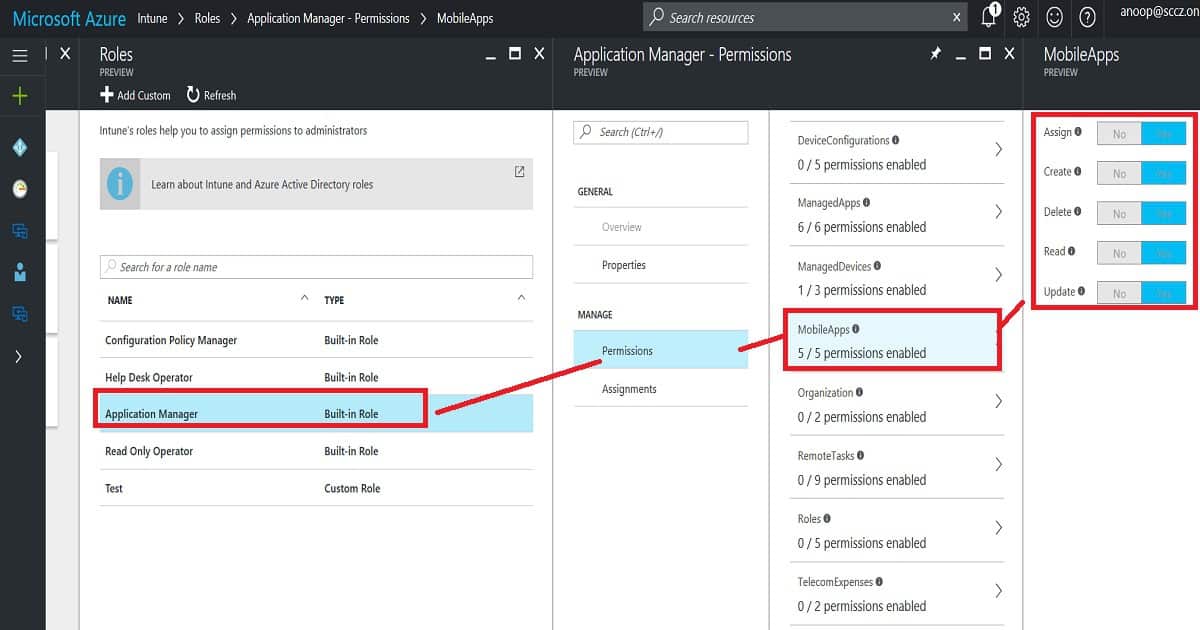
Managed Apps – Intune Application Policy Manager RBA Controls In MEM Portal
Managing your organization‘s IT infrastructure is essential to effectively controlling access to various resources. Here’s a breakdown of permissions for managing apps, devices, and mobile apps.
- Assign managed apps to a security group
- Create managed apps
- Delete managed apps
- Read managed apps
- Update managed apps
- Wipe Managed apps Managed Devices
- No Access to delete devices
- Access to read device information
- No Access to update device properties Mobile Apps
- Assign mobile apps to a security group
- Create mobile apps
- Delete mobile apps
- Read mobile apps
- Update mobile apps
| Mobile Apps |
|---|
| Assign mobile apps to a security group |
| Create mobile apps |
| Delete mobile apps |
| Read mobile apps |
Overall Access Rights of Intune Tiles – Intune Application Policy Manager RBA Controls In MEM Portal
It can administrate some actions in managing apps and configuring device tiles. Access is denied to perform any activities in Conditional Access, Device Enrollment, Access control, and Set device compliance tiles.
- You are allowed to set up certificate authority in the Configure devices tile. However, you do not have access to view profiles.
- You are allowed to view the device information in the Device and Groups tile.
- Access is denied to create/delete new or existing groups or user profiles. It doesn’t matter whether the Intune policy manager is editing the groups in SCOPE. In many places, save and add buttons are enabled, but when we try to save, we get an error.
- Access is denied to change device and user settings in the Manage user tile.
- Access is denied to the Intune Silverlight console.
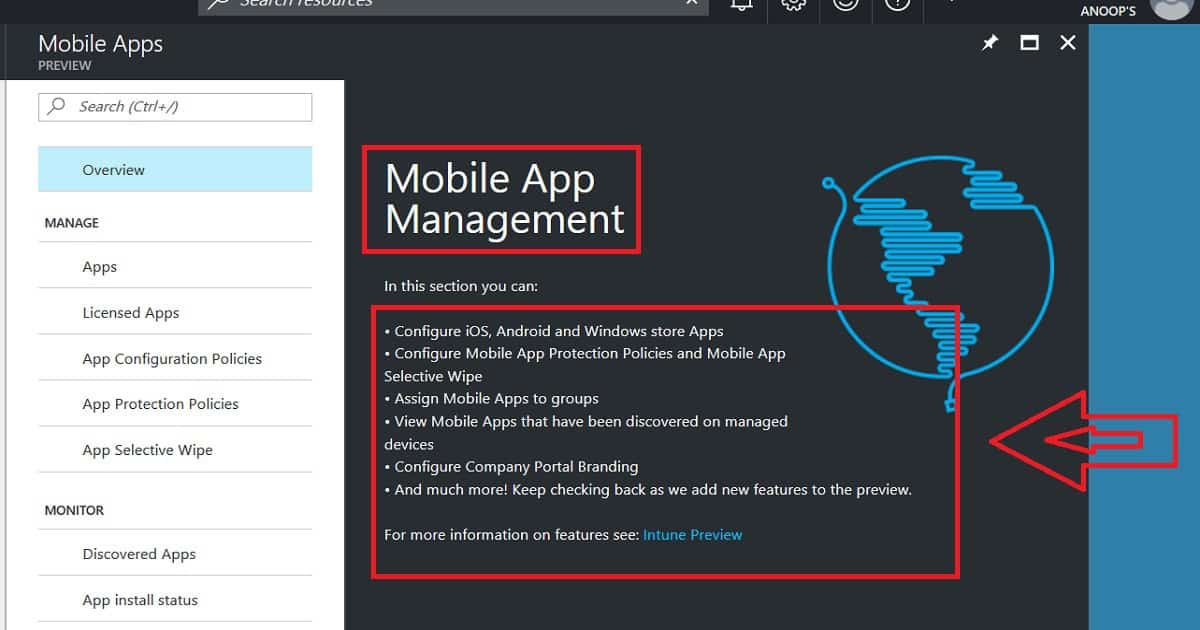
- Access is denied to the Intune App Protection section, and Intune mobile application management is not allowed for Intune App Managers. These app protection options are probably part of the Azure portal’s Intune—Manage Apps tab.
Access Rights – Manage Apps (Manage Apps and Mobile Apps) – Intune Application Policy Manager RBA Controls
You can create new mobile apps and edit mobile apps uploaded by admins. Access is Denied to edit the managed apps, which are automatically uploaded.
- Access is denied to remove assignments/deployments to a group outside the Intune application manager’s scope.
- Access is denied to remove assignments/deployments from a group in the Intune application manager’s scope. This should be allowed!
- If the user group is within the scope of the Intune application manager, you can add an assignment to the mobile/manage app.
- Access Denied adding an assignment to mobile/manage app if the user group is out of the scope of Intune application manager.
- App Protection Policies are getting hung while trying to edit (or create) existing (or new) app protection policies from the Intune App Manager account.
- Allowed to perform App Selective wipe option from Intune app manager account. Allowed to perform app selective wipe only on “in scope users/devices”.
- Access is denied to edit Company portal Branding from the Intune app manager account.
We are on WhatsApp now. To get the latest step-by-step guides, news, and updates, Join our Channel. Click here. HTMD WhatsApp.
Author
Anoop C Nair is Microsoft MVP! He is a Device Management Admin with more than 20 years of experience (calculation done in 2021) in IT. He is a Blogger, Speaker, and Local User Group HTMD Community leader. His main focus is on Device Management technologies like SCCM 2012, Current Branch, and Intune. He writes about ConfigMgr, Windows 11, Windows 10, Azure AD, Microsoft Intune, Windows 365, AVD, etc.



Nice explanation Anoop.