






What are Intune Application Agents Running on Windows Devices?
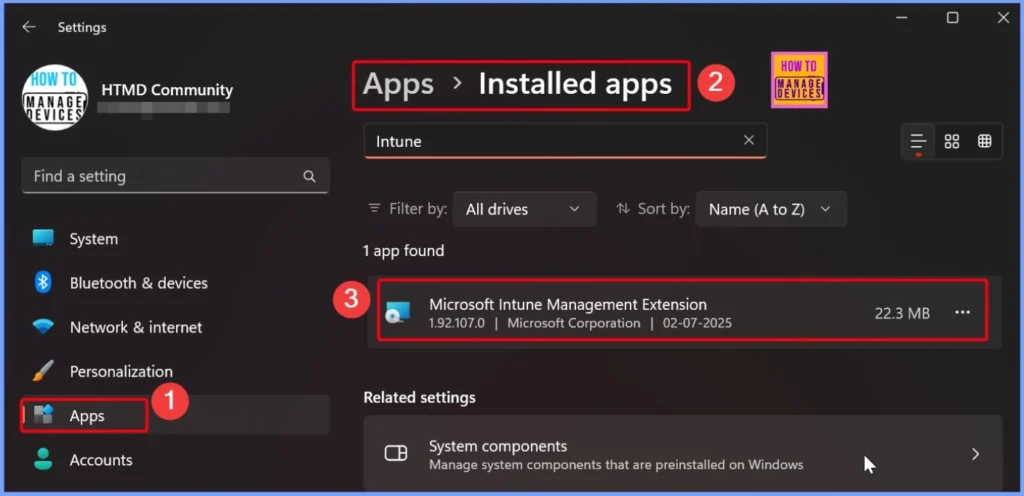
What are Intune Application Agents running on Windows Devices? When a Windows 11 device is managed by Microsoft Intune, certain agent applications are automatically installed to enable management capabilities. Two critical components we might notice in the Apps list are the Microsoft Device Inventory Agent and the Microsoft Intune Management Extension.
These agents play important roles in device communication, inventory reporting, application deployment, policy deployment, etc. Their presence confirms that the device is properly enrolled and actively communicating with the Intune service.
Microsoft Intune is a cloud-based endpoint management solution and focuses on mobile device management (MDM) and mobile application management (MAM) to ensure corporate data is protected, no matter where users are working from.
In this post, you will get all the details about what Intune application agents are running on Windows devices and why they are important for effective device management. When a Windows device is enrolled into Intune, Microsoft automatically installs a few critical components to ensure proper communication between the device and the Intune cloud service.

Table of Contents
What are Intune Application Agents Running on Windows Devices?
When a Windows device is managed by Microsoft Intune, a couple of background agents are silently installed to support ongoing management and monitoring. The Microsoft Device Inventory Agent and the Intune Management Extension (IME) are important agents that are not optional agents.
Note: These agents are automatically installed when your device is managed by Intune, and should never be uninstalled, as they are essential for device communication and policy enforcement.
- Free Intune Training 2025 for Device Management Admins
- Intune Training Course 2023
- Intune Design Decisions Free Training | Version 1 Starter Kit | Basic
- Intune Management Extension Health Evaluation | IME Health Issue | ClientHealthEval.exe | Task Scheduler
Microsoft Device Inventory Agent
The Microsoft Device Inventory Agent is responsible for collecting hardware and software inventory data from the device and sending it to Intune. This data is crucial for IT administrators to get a real-time view of device compliance, health, and installed applications. Without this agent, the Intune portal may show outdated or incomplete information about the device, which could lead to policy misalignment or inaccurate reporting in compliance dashboards and inventory logs.
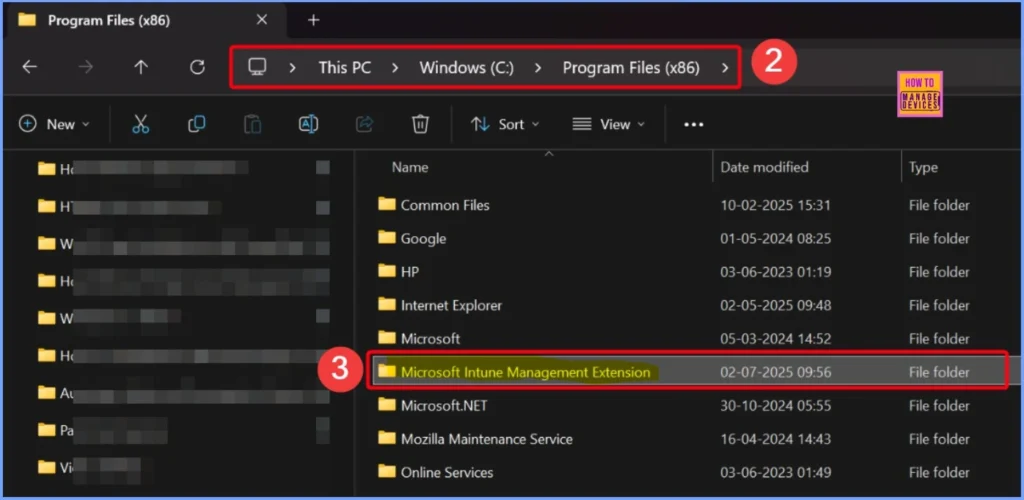
Never Uninstall the Microsoft Intune Management Extension (IME)
Microsoft Intune Management Extension (IME) is essential for delivering PowerShell scripts and deploying Win32 applications. This extension allows Intune to manage more complex configurations. Uninstalling either of these agents will severely disrupt the device’s ability to receive policies, apps, and scripts from Intune. Therefore, you should never attempt to remove these applications manually, as doing so can cause significant disruptions to device management.
What are these Intune Agents Used For?
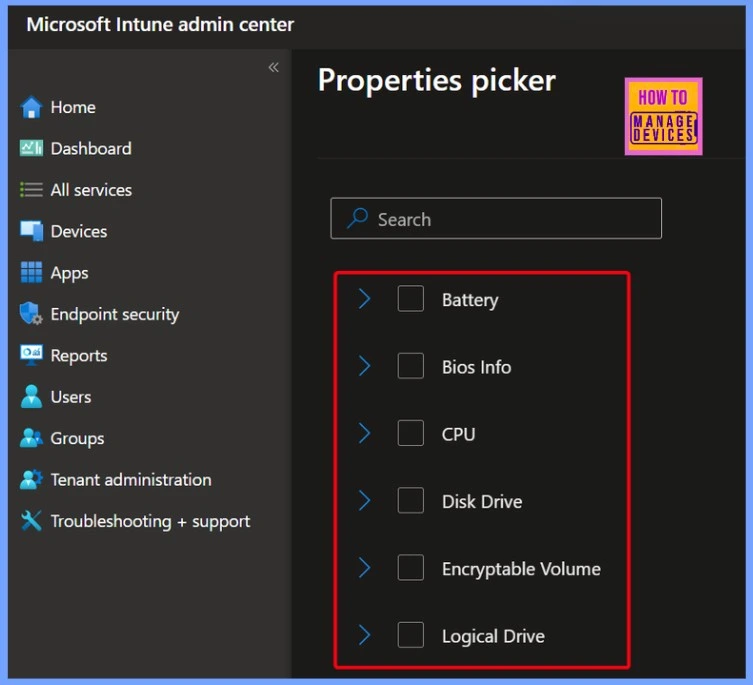
The Microsoft Device Inventory Agent helps Intune collect essential inventory details from the device, including Battery, BIOS Info, CPU, Disk Drive, Encryptable Volume, Logical Drive, Memory Info, Network Adapter
etc. This data is crucial for IT administrators to maintain an up-to-date view of the device performance, ensure compliance, and generate accurate reports for auditing and support purposes.
The Intune Management Extension (IME), on the other hand, is an additional agent that extends Intune’s capabilities beyond what the built-in MDM channel can handle. It enables the deployment of Win32 applications, execution of PowerShell scripts, and application of complex policies that are not natively supported.
| Intune Agents | Purpose | Key Capabilities |
|---|---|---|
| Microsoft Device Inventory Agent | Helps Intune collect detailed hardware and system inventory from managed devices | > Battery information > BIOS info > CPU > Disk drive > Encryptable volume > Logical drive > Memory info > Network adapter details |
| Intune Management Extension (IME) | Extends Intune functionality beyond MDM for advanced management scenarios | > Deploy Win32 applications > Execute PowerShell scripts > Apply complex configurations and custom policies |
Don’t Uninstall these Apps from Intune Managed Windows Devices – HTMD Video
In this video, you will get all the details about two important applications installed on Intune-managed Windows 11 devices, the Microsoft Device Inventory Agent and the Microsoft Intune Management Extension (IME). These applications appear in the app list of your device and play a vital role in ensuring smooth and effective device management through Intune.
Conclusion
Together, these agents are essential for maintaining full management and control of Windows devices. They should never be removed, as doing so can break policy enforcement, application delivery, and overall device compliance within the Intune environment.
Need Further Assistance or Have Technical Questions?
Join the LinkedIn Page and Telegram group to get the latest step-by-step guides and news updates. Join our Meetup Page to participate in User group meetings. Also, join the WhatsApp Community to get the latest news on Microsoft Technologies. We are there on Reddit as well.
Author
Anoop C Nair has been Microsoft MVP for 10 consecutive years from 2015 onwards. He is a Workplace Solution Architect with more than 22+ years of experience in Workplace technologies. He is a Blogger, Speaker, and Local User Group Community leader. His primary focus is on Device Management technologies like SCCM and Intune. He writes about technologies like Intune, SCCM, Windows, Cloud PC, Windows, Entra, Microsoft Security, Career, etc.


Discussion