






Intune Audit Logs Track Who Created Updated Device Compliance Policy
Let’s check Intune Audit logs to track who Created Updated Device Compliance Policy from Intune, aka MEM Portal. This post also helps you to find who created updated assignments for the device compliance policy. Audit logs include a record of activities that generate a change in Microsoft Intune.
Create, update (edit), delete, assign, and remote actions create audit events that administrators can review for most Intune workloads. By default, auditing is enabled for all customers. It can’t be disabled.
Compliance policy configuration is an important design decision while managing Windows 10 or Windows 11 physical or virtual devices with MEM Intune. Intune compliance policies are the first step of the protection before providing access to corporate applications, along with Conditional Access policies.
Once any of the actions are performed by users, you can directly visit audit logs to see recent actions. I have also noticed that Audit logs in the MEM portal are very short-lived or removed immediately from the dashboard.

From the MEM admin perspective, the audit logs are mainly for auditing reasons. However, Windows 365 audit logs help us understand the back-end activities behind the scenes. The interesting audit reports are available for the Cloud PC provisioning or reprovisioning process.
- Windows 365 Cloud PC Audit Logs
- Managing Windows Bitlocker Compliance Policy Using Intune | MS Graph | Grace Period
- Intune Logs Event IDs IME Logs Details for Windows Client Side Troubleshooting
Who Created Device Compliance Policy
Let’s check who has created updated Device Compliance Policy. You can find audit logs in the MEM Admin center portal –
- Sign in to the https://endpoint.microsoft.com/
- Select Tenant administration > Audit logs.
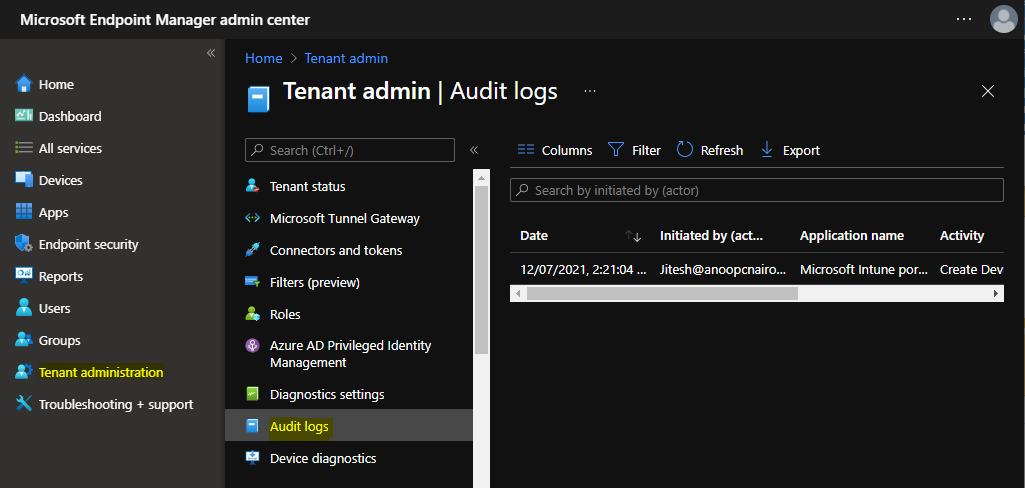
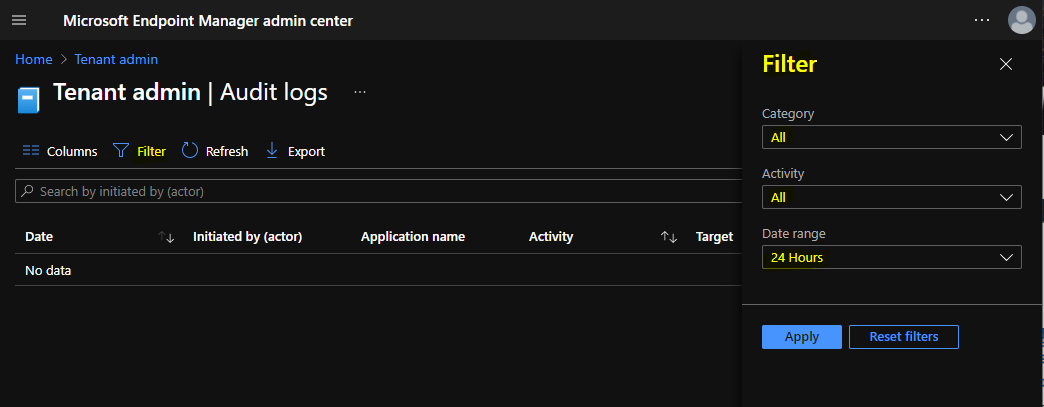
To filter the results, You need to click on Filter and select the following options to get the details for created device compliance policy and click Apply –
- Category: Compliance
- Activity: the options listed here either you can select All or
- Create DeviceCompliancePolicy
- Create DeviceCompliancePolicyAssignment
- Patch DeviceCompliancePolicy
- Update Assignment DeviceCompliancePolicy
- Date range: you can choose logs for the previous year, month, week, or day.
Who Create Device Compliance Policy
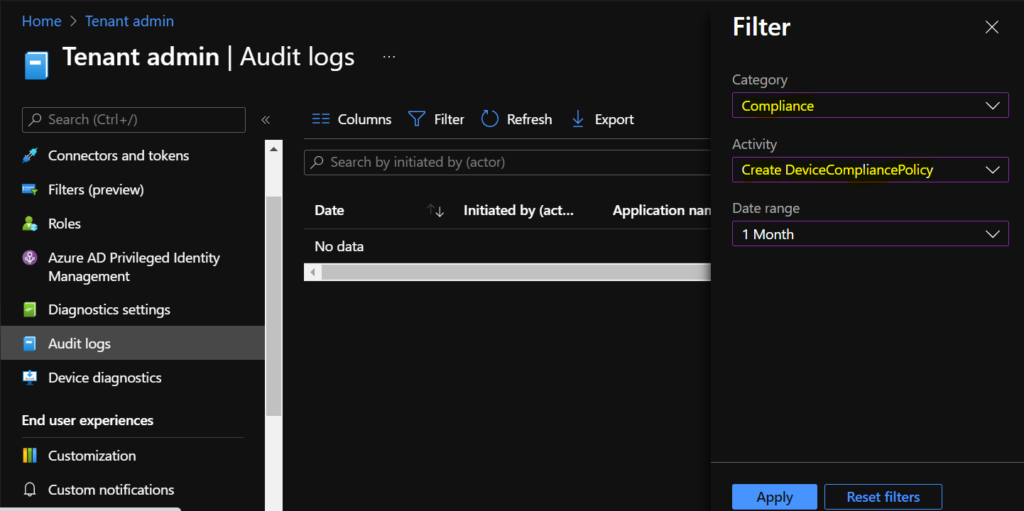
Select the following options to get the details for created device compliance policy and click Apply –
- Catagory -> Compliance
- Activity -> Create DeviceCompliancePolicy
- Date range -> You can choose logs for the previous year, month, week, or day.
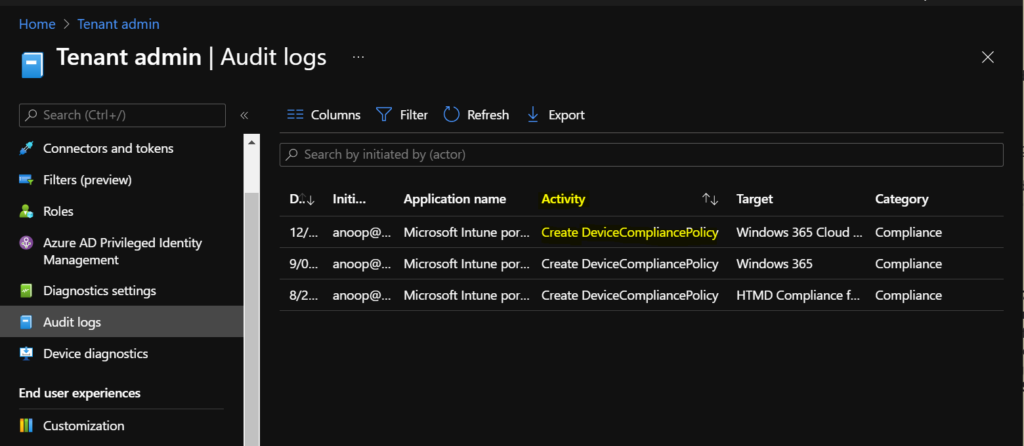
The following are some of the categories available for MEM portal audit logs. You can select an item in the list to see the activity details.
- Date – Date of the activities.
- Initiated by (actor) – Who Initiated the Action?
- Application name – The API name of the application.
- Activity – Create DeviceCompliancePolicy
- Target – Profile Name
- Category – Compliance
Here you can see the activity details for the activity Create Device Compliance Policy.
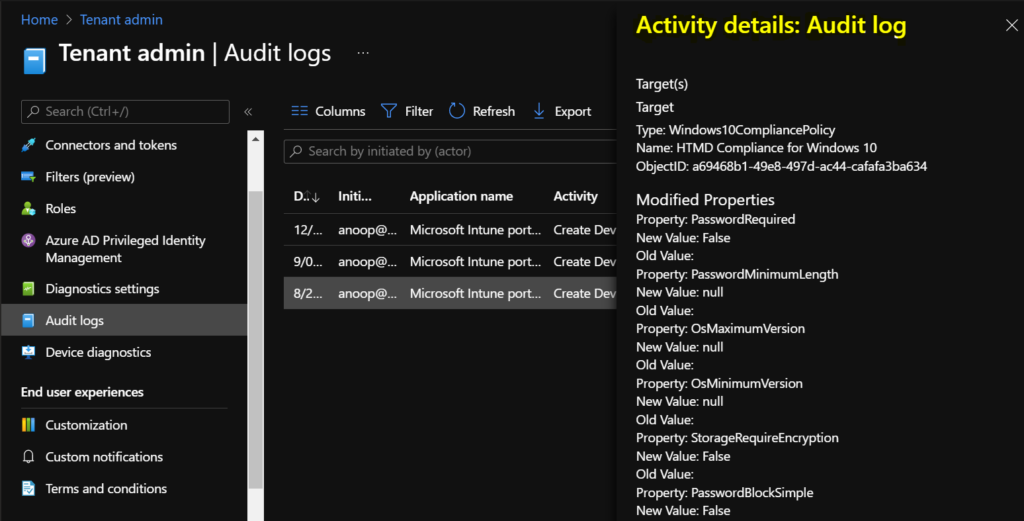
Activity
Date: Mon, 3 Jan 2022 04:46:24 GMT
Name: Create Microsoft.Management.Services.Api.Windows10CompliancePolicy
CorrelationID: 9a1e5e16-6f40-4eb4-bc25-313d92fcfa9f
Category: Compliance
Component: DeviceCompliancePolicy
Activity Status
Status: Success
Operation Type: Create
Activity Type: Create DeviceCompliancePolicy
Initiated By (Actor)
Type: ItPro
Upn: anoop@HTMD.onmicrosoft.com
Application: Microsoft Intune portal extension
ApplicationID: 5926fc8e-304e-4f59-8bed-58ca97cc39a4
Scope Tag(s)
Tag(s):
Target(s)
Target
Type: Windows10CompliancePolicy
Name: HTMD Compliance for Windows 10
ObjectID: a69468b1-49e8-497d-ac44-cafafa3ba634
Modified Properties
Property: PasswordRequired
New Value: False
Old Value:
Property: PasswordMinimumLength
New Value: null
Old Value:
Property: OsMaximumVersion
New Value: null
Old Value:
Property: OsMinimumVersion
New Value: null
Old Value:
Property: StorageRequireEncryption
New Value: False
Old Value:
Property: PasswordBlockSimple
New Value: False
Old Value:
Property: PasswordRequiredToUnlockFromIdle
New Value: False
Old Value:
Property: PasswordMinutesOfInactivityBeforeLock
New Value: <null>
Old Value:
Property: PasswordExpirationDays
New Value: <null>
Old Value:
Property: PasswordMinimumCharacterSetCount
New Value: <null>
Old Value:
Property: PasswordRequiredType
New Value: DeviceDefault
Old Value:
Property: PasswordPreviousPasswordBlockCount
New Value: <null>
Old Value:
Property: RequireHealthyDeviceReport
New Value: False
Old Value:
Property: MobileOsMinimumVersion
New Value: <null>
Old Value:
Property: MobileOsMaximumVersion
New Value: <null>
Old Value:
Property: EarlyLaunchAntiMalwareDriverEnabled
New Value: False
Old Value:
Property: BitLockerEnabled
New Value: True
Old Value:
Property: SecureBootEnabled
New Value: False
Old Value:
Property: CodeIntegrityEnabled
New Value: False
Old Value:
Property: ActiveFirewallRequired
New Value: False
Old Value:
Property: DefenderEnabled
New Value: False
Old Value:
Property: DefenderVersion
New Value: <null>
Old Value:
Property: SignatureOutOfDate
New Value: False
Old Value:
Property: RtpEnabled
New Value: False
Old Value:
Property: AntivirusRequired
New Value: False
Old Value:
Property: AntiSpywareRequired
New Value: False
Old Value:
Property: DeviceThreatProtectionEnabled
New Value: False
Old Value:
Property: DeviceThreatProtectionRequiredSecurityLevel
New Value: Unavailable
Old Value:
Property: ConfigurationManagerComplianceRequired
New Value: False
Old Value:
Property: TpmRequired
New Value: False
Old Value:
Property: Id
New Value: a69468b1-49e8-497d-ac44-cafafa3ba634
Old Value:
Property: CreatedDateTime
New Value: 8/23/2021 4:46:24 AM
Old Value:
Property: Description
New Value: <null>
Old Value:
Property: LastModifiedDateTime
New Value: 1/20/2022 4:46:24 AM
Old Value:
Property: Version
New Value: 1
Old Value:
Property: DeviceManagementAPIVersion
New Value:
Old Value:
Property: $Collection.RoleScopeTagIds[0]
New Value: Default
Old Value:
Who Create Device Compliance Policy Assignment
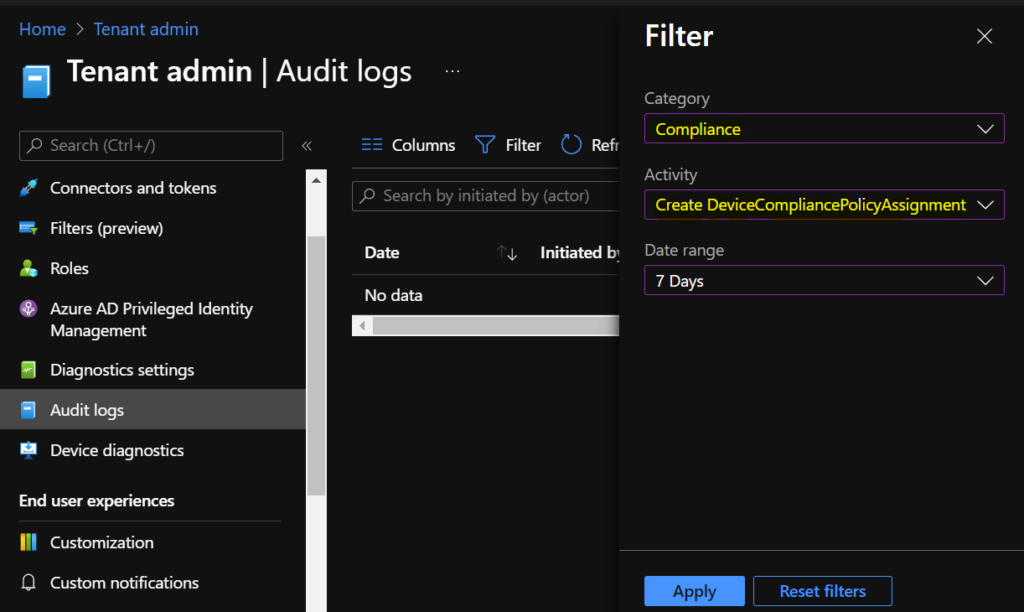
Here’s how you can click on Filter to check the creation of device compliance policy from Intune portal. Here, you need to select Filter’s options to get the details of who has created Device Compliance Policy Assignment –
Select the following options to get the details for created device compliance assignment policy and click Apply –
- Catagory -> Compliance
- Activity -> Create DeviceCompliancePolicyAssignment
- Date range -> You can choose logs for the previous year, month, week, or day.
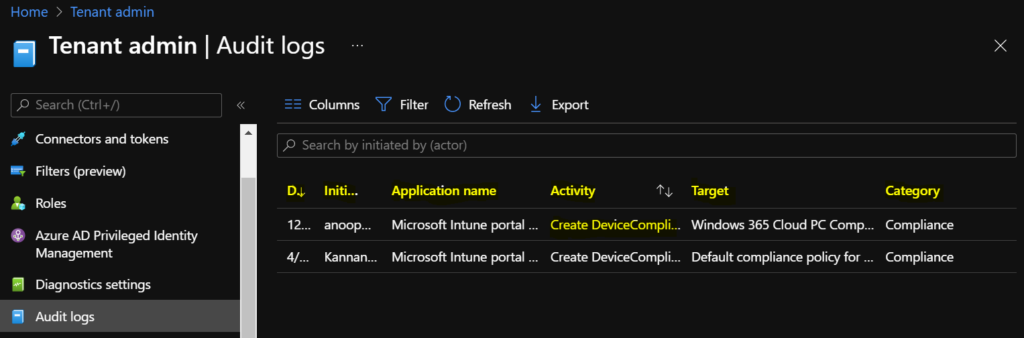
The following are some of the categories available for MEM portal audit logs. You can select an item in the list to see the activity details.
- Date – Date of the activities.
- Initiated by (actor) – Who Initiated the Action?
- Application name – The API name of the application.
- Activity – The API details with the Object ID (Create DeviceCompliancePolicyAssignment)
- Target – Profile Name
- Category – Compliance
Here you can see the activity details for the activity Create Device Compliance Policy Assignment.
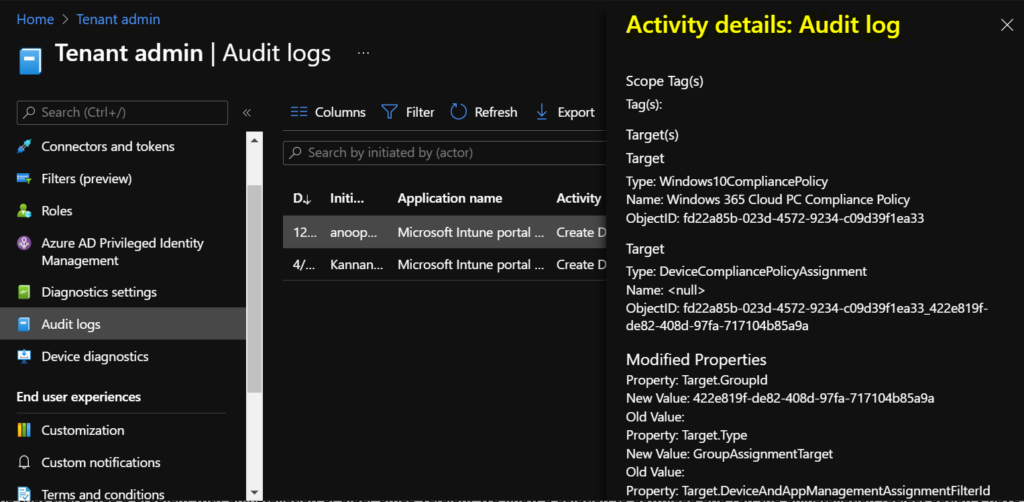
Activity
Date: Thu, 13 Jan 2022 05:49:06 GMT
Name: Create GroupAssignmentTarget assignment.
CorrelationID: 184d177c-87b1-40c7-a2e9-0eb2ec39290c
Category: Compliance
Component: DeviceCompliancePolicy
Activity Status
Status: Success
Operation Type: Create
Activity Type: Create DeviceCompliancePolicyAssignment
Initiated By (Actor)
Type: ItPro
Upn: anoop@HTMD.onmicrosoft.com
Application: Microsoft Intune portal extension
ApplicationID: 5926fc8e-304e-4f59-8bed-58ca97cc39a4
Scope Tag(s)
Tag(s):
Target(s)
Target
Type: Windows10CompliancePolicy
Name: Windows 365 Cloud PC Compliance Policy
ObjectID: fd22a85b-023d-4572-9234-c09d39f1ea33
Target
Type: DeviceCompliancePolicyAssignment
Name: <null>
ObjectID: fd22a85b-023d-4572-9234-c09d39f1ea33_422e819f-de82-408d-97fa-717104b85a9a
Modified Properties
Property: Target.GroupId
New Value: 422e819f-de82-408d-97fa-717104b85a9a
Old Value:
Property: Target.Type
New Value: GroupAssignmentTarget
Old Value:
Property: Target.DeviceAndAppManagementAssignmentFilterId
New Value: <null>
Old Value:
Property: Target.DeviceAndAppManagementAssignmentFilterType
New Value: None
Old Value:
Property: Id
New Value: fd22a85b-023d-4572-9234-c09d39f1ea33_422e819f-de82-408d-97fa-717104b85a9a
Old Value:
Property: Source
New Value: Direct
Old Value:
Property: SourceId
New Value: fd22a85b-023d-4572-9234-c09d39f1ea33
Old Value:
Property: DeviceManagementAPIVersion
New Value:
Old Value: 


Hi, thank you for sharing,
Do you know if it s possible to go back longer than a year? There is a change my company thinks was done about 2 years ago and would like to see who did it.
Thanks.
StaffHi Henry, I don’t think that can be done from the portal (GUI) as it’s currently allowing only for the last 1 year of data.
If we get an update, will post the same!
Hi Jitesh
Can we do it for Device cleanup rules even if it means using custom OMA-URI
StaffHi Lalitha, You can get the details with the same action “Category: DeviceConfiguration” if using OMA-URI Custom configuration profiles!
Hi Jitesh,
I followed this article “https://learn.microsoft.com/en-us/windows/client-management/mdm/policy-csp-audit” and created few Audit policies to track events related to process and application opened using admin rights on the Client Machine.
Intune shows applied Audit policy is compliant. However, I am not sure where to look for the events created as per enforced Audit Policy.
Thanks.