






Intune Device Firmware Configuration Interface DFCI now Supports VAIO Devices Running Windows 10 and 11! This new feature enables administrators to create DFCI profiles to manage UEFI (BIOS) settings directly from the Microsoft Intune admin center.
This functionality is especially beneficial for organizations that aim to bolster security and maintain control over their devices by managing essential firmware settings via the cloud using Microsoft Intune.
This post explores the new Microsoft Intune feature that supports the Device Firmware Configuration Interface (DFCI) for managing UEFI (BIOS) settings on VAIO devices with Windows 10 or 11. This feature allows IT administrators to configure and manage critical firmware settings remotely. It also helps organizations improve security and simplify device management processes.
The Device Firmware Configuration Interface (DFCI) is a management framework developed by Microsoft that enables IT administrators to control and configure UEFI (Unified Extensible Firmware Interface) settings on devices, particularly those deployed via Windows Autopilot.

Table of Contents
Which Devices Support DFCI?
DFCI is supported on specific VAIO devices running Windows 10 or Windows 11.
Intune Device Firmware Configuration Interface DFCI now Supports VAIO Devices
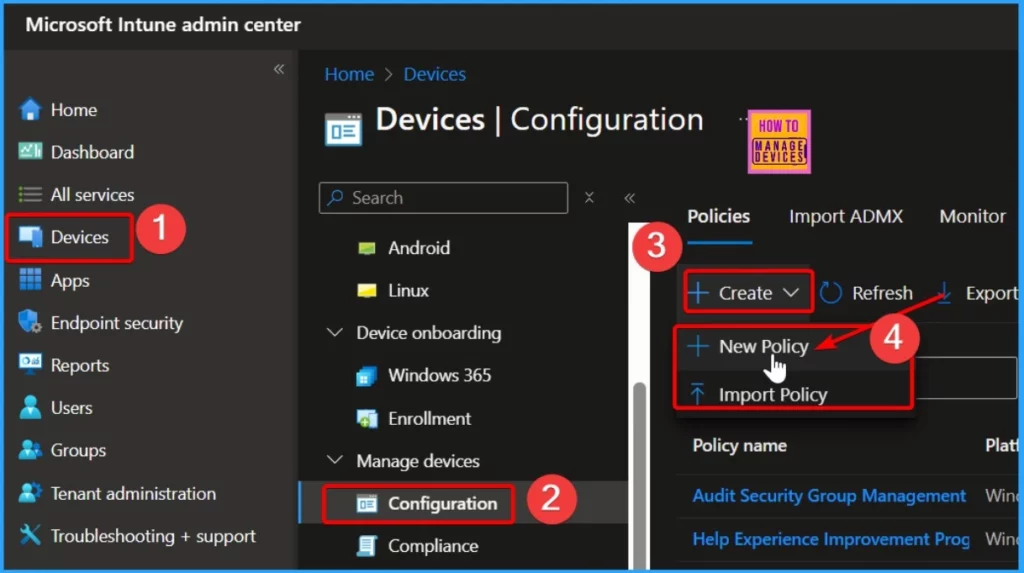
You can easily create a DFCI profile in Intune by following the below steps. Log in to the Microsoft Intune admin center. Go to the menu and select Devices, then Manage Devices, and click on Configuration.
- Enhanced App Deployment in Intune with Direct App Links from Enterprise App Catalog
- Integrating Dell Management Portal in Intune Admin Center Coming Soon
- New Working Time Settings for App Protection Policies in Intune Limit Access and Mute Notifications
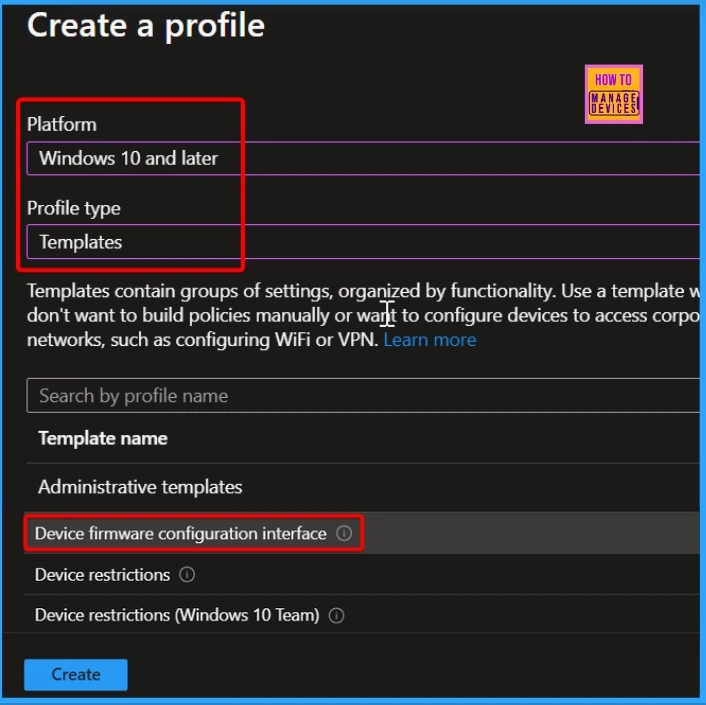
When creating a DFCI profile, select Windows 10 and later as the platform. Next, navigate Templates and choose Device Firmware Configuration Interface as the profile type. This selection allows you to manage UEFI (BIOS) settings for supported devices effectively.
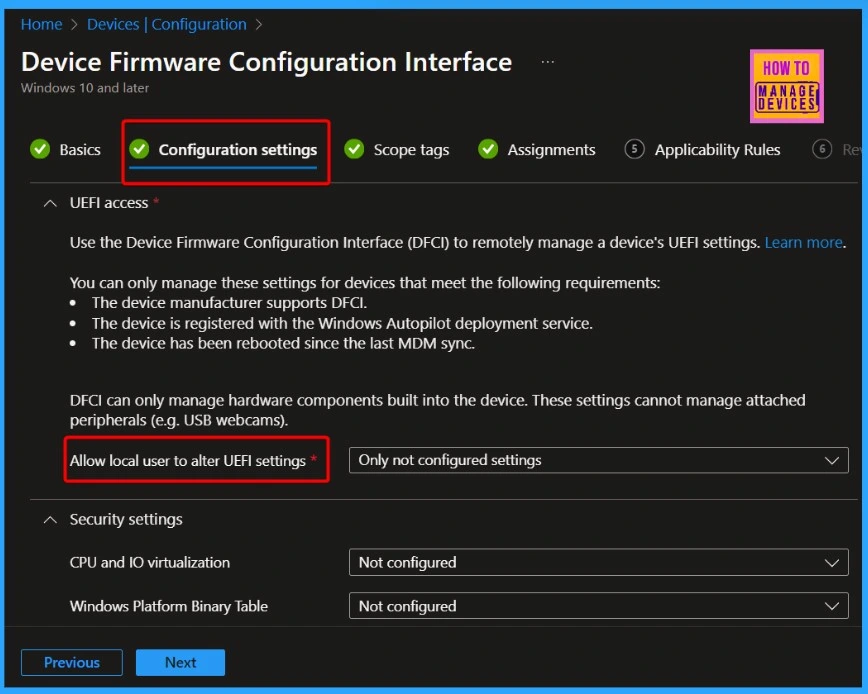
UEFI Access with Device Firmware Configuration Interface (DFCI)
You can use DFCI to remotely manage a device’s UEFI settings. Here’s what you need to know:
- The device manufacturer must support DFCI.
- The device needs to be registered with the Windows Autopilot deployment service.
- The device must be rebooted after the last MDM sync for changes to apply.
- DFCI only controls hardware built into the device and cannot manage external devices like USB webcams.
| Allowing Local UEFI Changes |
|---|
| Local users can only change UEFI settings that DFCI does not configure. |
| If DFCI settings are applied, they cannot be changed locally. |
- Create Intune Turn Off Real-Time Protection Policy
- CPU and RAM Spike Time Scores Report for Windows Physical Devices in Intune Advanced Analytics
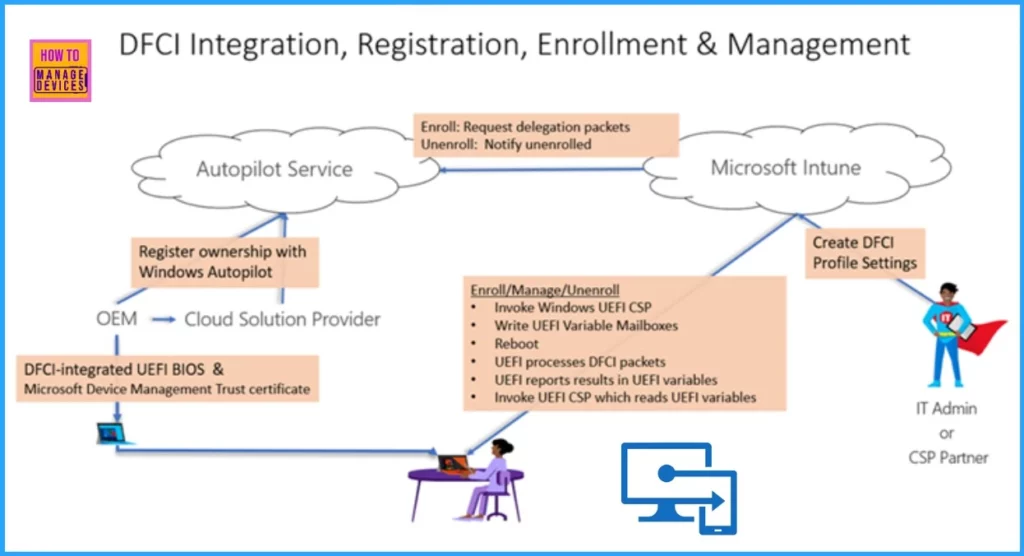
DFCI Management Lifecycle
The DFCI (Device Firmware Configuration Interface) management lifecycle involves several key steps. The steps below help you understand them in more detail.
- UEFI Integration: Setting up the device’s UEFI firmware to work with DFCI.
- Device Registration: Registering the device with the necessary services, like Windows Autopilot.
- Profile Creation: Creating profiles to manage UEFI settings on the device.
- Enrollment: Enrolling the device so it can be managed remotely through DFCI.
- Management: Continuously manage and update UEFI settings on the device as needed.
- Retirement: Removing the device from management when it’s no longer in use or needs a reset.
- Recovery: Restore or recover the device if there are issues with its settings.
Join the LinkedIn Page and Telegram group to get the latest step-by-step guides and news updates. Join our Meetup Page to participate in User group meetings. Also, Join the WhatsApp Community to get the latest news on Microsoft Technologies. We are there on Reddit as well.
Author
Vidya is a computer enthusiast. She is here to share quick tips and tricks with Windows 11 or Windows 10 users. She loves writing on Windows 11 and related technologies. She is also keen to find solutions and write about day-to-day tech problems.


Discussion