






Native Authentication for Microsoft Entra External ID | Complete Control Over Login Experience
Let’s discuss Native Authentication for Microsoft Entra External ID. Microsoft announced its general availability. In March 2024, they brought the Public Preview of Entra External IDs‘ Native Authentication, which enhanced the user experience.
This new feature empowers you to take complete control over the design of the login experience. It allows you to craft stunning, pixel-perfect authentication screens seamlessly integrated into your mobile apps, removing the need to redirect users to an external browser.
With this feature, the authentication process is straightforward. Currently, native authentication supports local account identity providers for two authentication methods. Native authentication doesn’t yet support federated identity providers such as social or enterprise identities.
In this blog post, I will explain this new authentication method for Microsoft Entra External ID, an advanced authentication method that provides more security than other processes. Users can implement authentications such as Microsoft-hosted browser-delegated authentication and Fully custom SDK-based native authentication, depending on your app’s specific requirements.

Table of Contents
Native Authentication for Microsoft Entra External ID | Complete Control Over Login Experience
First of all, we can discuss about the user experience. This authentication for Entra External ID offers a very user-friendly authentication screen like an app. Users enjoy a consistent and branded experience without leaving the app.
- How Microsoft Entra Face Check Fixes Recovery Gap In Phishing-Resistant Authentication
- Entra External ID Now Supports SMS as an MFA Option
- Retirement of Legacy Authentication Methods Management in Microsoft Entra ID
- New External Authentication Methods in Microsoft Entra ID
- Modernize MFA Authentication Policies in Entra ID
How to Use Native Authentication
Using native authentication API or the Microsoft Authentication Library (MSAL) SDK for Android or iOS, you can use apps that use this authentication. Whenever possible, Microsoft recommends you use MSAL to add native authentication to your apps. If you plan to create a mobile app on a framework currently not supported by MSAL, you can use their authentication API.
Difference Between Browser-Delegated Authentication and Native Authentication
There are many differences between these 2 authentication methods. Each authentication offers a different user experience, customization, etc.
| Features | Browser-Delegated Authentication | Native Authentication |
|---|---|---|
| User Experience | Users are redirected to a system or embedded browser for authentication and then brought back to the app once the sign-in is complete | Users have a seamless, rich sign-up and sign-in journey without leaving the app |
| Benefits | Limited UI customization options. Managed branding and customization are available as out-of-the-box features | High level of customization, allowing for pixel-perfect, branded authentication screens |
| Customization | Reduces attack vectors and supports Single Sign-On (SSO) | Full control over the user interface and experience |
| Drawbacks | This Can result in a disruptive user experience due to the redirection | Currently, it doesn’t support federated identity providers like social or enterprise identities |
Browser-Delegated Authentication
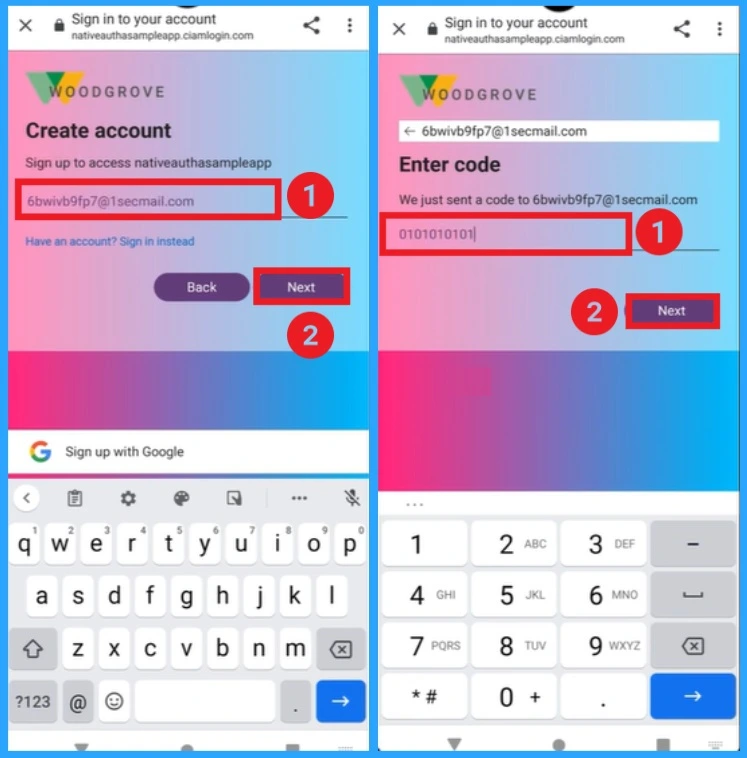
Microsoft Entra External ID for your customers offers solutions that let you quickly add intuitive, user-friendly sign-up and sign-up experiences for your customer apps. Woodgrove helps with sign-up and sign-in authentication experiences for common retail scenarios.
- Enter the email ID shown in the screenshot and click the Enter button.
- Then you will get a code on the above email id
- Enter the code in the next window and click on the Next button
- Top 40 Microsoft Entra Interview Questions and Answers Modern Identity and Access Management Solution
- Top 83 Windows 11 Desktop Admin Interview Questions
- High Level Overview of Identity Protection in Microsoft Entra ID
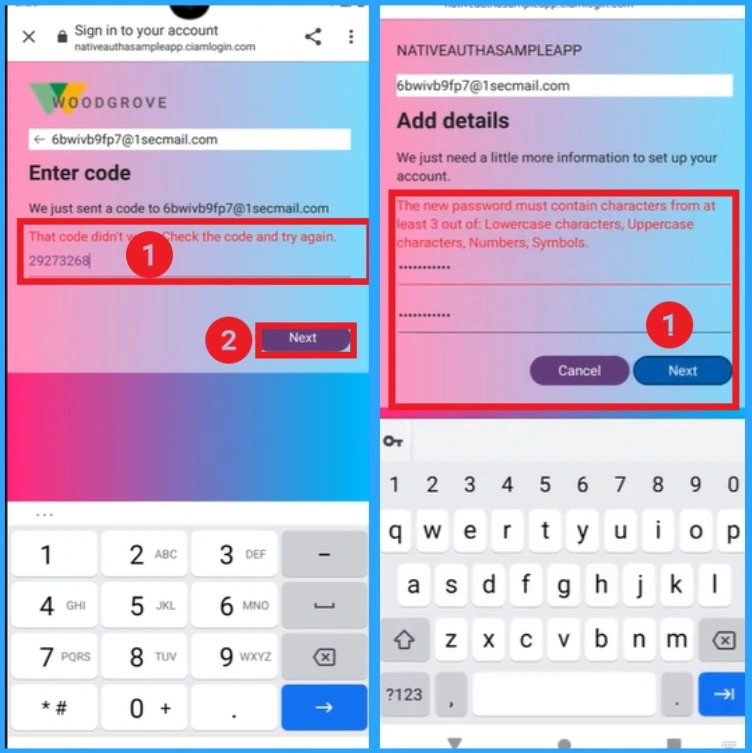
Here, you can see the entered code is incorrect, and the code is entered once again. The password is reset on the next window. Click on the Next window to continue the authentication.
Native Authentication
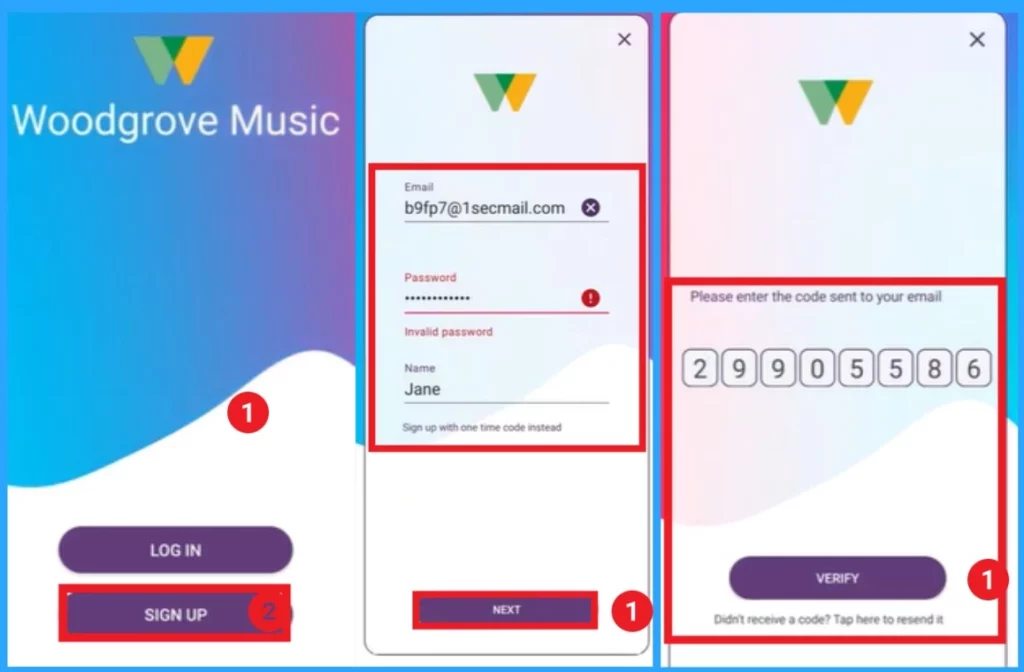
With Native Authentication, users can complete the authentication quickly. In the first window, click on the signup to start the Native authentication process. After that, you can enter your email ID, password, and name. Then, you will get the code. Enter the code in the next window and click on the Verify button.
Join the LinkedIn Page and Telegram group to get the latest step-by-step guides and news updates. Join our Meetup Page to participate in User group meetings. Also, Join the WhatsApp Community to get the latest news on Microsoft Technologies. We are there on Reddit as well.
Author
Anoop C Nair has been Microsoft MVP from 2015 onwards for 10 consecutive years! He is a Workplace Solution Architect with more than 22+ years of experience in Workplace technologies. He is also a Blogger, Speaker, and Local User Group Community leader. His primary focus is on Device Management technologies like SCCM and Intune. He writes about technologies like Intune, SCCM, Windows, Cloud PC, Windows, Entra, Microsoft Security, Career, etc.




Discussion