






How to Fix Intune iOS App Installation Error 0x87D1313D
Hai all today we are discussing on How to Fix Intune iOS app Installation Error 0x87D1313D. As you all know that the Apple devices are manage through Intune and it is well organized though them. But sometimes some errors can occur.
MS reported an error code 0x87D1313D and this is an issue IT admins faces this error 0x87D1313D (2016333507), which indicates that Could not retrieve license for the app with iTunes Store ID. This usually happens when trying to install apps using Apple’s VPP.
When Intune tries to install an app on an Apple device, it needs a license from Apple. Sometimes, Intune can’t get this license, so the app doesn’t install. When this error occurs, the app may not install on the user’s device. This error happens when Intune can’t get the app license from Apple.
It usually happens when using Apple’s Volume Purchase Program (VPP) to install apps. The problem might be caused by many reasons. In this post let’s look how this issue can be solved by knowing its casuese. so let’s get started.

Table of Contents
How to Fix Intune iOS app Installation Error 0x87D1313D
Above we discussed a lot of things about How to Fix Intune iOS app Installation Error 0x87D1313D. So this errod code basically happens When using Microsoft Intune to install apps on Apple devices, you might see an error that indicates Could not retrieve license for the app with iTunes Store ID so we get the Error code: 0x87D1313D
- This means Intune couldn’t get permission (a license) from Apple to install the app on the device. So thats why the app does not install.
| Error Code (Hex) | Error Code (Dec) | Error Message/Code | Description/Troubleshooting Tips |
|---|---|---|---|
| 0x87D1313D | 2016333507 | Could not retrieve license for the app with iTunes Store ID | Sync the associated VPP token, then sync the device with Intune. If the issue persists, remove group assignment and reassign the VPP app as device-licensed. |
- How To Fix Error 0x87D13B9D On Intune IOS App Latest Version Updating
- How To Schedule IOS Automatic Updates Using Intune Policies
- Configure Intune Enrollment Setup for iOS macOS Devices
- Revoke and Delete Cloud PKI Certification Authorities in Intune
Workaround for this Issue – Sync VPP Token
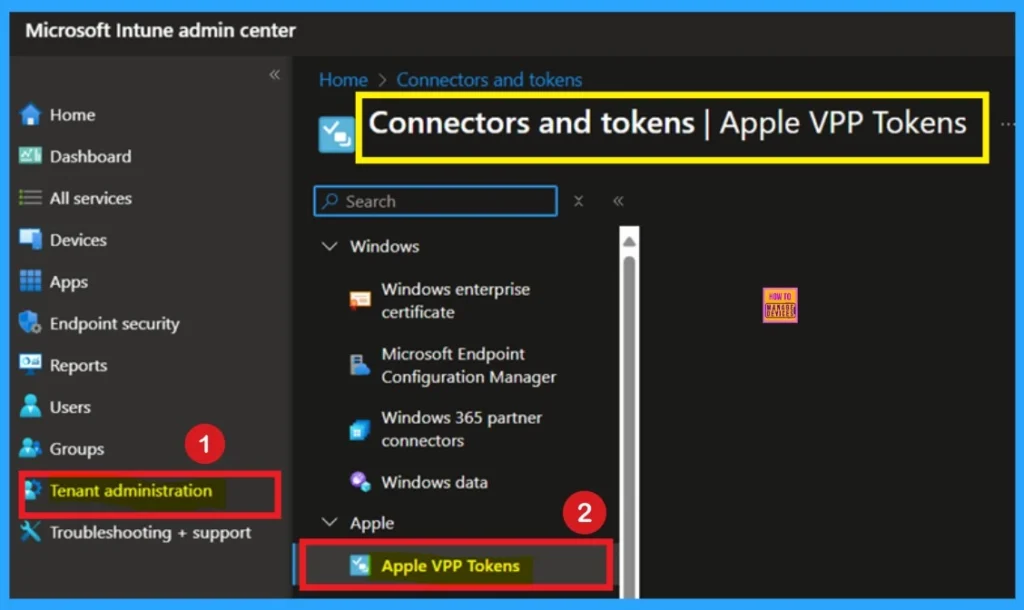
When a issue happens there will be some workaround for that. MS also sauggest some workarounds for this. The first recommended step to resolve this issue is to sync the associated VPP token. This ensures that Intune has the most up-to-date licensing information from Apple.
- To Sync VPP Token you have to sign in to the MS Intune and navigate through the Tenant Admministration> Connectors and Tokens> Then select Apple VPP Tokens.
- Select the token and click Sync to update license info from Apple.
See More: Revoke App Licenses for Apple VPP App using Intune
Revoke Liceses
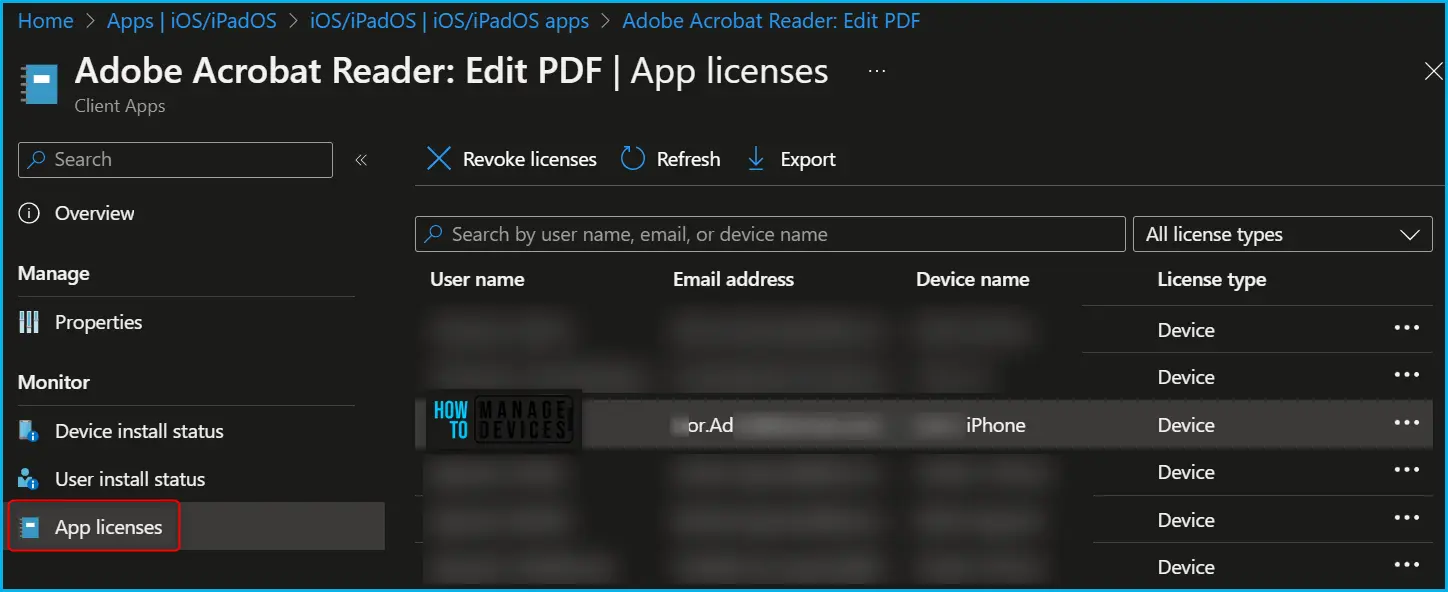
This is the another solution when these type of error occures. We already have these post if you want to get more about this you can check the below link. If the issue persists, it may help to revoke the app license and reassign it. Navigate to Apps > iOS > Select VPP app > App licenses > select device, and revoke the existing license.
- Then, remove and reassign the app to the same or a different device or user group.
- This clears any incorrect license associations that may be causing the error.
See More: Revoke and Delete Cloud PKI Certification Authorities in Intune
Need Further Assistance or Have Technical Questions?
Join the LinkedIn Page and Telegram group to get the latest step-by-step guides and news updates. Join our Meetup Page to participate in User group meetings. Also, Join the WhatsApp Community to get the latest news on Microsoft Technologies. We are there on Reddit as well.
Author
Anoop C Nair has been Microsoft MVP from 2015 onwards for 10 consecutive years! He is a Workplace Solution Architect with more than 22+ years of experience in Workplace technologies. He is also a Blogger, Speaker, and Local User Group Community leader. His primary focus is on Device Management technologies like SCCM and Intune. He writes about technologies like Intune, SCCM, Windows, Cloud PC, Windows, Entra, Microsoft Security, Career, etc.


Discussion