






Troubleshooting Intune iOS and iPadOS App Installation Error 0x87D13B73
Hey, all, today we are discussing Troubleshooting Intune iOS and iPadOS App Installation Error 0x87D13B73. An error code is always considered when something happens on the client side or the server side. As we all know that in Intune, we are deploying different types of settings and app installations when this time an error occurs, we are getting confused.
Here in this error code situation, when the admin tries to install an app on the iOS device, the user gets an error message: your You lost connection to the Internet. This issue indicates that when a device loses internet connectivity during the app installation process, particularly when Intune attempts to validate the app manifest.
So, what is the manifest in app installation that is also known as a side-by-side application manifest? The app manifest is an important file that means it defines how the system installs the app, what it needs to run, and other setup details.
It is commonly seen when deploying Win32 applications and involves a failure during the app manifest validation process. The error is displayed with a specific code and description. So, in this post, let’s discuss Troubleshooting Intune iOS and iPadOS App Installation Error 0x87D13B73 and what the workaround for this.

Table of Contents
Troubleshooting Intune iOS and iPadOS App Installation Error 0x87D13B73
Above, we discussed an overall view on the topic of Troubleshooting Intune iOS and iPadOS App Installation Error 0x87D13B73. In the error happens, it gets App Manifest validation failure due to a network connectivity (Not Connected to internet) message.
| Error code (Hex) | Error code (Dec) | Error message/code | Description/Troubleshooting tips |
|---|---|---|---|
| 0x87D13B73 | 2016330893 | You lost connection to the Internet. | App Manifest validation failure due to network connectivity (Not connected to the internet) |
- FIX Windows Update Issues for Windows 11 Errors Troubleshooting Tips
- How to Allow or Block Option to Show Network using Intune Policy
- Windows 11 Reset Network Settings | Track Internet Data Usage
Workaround for this Issue – Check the Network Connection is Stable
Microsoft suggest some Troubleshooting to us that is App Manifest validation failure because of the network connectivity. When the deployement time this connectivity issue is very common we can fix this with some tips. First we have to check that the internet connection is stable or not, for that you can use many method.
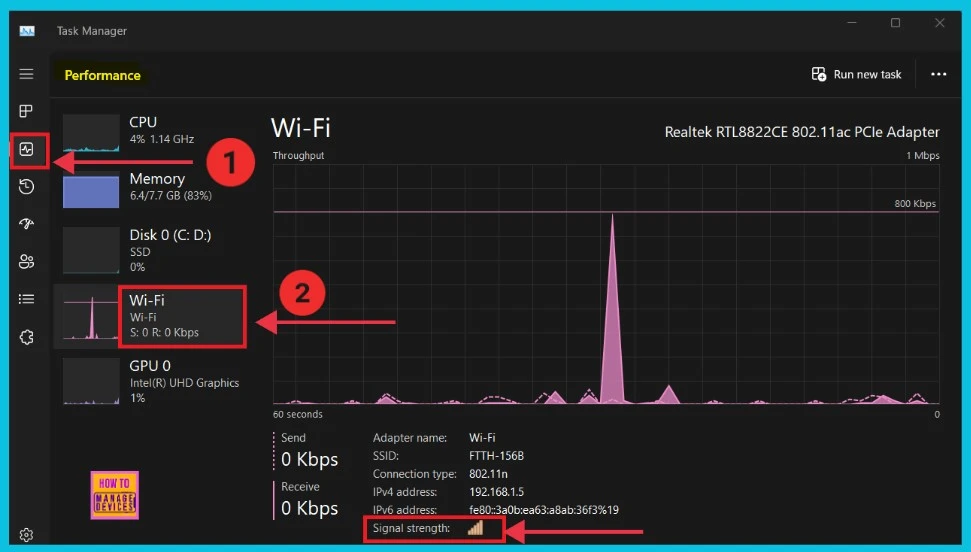
- Here in the below screenshot is way to check Check Wi-Fi Network Signal Strength
- Open Task Manager(Ctrl+Shift+Esc)
- Click the Performance tab
- Select Wifi from the left options
- Now we can see the signal strength option at the bottom(the maximum number of lines shows the stronger signal strength)
- We have a post based on Check Wi-Fi Network Signal Strength.
- If you want to refer other tips to check network signal strength click on the below link.
See More : 6 Methods to Check Wi-Fi Network Signal Strength in Windows 11
Reconnect the Internet Connection
The another method is you can reconnect the internet by turn off the Wifi On or Off manually this will refresh the internet connection and solve the issue. Then you can manually sync company portal. This method will sometimes helpful when you lost connection to the Internet.
FIX Missing WiFi Internet Connection Issue
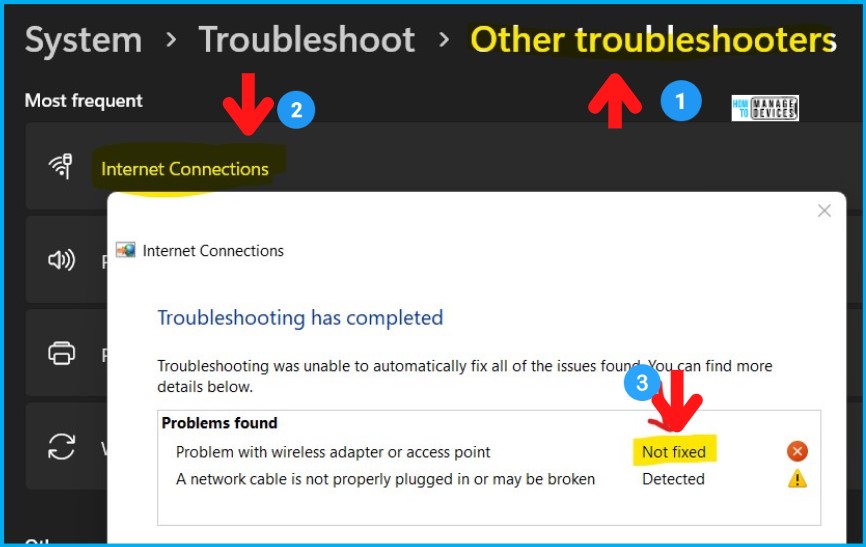
OIf any issue is on going to your device you can fix them. To troubleshoot the missing Wi-Fi icon issue on a Windows 11 laptop, you can start by using the built-in troubleshooters. To do that:
- Navigate to Start -> Settings App.
- Click on System Tab.
- Scroll down and click on Troubleshoot (this is the recommended method).
- Click on the Other Troubleshooters option.
- Click on the Internet Connections -> Run option.
Restart your System
If this issue is cointinuing you can use the other method such as restart the system and wait o some time. Then you can check the issue is still continueing or not. Also you can Connect to the other internet comnnection will help to solve this issue.
Need Further Assistance or Have Technical Questions?
Join the LinkedIn Page and Telegram group to get the latest step-by-step guides and news updates. Join our Meetup Page to participate in User group meetings. Also, join the WhatsApp Community to get the latest news on Microsoft Technologies. We are there on Reddit as well.
Author
Anoop C Nair has been Microsoft MVP for 10 consecutive years from 2015 onwards. He is a Workplace Solution Architect with more than 22+ years of experience in Workplace technologies. He is a Blogger, Speaker, and Local User Group Community leader. His primary focus is on Device Management technologies like SCCM and Intune. He writes about technologies like Intune, SCCM, Windows, Cloud PC, Windows, Entra, Microsoft Security, Career, etc.


Discussion