






Intune MAM Benefits Available for Windows 365 and AVD
Exciting News! Intune MAM Benefits are Available for Windows 365 and AVD. Intune MAM (Mobile Application Management) now provide numerous benefits for iOS/iPad OS and Android clients. Microsoft introduced this feature available for users as Preview.
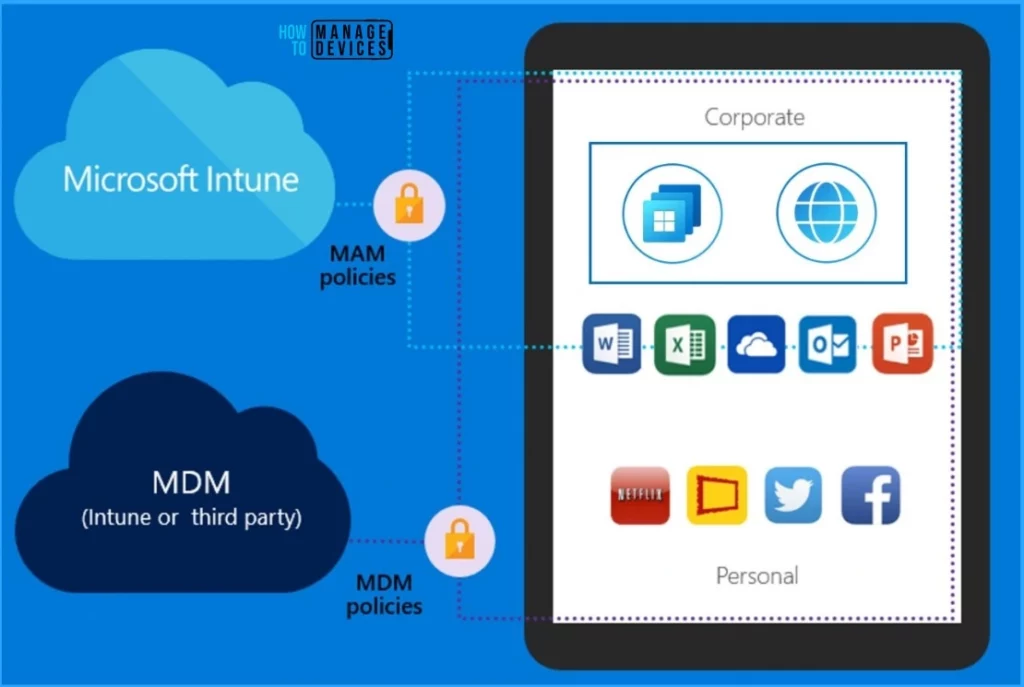
As you know, MDM (Mobile Application Management) is software that helps secure and enable IT control over enterprise applications on end users’ corporate and personal smartphones and tablets.
This new feature allows users to access Azure Virtual Desktop or Windows 365 on their personal iOS/iPadOS and Android devices. Users can do this with more restrictive redirection policies than on managed devices and only allow a connection if some security criteria are met.
This new feature allows end users to configure different redirections when they connect to Azure Virtual Desktop and Windows 365 using the latest versions of the Remote Desktop client (iOS/iPadOS and Android) and the Windows App (iOS/iPadOS) that are integrated with Intune MAM.


- Microsoft Intune Adoption Kit Got a Recent Update
- Best Guide to Set New Outlook as Default Mail Client with Intune
- Best Guide to Deploy New Intune Company Portal App on Windows using Intune
| Index |
|---|
| Intune MAM Benefits Available for Windows 365 and AVD |
| Steps for Managing Redirection Using Intune MAM |
| Intune Device Filter |
| Intune App Configuration Policies |
Intune MAM Benefits Available for Windows 365 and AVD
This new feature allows users to apply different redirection settings based on user security group, device operating system, or whether the device is Intune managed or not. The following are some features allowed by Intune MAM Without managing the personal device.
| Features Allowed by Intune MAM |
|---|
| It allows users to disable specific redirections on personal devices |
| Require PIN access to the app before connection |
| It helps to block third-party keyboards |
| It Specifies a minimum device operating system version before the connection |
| Helps to Specify a minimum Windows App and/or Remote Desktop app version number before connection |
| Block jailbroken/rooted devices from connection |
| Require a mobile threat defence solution on devices, with no threats detected before connection |
Steps for Managing Redirection Using Intune MAM
There are 4 steps needed to manage redirection using Intune MAM. These steps are mandatory for redirection. The 4 steps include Intune device filter, Intune app configuration policies, Intune app protection policies, and Conditional Access policies.
- Intune device filter—This filter allows app configuration and app protection policies to be targeted for specific devices, regardless of whether they are enrolled or unenrolled.
- Intune app configuration policies help manage redirection settings for the Windows App and the Remote Desktop app on a client device.
- Intune app protection policies – It specify security requirements that must be met by the application and the client device. Use filters to target users based on specific criteria.
- Conditional Access policies – It control access to Azure Virtual Desktop and Windows 365 and ensure criteria set in app configuration policies and app protection policies are met.
Intune Device Filter
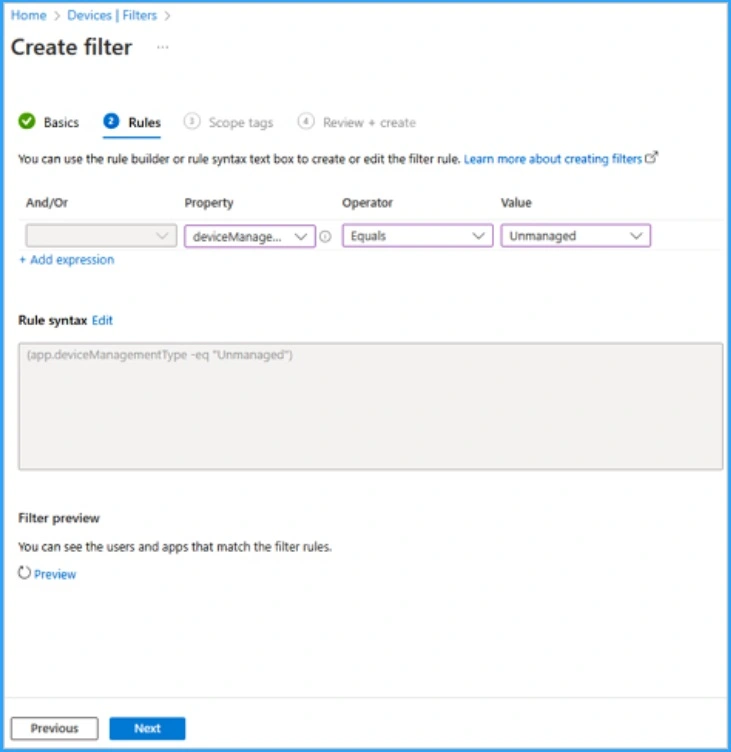
First, we must create a filter for unmanaged devices in Microsoft Intune. This is the first key step for managing redirection using MAM.
- Sign in to the Microsoft Intune admin center
- Devices > Create Filter.
- Enter Name, and Descriptions in the Basics section.
- In the Rules section select the devicemanager as property, Equals as Operator Unmanaged as Value.
- Click on the Next button.
Intune App Configuration Policies
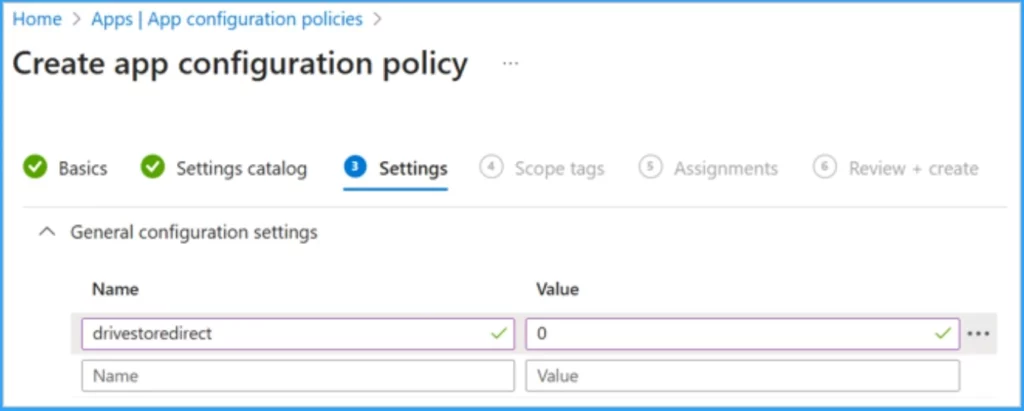
After that, the settings section Create an app configuration policy to disable drive redirection using the Remote Desktop Protocol (RDP) property name of drivestoredirect as below, Give value as 0.
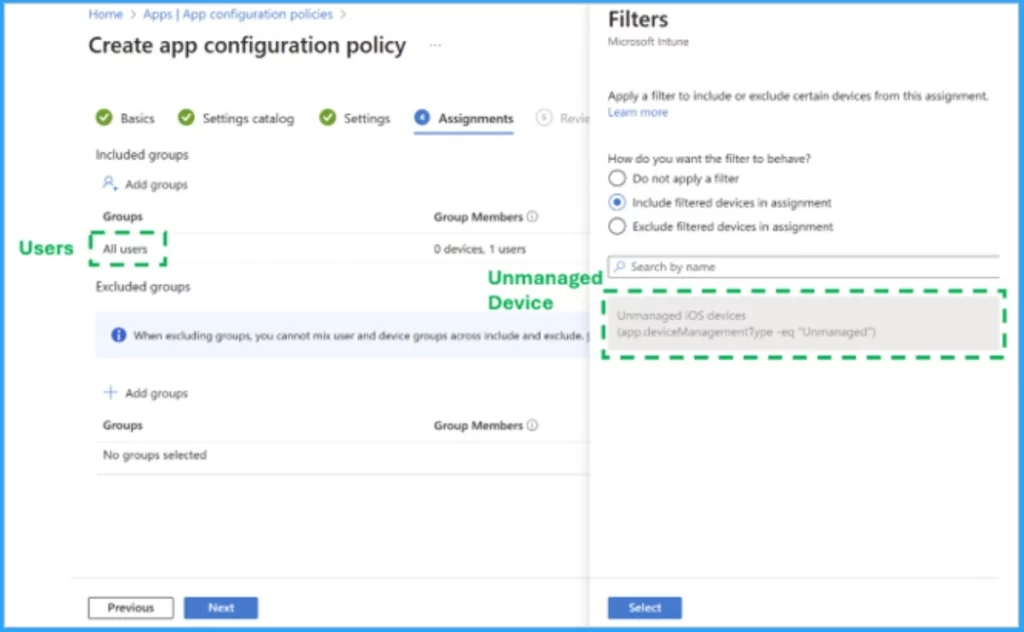
Select the groups the Intune app configuration policy applies( now the groups the redirection settings apply to). Select Edit Filter and choose the unmanaged devices filter that was created earlier. After that, Sign in to your Azure Virtual Desktop session host or Windows 365 Cloud PC.
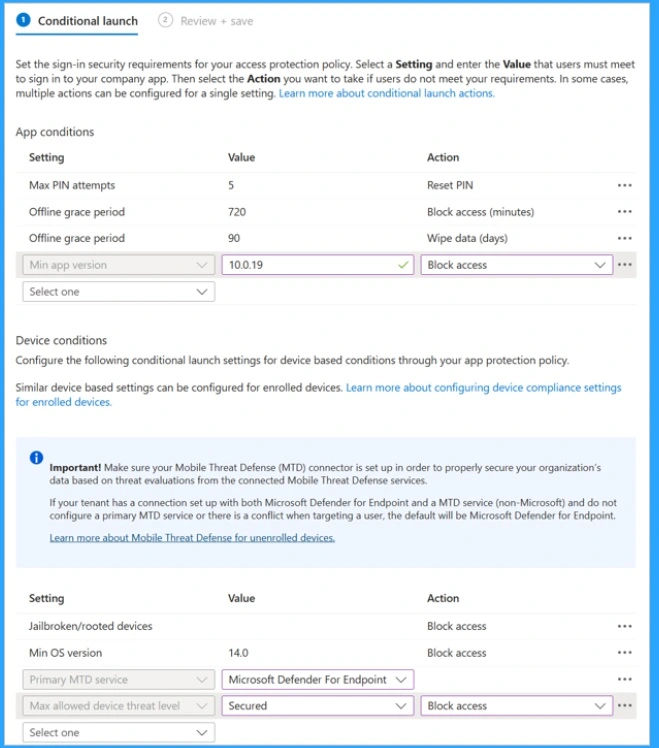
In addition to different redirections, you may also want to require a minimum OS and Remote Desktop app version. It helps to reduce the risk of threats caused by older and potentially unsupported devices that are not current with the latest security updates. The below example shows the Android device requirements.
- Android 14.0 or later
- Remote Desktop 10.0.19 or later
- Determined as Secured – no threats – by Microsoft Defender for Endpoint
- New Appearance for Intune Company Portal App for Windows
- Easy Way to Disable Device Password Sync with Intune
We are on WhatsApp. To get the latest step-by-step guides and news updates, Join our Channel. Click here –HTMD WhatsApp.
Author
Anoop C Nair is Microsoft MVP! He is a Device Management Admin with more than 20 years of experience (calculation done in 2021) in IT. He is a Blogger, Speaker, and Local User Group HTMD Community leader. His main focus is on Device Management technologies like SCCM 2012, Current Branch, and Intune. He writes about ConfigMgr, Windows 11, Windows 10, Azure AD, Microsoft Intune, Windows 365, AVD, etc.


Discussion