






Intune Policy Configuration Agent Introduces an Agentic Way to Create Policies for Admins
Intune Policy Configuration Agent Introduces an Agentic Way to Create Policies for Admins! Configuring Intune policies is very important, and it doesn’t have to be confusing or stressful anymore. Every setting you choose affects your organisation’s security, performance, and compliance, so getting it right is important.
The new Policy Configuration Agent simplifies everything. IT admins only need to explain their requirements in everyday language, and the agent turns those words into the right Intune policy settings automatically. This AI assistant makes complicated policy choices much easier to understand.
The Intune Agentic AI Enablement Roadmap for 2026 introduces 3 intelligent agents such as Policy Configuration, Change Review, and Device Offboarding designed to automate and enhance endpoint management. Now rolling out in preview, these agents will appear under the new Agents section in the Intune portal.
With the Policy Configuration Agent in Intune, admins no longer need to navigate multiple menus or search through complex settings. Instead, the agent provides clear recommendations and explains the purpose of each option, making policy creation far easier.

Table of Contents
What is the Intune Policy Configuration Agent?
The Intune Policy Configuration Agent is an AI-powered tool that helps IT admins create, validate, and optimize Intune policies using simple natural language instructions.
How Does it Help with Policy Creation?
Admins can describe what they need in plain language, and the agent automatically converts it into accurate, actionable Intune configurations.
Does the Agent Help with Compliance Requirements?
Yes. It checks Intune policy choices against compliance standards such as PCI, HIPAA, and DISA STIG to ensure everything is aligned with regulatory needs.
Can it Detect Policy Issues or Risks?
The agent continuously audits policies, identifies deviations, and flags anything that may lead to security or compliance problems.
Intune Policy Configuration Agent Introduces an Agentic Way to Create Policies for Admins
The Policy Configuration Agent not only helps create Intune policies but also plays a key role in maintaining compliance for organizations that follow strict standards like PCI, HIPAA, or DISA STIG. While building or reviewing policies, the agent checks if the settings meet these rules.
- If something is missing or incorrect, it points it out and suggests how to fix it. This makes sure every policy is aligned with required regulations and helps organisations stay ready for audits.
- Go to the Microsoft Intune Admin Center and log in with your admin account.
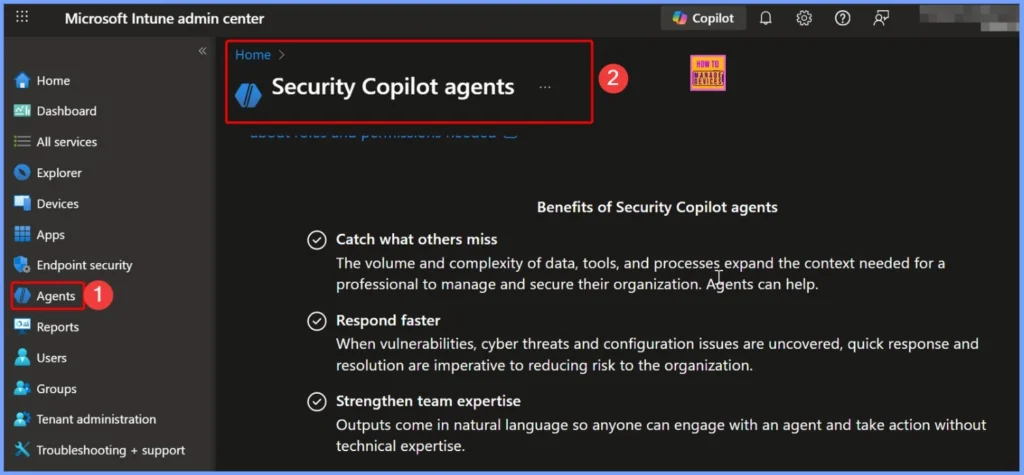
- Select “Agents” from the Left Menu
- In the Intune portal, open the Agents section where all AI-powered Intune agents—including the Policy Configuration Agent are listed.
- Intune Security Policy Configuration Options
- How to Deploy Trusted Root Certificate using Intune Configuration Policy
- Effective Vulnerability Remediation Agent Strategies and Best Practices with Microsoft Intune
- How to Fix Intune Agent Crash Access Violation Error 0xc0000005
Overview of Policy Configuration Agent Capabilities
Let’s discuss the overview of policy configuration agent capabilities. By automating policy creation, validation, and compliance checks, the agent reduces manual effort, improves accuracy, and gives IT teams more agility and control. The below table helps you to show more details.
| Feature | Description | Benefit |
|---|---|---|
| Natural Language Policy Creation | Converts simple text instructions into Intune policies | Faster, easier configuration |
| Guided Recommendations | Explains settings and suggests best options | Reduces confusion and mistakes |
| Compliance Mapping | Checks policies against PCI, HIPAA, DISA STIG, etc. | Ensures regulatory alignment |
| Continuous Auditing | Monitors policies for risks or deviations | Early detection of issues |
| Automated Validation | Highlights incorrect or risky settings | Improves security posture |
| Scalable Management | Supports large and complex environments | Saves time and boosts efficiency |

Need Further Assistance or Have Technical Questions?
Join the LinkedIn Page and Telegram group to get the latest step-by-step guides and news updates. Join our Meetup Page to participate in User group meetings. Also, Join the WhatsApp Community to get the latest news on Microsoft Technologies. We are there on Reddit as well.
Author
Anoop C Nair has been Microsoft MVP from 2015 onwards for 10 consecutive years! He is a Workplace Solution Architect with more than 22+ years of experience in Workplace technologies. He is also a Blogger, Speaker, and Local User Group Community leader. His primary focus is on Device Management technologies like SCCM and Intune. He writes about technologies like Intune, SCCM, Windows, Cloud PC, Windows, Entra, Microsoft Security, Career, etc.


Discussion