






How Intune Simplifies Shared Device Management in Retail with Multi-App Kiosk Mode
Hi today with a new topic Accelerating Retail Worker Shared Device Experience with the Multi App Kiosk Mode. As we know that recently Microsoft announced the Part 1 series to us. Recently Microsoft announced the part 2 in that explaining how to improve shared devices that run multiple apps.
The Contoso Eateries, to show how these ideas work in real life. It also introduces helpful tools like multi-app kiosk mode, Microsoft Entra security groups, and a new feature called enrollment time grouping, which makes setting up devices faster and easier especially for Android and iOS devices.
Retail stores increasingly use shared devices to help employees and customers work. Part 1 covered how Microsoft Intune keeps these devices secure for workers. But in this latest series focuses on how Intune helps manage multiple apps, making shared devices more efficient.
You know Retail stores use smart devices like kiosks and tablets to help customers and workers with ordering, inventory, and assistance. Contoso Eateries uses Android devices with Microsoft Entra shared mode, making it easy for employees to switch between work apps like Teams and inventory tools.

Table of Contents
Accelerating Retail Worker Shared Device Experience with the Multi App Kiosk Mode
Above we discussed about the Accelerating Retail Worker Shared Device Experience with the Multi App Kiosk Mode. You know this new part 2 explains that Shared devices are essential in retail because they help stores run smoothly and improve customer service.
- Windows 365 Cloud PC Frontline Provisioning Policy Creation Process | 3 Cloud PC with One License
- Configure Idle Session Time Limits for Windows 365 Cloud PC Frontline
- How to Simplify Shared Android Devices with Entra Shared Mode and Intune
Know the Contoso Eateries
Contoso Eateries wants to use Android tablets in their stores for tasks like billing customers, tracking inventory, and ordering supplies. To keep the devices, secure and ensure they are only used for work-related tasks. So that they used point of sales (POS) this help the billing procedure checking inventory etc. So, it’s very important to control these tablets remotely and block access to any apps that aren’t needed.
- Created a Microsoft Entra security group to organize the devices.
- Used a new feature called enrollment time grouping (available from April 2025) to speed up setup.
- Enrolled the tablets as corporate-owned dedicated devices (managed by the company and don’t belong to any one user)
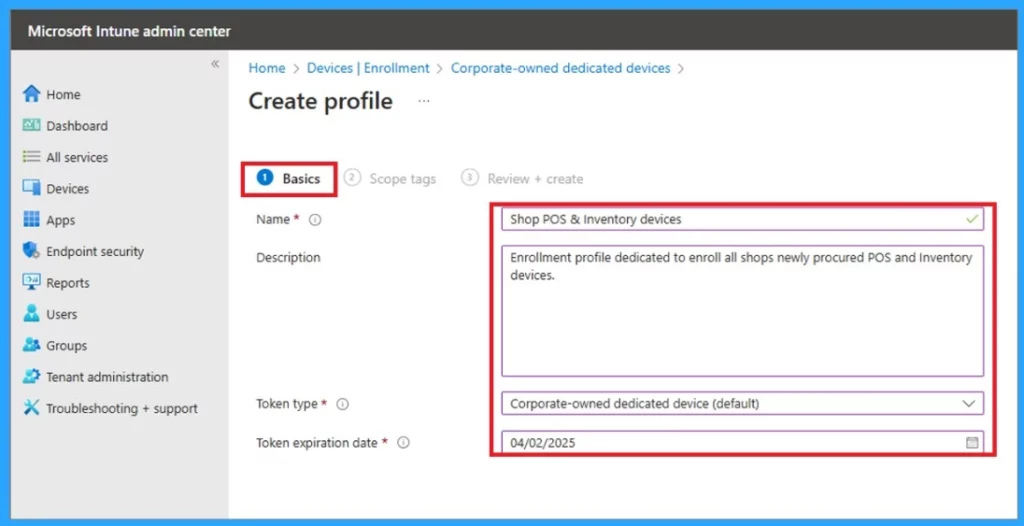
- In Intune, navigate through the Devices> Enrollment> Corporate-owned dedicated devices >Create Profile
- In Basics enter the basic details and Token type and token expiration date.
The IT team installs work-related apps like POS and inventory management from the Managed Google Play Store. They limit access so employees can only use approved apps, keeping the device focused on work. This setup is applied to all company tablets using Microsoft Entra, making them easy to manage and secure.
- Employees can only use approved apps by applying a device restriction profile.
- Tablets are locked into multi-app kiosk mode to ensure focused use.
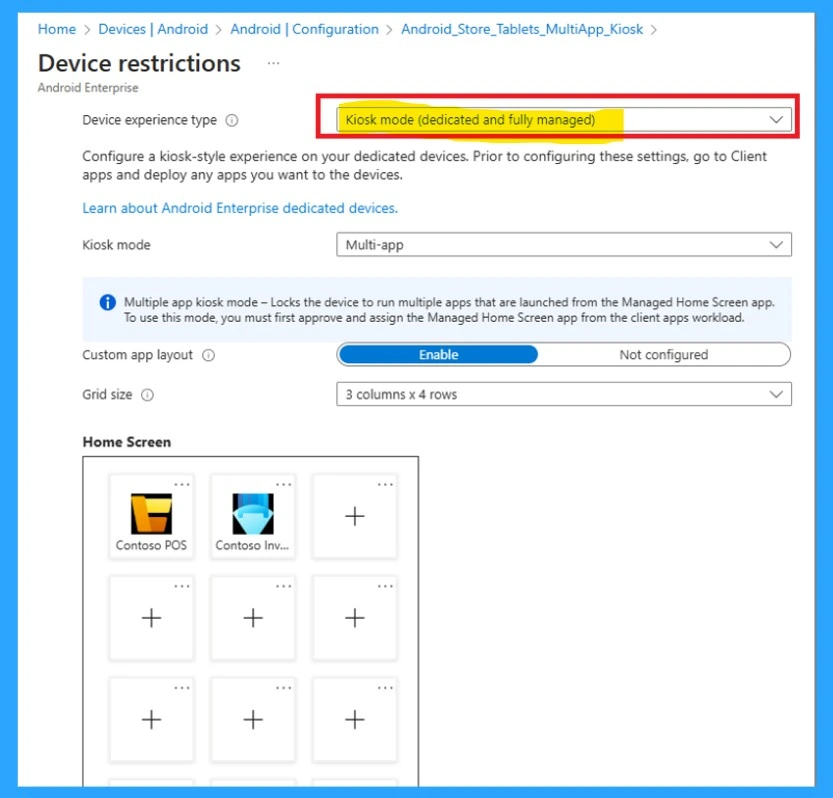
Restricted to POS
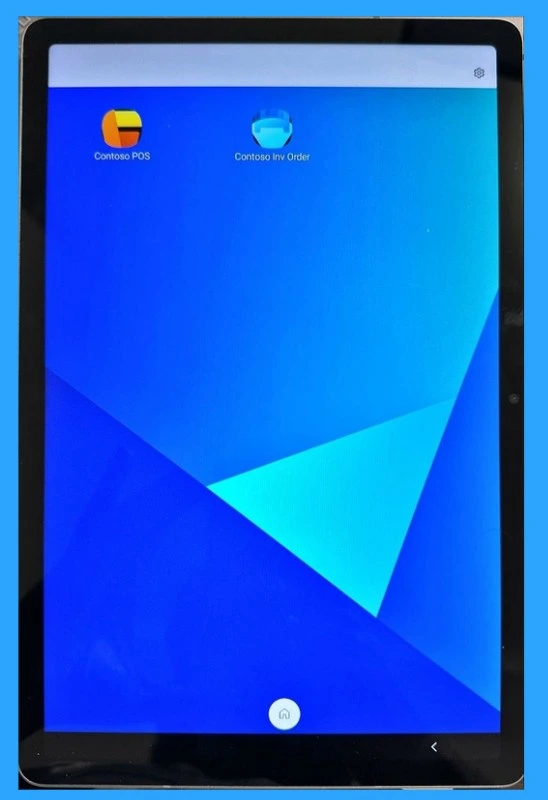
The tablet only has POS and inventory apps. Customers use the POS app for self-checkout, and staff restock items using the inventory app after business hours. The below screenshot is a Personalized user experience on an Android device.
Contoso Pastries
The Contoso Pastries wants their employees and customers to have the same experience as Contoso Eateries with using iPads instead of Android tablets. So they make sure iPads are managed centrally and only work apps are available.
They buy iPads from an Apple reseller, who sets them up in Apple Business Manager (ABM) with supervision enabled. If ABM isn’t available, Apple Configurator can be used instead.
- The HQ IT team sets up the iPads so they don’t need to be linked to specific users.
- They also create a filter to organize them.
- Then, they add the POS and inventory management apps to Intune and assign them to all iPads using the filter. This makes management easier and faster.
- Finally, they remove unnecessary apps and keep only the needed ones by applying a restriction profile. This makes the iPads work like a managed home screen.
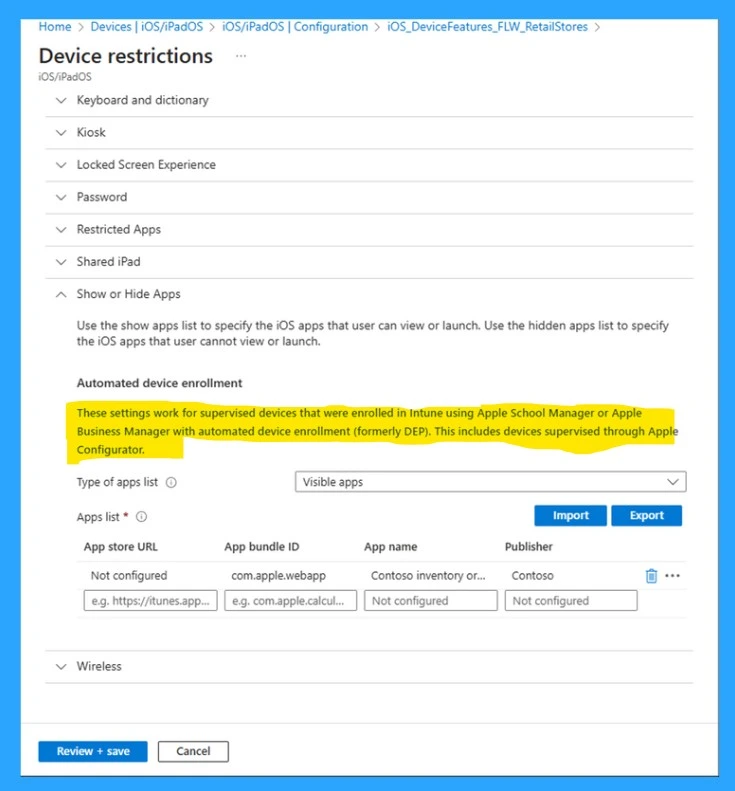
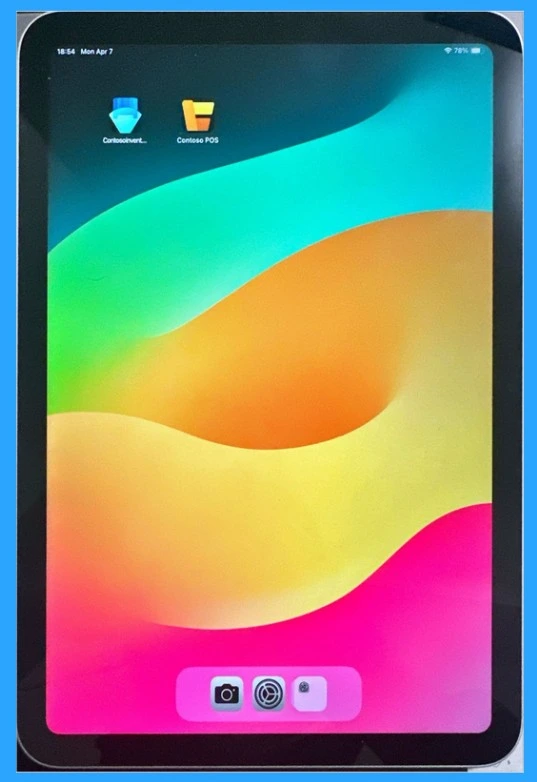
Contoso Pastries – Result
The store receives the device and the manager turns it on, it automatically enrolls in Intune with all the required settings. The device is then locked to only use the POS and inventory management apps. The inventory app helps staff restock items after business hours.
| Importance of Device Setup |
|---|
| The device registers in Intune as soon as it is turned on. |
| Only POS and inventory management apps are accessible. |
| Customers use the POS app for purchases on their own. |
| Staff use the inventory app to restock items after business hours. |
Need Further Assistance or Have Technical Questions?
Join the LinkedIn Page and Telegram group to get the latest step-by-step guides and news updates. Join our Meetup Page to participate in User group meetings. Also, Join the WhatsApp Community to get the latest news on Microsoft Technologies. We are there on Reddit as well.
Resource:
From the frontlines: Accelerating retail worker shared device experience (Part two)
Author
Anoop C Nair has been a Microsoft MVP for 10 consecutive years from 2015 onwards. He is a Workplace Solution Architect with more than 22+ years of experience in Workplace technologies. He is a Blogger, Speaker, and Local User Group Community leader. His primary focus is on Device Management technologies like SCCM and Intune. He writes about technologies like Intune, SCCM, Windows, Cloud PC, Windows, Entra, Microsoft Security, Career, etc.


Discussion