






Steps to Leverage Intune’s Full Power for Microsoft Cloud Security Benchmark
Let’s discuss Steps to Leverage Intune’s Full Power for Microsoft Cloud Security Benchmark. Microsoft Intune helps to operates MSCB control like Endpoint Security, Data protection, Identity Management, Privileged Access etc.
Microsoft Cloud Security Benchmark collection of high-impact security recommendations designed to secure services in single and multi-cloud environments. It helps to improve the security posture and avoid misconfigurations or attacks in organizations.
MCSB Microsoft’s unified framework of high-impact security recommendations for single and multi-cloud environments. There are 2 components are included on MCSB which are security controls and Services Baselines. Security controls includes high-level principles.
MCSB’s service baselines includes technical applications of those security controls to individual cloud services (the how on a specific service). MCSB’s have secure services in single and multi-cloud environments, officially succeeding the Azure Security Benchmark.

Table of Contents
Steps to Leverage Intune’s Full Power for Microsoft Cloud Security Benchmark
Microsoft Intune helps to make sure your company follows Microsoft’s best practices for cloud security, called the Microsoft Cloud Security Benchmark (MCSB). MCSB provides security rules which are follow in cloud and Intune is the main tool that makes sure your company’s endpoints actually follows those rules.
- 50% of Identities have Access to Full Access as per Microsoft Security Report 2024
- XSPM vs XDR Illustration in Microsoft Security Stack
- Maester Microsoft Security Test Automation Framework
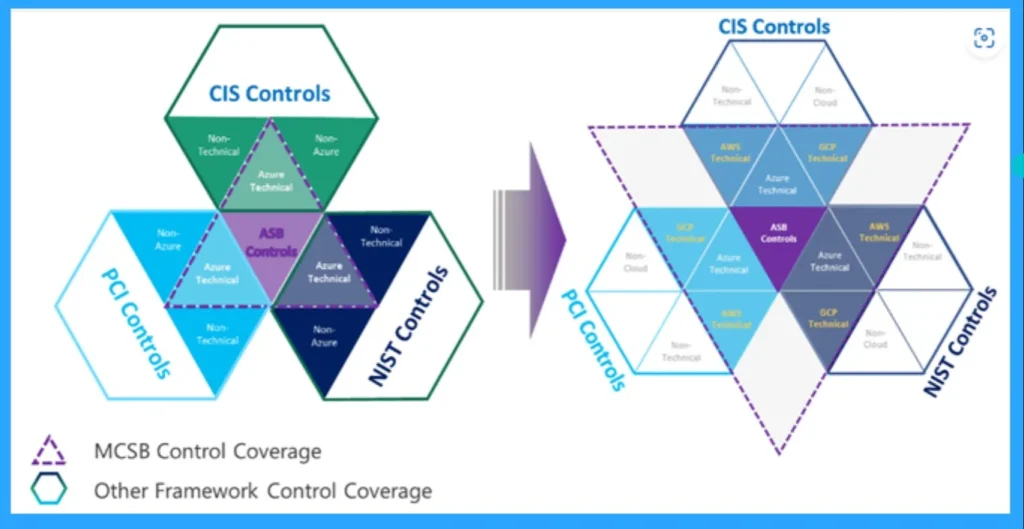
Structure of MCSB
It is the successor to the Azure Security Benchmark (ASB), and its key feature is that it now covers security recommendations for multi-cloud environments, including Azure, AWS, and Google Cloud Platform (GCP). MCSB are classified into 2 parts.
| Classifications | Details |
|---|---|
| Security Controls | These are the high-level, general security best practices and principles (the what and why). |
| Service Baselines | These are the specific, technical instructions on how to apply the controls to individual cloud services (like Azure Storage or Databases). |
MCSB Core Security Domains
MCSB is organized into key security domains that cover the full spectrum of cloud security. This provides a holistic view of your security posture.
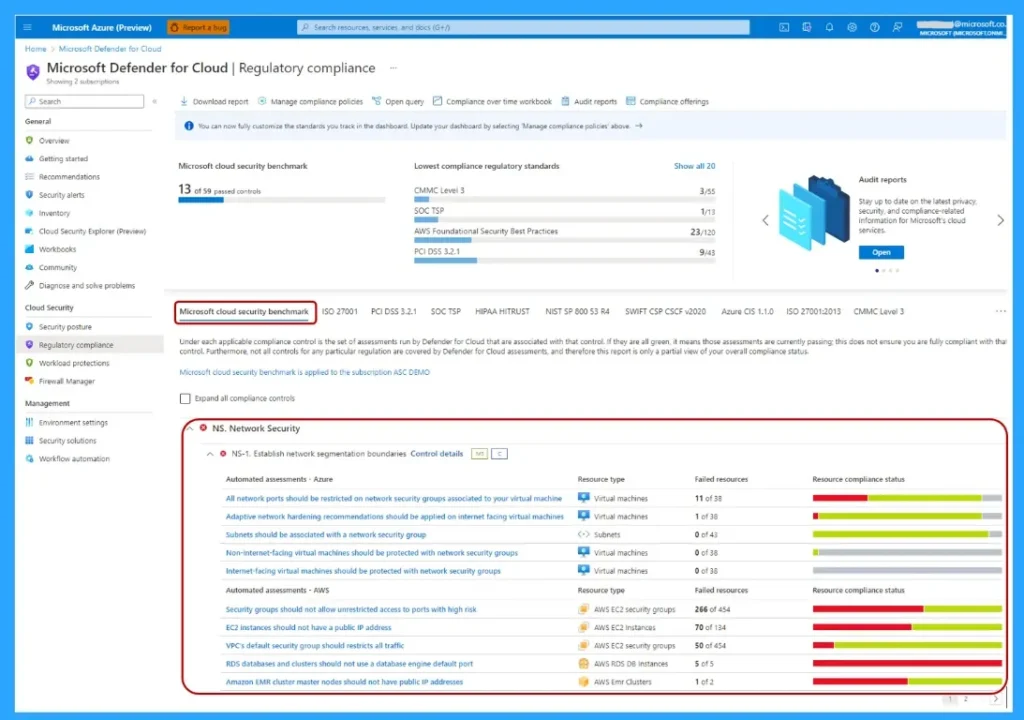
Core Enforcement Signal
Intune’s most critical function is defining and enforcing access based on a device’s health. This core function is work with 3 functions which are Define “Healthy”, Enhance the Signal and enforce policy.
- Define “Healthy“: Intune Device Compliance Policies define the security requirements for a device (e.g., must have BitLocker, must have a certain OS version). If the device meets the rules, it is marked as “Compliant”.
- Enhance the Signal: Intune integrates with Microsoft Defender for Endpoint (MDE) to get a real-time risk level for the device (e.g., Low, Medium, High). This is a dynamic check for active threats.
- Enforce Policy: Microsoft Entra Conditional Access acts as the gatekeeper. It checks the “Compliant/Non-compliant” status from Intune before allowing access to any corporate resource (like email, SharePoint, or the AWS Console). If the device is Non-compliant, access is blocked.
Need Further Assistance or Have Technical Questions?
Join the LinkedIn Page and Telegram group to get the latest step-by-step guides and news updates. Join our Meetup Page to participate in User group meetings. Also, Join the WhatsApp Community to get the latest news on Microsoft Technologies. We are there on Reddit as well.
Author
Anoop C Nair has been Microsoft MVP from 2015 onwards for 10 consecutive years! He is a Workplace Solution Architect with more than 22+ years of experience in Workplace technologies. He is also a Blogger, Speaker, and Local User Group Community leader. His primary focus is on Device Management technologies like SCCM and Intune. He writes about technologies like Intune, SCCM, Windows, Cloud PC, Windows, Entra, Microsoft Security, Career, etc


Discussion