






How IT Pros Can Use an iOS App to Manage Windows365 Cloud PCs using REST APIs
Today we are discuss How IT Pros Can Use an iOS App to Manage Windows365 Cloud PCs using REST APIs. You know Mr. Somesh Pathak [MVP] has newly introduced a native mobile iOS app for IT professionals to manage Windows 365 Cloud PCs, and the application is called Zap365.
We know the advantages of Windows 365 Cloud PCs for hybrid workers. But in the case of Microsoft admins, it will be a great advantage to use the new Zap365. It’s an iPhone app that lets IT admins control and manage their company’s Cloud PCs right from their mobile device.
Zap365 gives IT admins the power to manage Cloud PCs right from their phone, no matter where they are. It also includes essential security tools, such as accessing LAPS (Local Administrator Password Solution) passwords, retrieving BitLocker keys, and viewing user details and device compliance information.
Zap365 is a new iPhone app that helps IT admins manage their company’s Windows 365 Cloud PCs from anywhere. Also, they can manage and check the health and status of all Cloud PCs. It was created by Somesh Pathak. So, in this post lets discuss a small overview about this application.

Table of Contents
How IT Pros Can Use an iOS App to Manage Windows365 Cloud PCs using REST APIs
Above we discussed overall view of the New Zap365 to Manage Windows 365 Cloud PCs. This news is shared by Christiaan BrinkhoffChristiaan Brinkhoff on his social media platform. Zap365 is a mobile app made for IT admins to manage Windows 365 Cloud PCs using their iPhone or iPad.
- Zap365 offers a wide range of powerful features that bring the key functions of the Windows 365 Admin Center to a mobile app.
- IT administrators can monitor the real-time health and performance of all Cloud PCs across their organization.
| Key Features |
|---|
| It is Mobile-friendly |
| Quickly check the status of all your Cloud PCs |
| Get real-time alerts for any issues |
| Uses Microsoft Entra ID for authentication |
| Securely access features like LAPS passwords on the go |
- Windows 365 Snapshot Health Indicator and Enhancement in Point-in-Time Restores using Intune
- How Windows App Enhances File and Folder Access on Azure Virtual Desktop and Windows 365
- Most Asked 54 Windows 365 Cloud PC Interview Questions and Answers
Secure and Maintain Cloud PCs
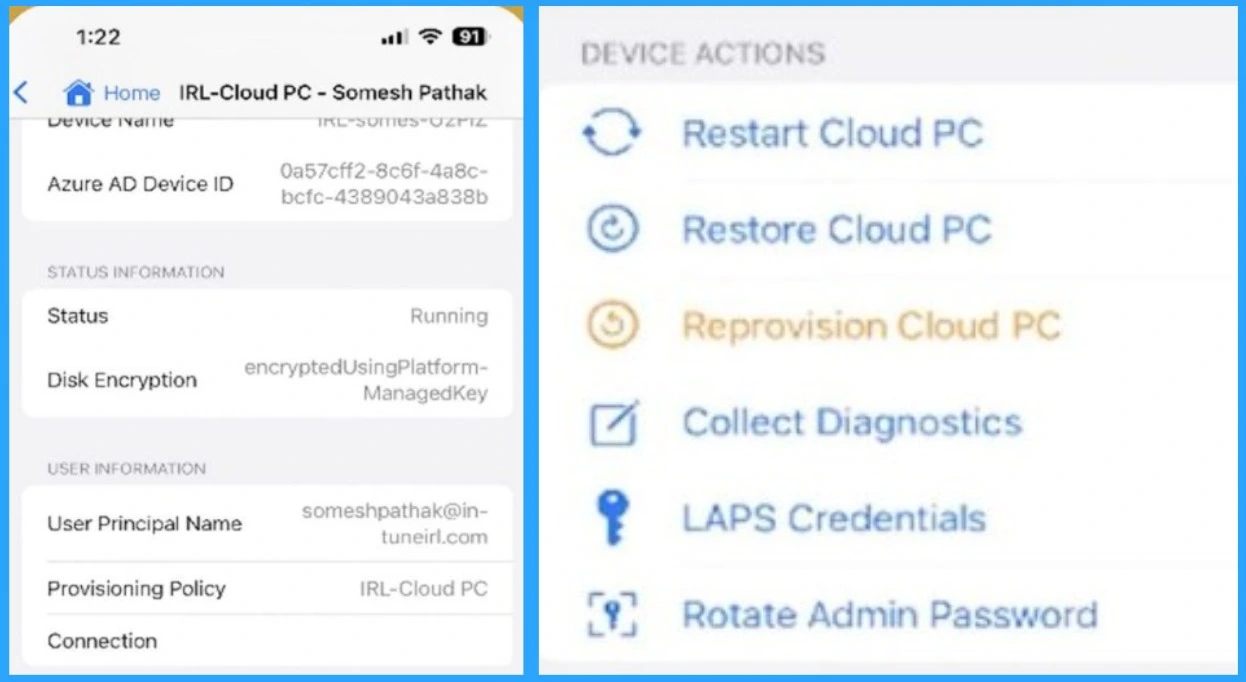
The below screenshot the image of Zap365, that helps IT admins manage Windows 365 Cloud PCs right from their iPhone. Here in this page, you can see that it gives admins quick access to important details about a Cloud PC, like its name, status, security settings. The app makes it easy to manage these virtual desktops while away from Workplace.
- With Zap365, admins can restart a PC, restore it, set it up again, check for issues, get secure passwords, and even change the admin password from their phone.
Monitor Cloud PC Status in Real-Time from Anywhere
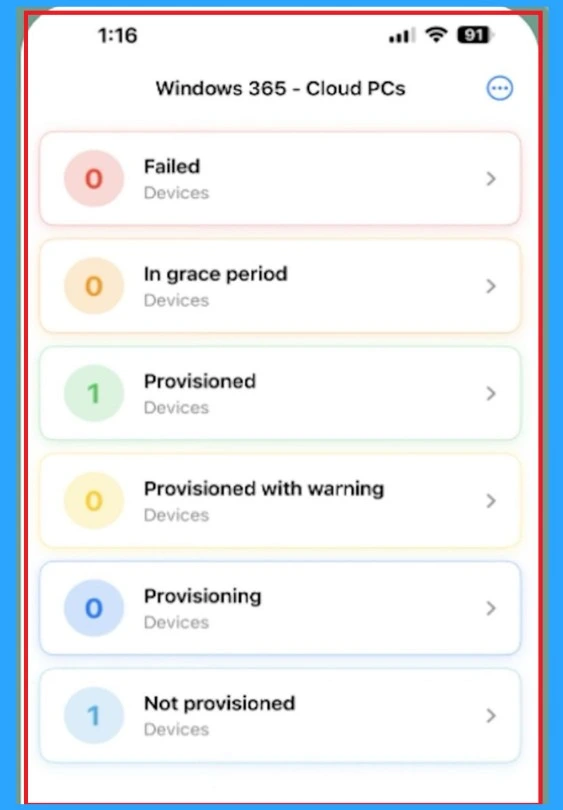
Monitor Cloud PC status in real-Time from anywhere This is the most important feature of Zap365. The below screenshot showing a dashboard where IT administrators can see the current status of all Cloud PCs in their organization, categorized by different states such as failed, in grace a period, Provisioned etc. These categories will help to stay informed and take immediate action on any issues, all from their iPhone.
Need Further Assistance or Have Technical Questions?
Join the LinkedIn Page and Telegram group to get the latest step-by-step guides and news updates. Join our Meetup Page to participate in User group meetings. Also, Join the WhatsApp Community to get the latest news on Microsoft Technologies. We are there on Reddit as well.
Reference
Zap365: Your Windows 365 Cloud PC Admin Center in Your Pocket
Author
Anoop C Nair has been a Microsoft MVP for 10 consecutive years from 2015 onwards. He is a Workplace Solution Architect with more than 22+ years of experience in Workplace technologies. He is a Blogger, Speaker, and Local User Group Community leader. His primary focus is on Device Management technologies like SCCM and Intune. He writes about technologies like Intune, SCCM, Windows, Cloud PC, Windows, Entra, Microsoft Security, Career, etc.




Discussion