






New Redesigned Start Menu in Windows 11 with Four Core Design Principles
Today we are discussing a new topic The New Redesigned Start Menu in Windows 11 with Four Core Design Principles. You all know that a start menu is essential for a Windows operating system. Recently in many updates Start Menu got updated but this time a major enhancement is to be done in the Start Menu.
The new changes are to be done for the feedback of users, and it has important four core design principles with Ensuring quick access to pinned, installed, and newly discovered apps. Also Optimizing every pixel for efficiency, so routine actions become quicker.
The older start menu needs some overall changes for a better experience. Windows 11 introduced a redesigned Start menu that makes it easier to access apps, files, and settings in a clean, focused layout. The redesigned Start menu in Windows 11 features with thoughtful updates to create a simpler, more personal experience.
It’s cleaner and easier to navigate, with less visual clutter and smoother animations that help users get things quickly. You can make it your own by pinning favorite apps, seeing suggestions, more effective. So, in this post let’s discuss how the new Redesigned Start Menu in Windows 11 perform.

Table of Contents
The New Redesigned Start Menu in Windows 11 with Four Core Design Principles
Above we discussed an overall thing about The New Redesigned Start Menu in Windows 11 with Four Core Design Principles. In this case we have to discuss About how the users demand for a better start menu. In this case the new Start menu make apps easier to find, let people customize Start to suit their workflow, and keep the features they already visit.
| Core Design Principles | Info |
|---|---|
| Apps, at a glance | See all your apps are pinned, installed, one place. |
| Make it yours | Customize Start to show only what you need, the way you like it. |
| Accelerate the day | Everything should help you move faster, so you can get to what matters. |
| Honor the icon | Keep what people know and love. Improve it, don’t replace it. |
- New Grid and Category Views Coming to the Start Menu in Windows 11
- Start Menu Stop Working in Windows 11 Insider Preview Build
- Add or Remove All Program Lists from the Start Menu in Windows 11
Phone Integration
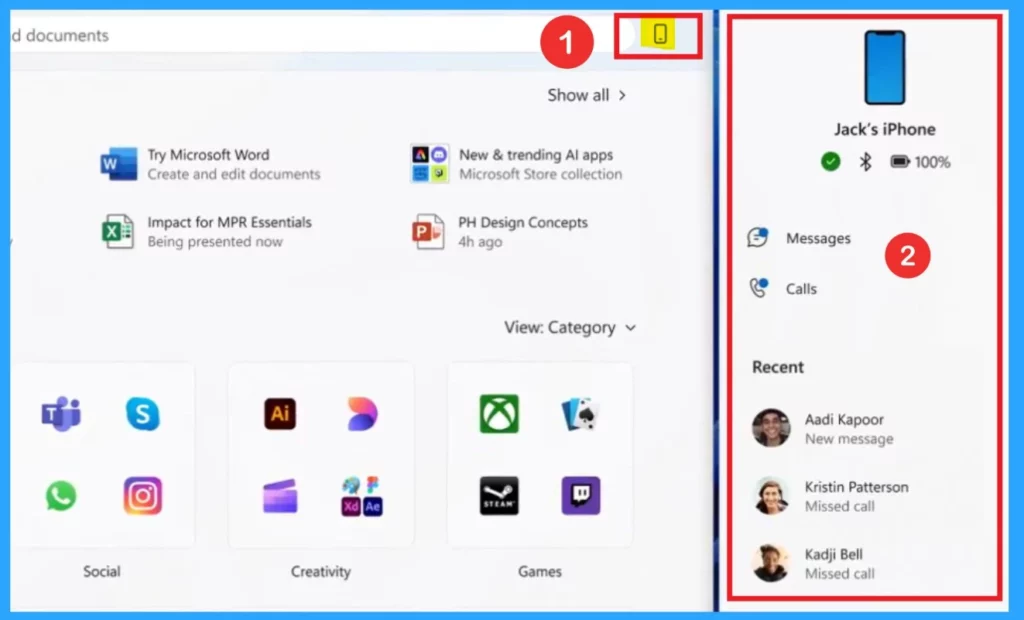
In this new redesigned Start Menu in Windows 11 helps you in phone integration. This will be very helpful for users to stay connected to your smartphone. By clicking the phone icon, you can open a panel showing your phone’s status, such as battery Bluetooth, connection, calls and messages.
For You
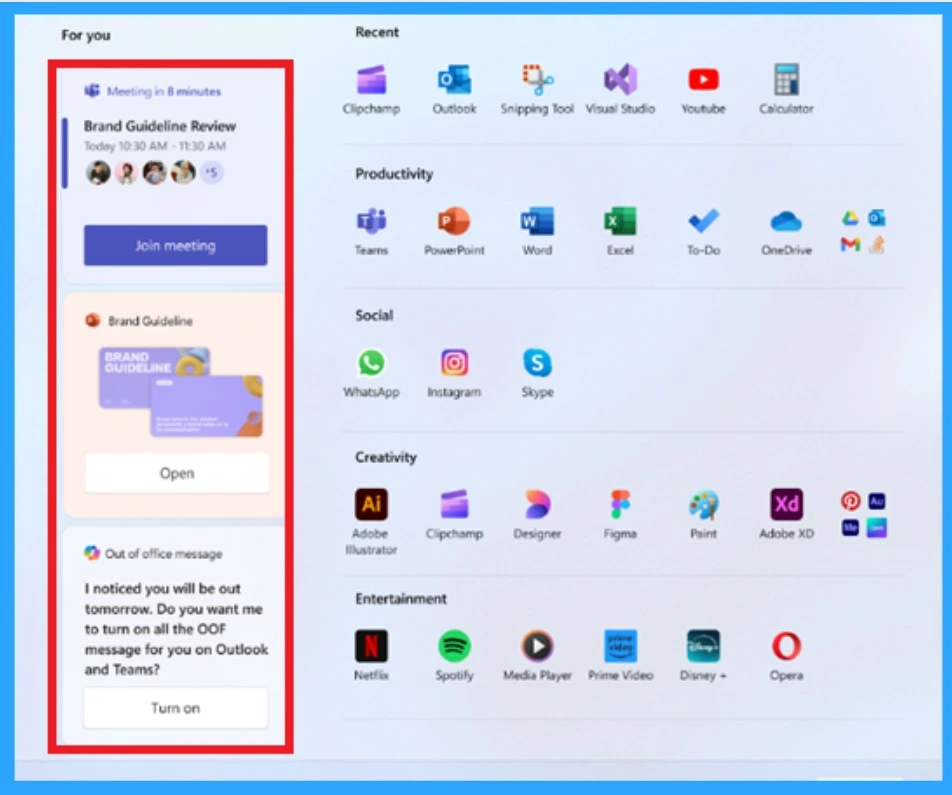
This is another section added in the redesigned Windows 11 Start menu helps you know about your day by showing timely and useful suggestions such as like reminders for upcoming meetings with a quick Join button, related documents. It’s designed to keep everything you need in one place so you can stay organized and work more smoothly.
App View
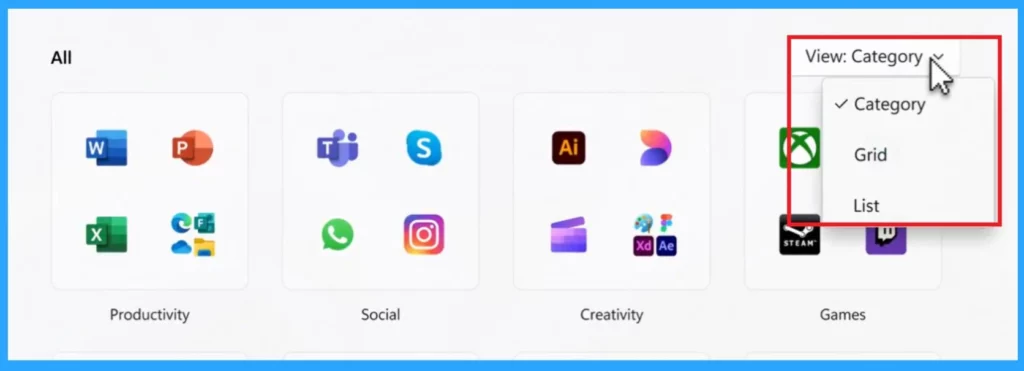
This feature is very helpful for the Users view the files and documents in different ways. In this application view the redesigned start menu offering 3 different types of ways to files and folders and it is very helpful for the user to identify the app easily. The category view is available on the previous update, and it is not a new one.
| App View | Info |
|---|---|
| List View | This will display the apps in a list view and displayed alphabetically |
| Grid View | Organize their apps in a grid format |
| Category View | This view based on categorized through social, productivity, and entertainment sections. |
Need Further Assistance or Have Technical Questions?
Join the LinkedIn Page and Telegram group to get the latest step-by-step guides and news updates. Join our Meetup Page to participate in User group meetings. Also, Join the WhatsApp Community to get the latest news on Microsoft Technologies. We are there on Reddit as well.
Reference
Start, Fresh — Redesigning the Windows Start menu for you
Author
Anoop C Nair has been Microsoft MVP for 10 consecutive years from 2015 onwards. He is a Workplace Solution Architect with more than 22+ years of experience in Workplace technologies. He is a Blogger, Speaker, and Local User Group Community leader. His primary focus is on Device Management technologies like SCCM and Intune. He writes about technologies like Intune, SCCM, Windows, Cloud PC, Windows, Entra, Microsoft Security, Career, etc.




Discussion