






How to Get iOS Device Features Configuration Policies with Intune Explorer and Security Copilot
Let’s discuss how to get iOS Device Features Configuration Policies with Intune Explorer and Security Copilot. Using Intune Explorer with Security Copilot, IT admins can quickly find all policies that are specifically meant for iOS/iPadOS device features.
iOS Device Features policies help organisations provide a consistent, secure, and user-friendly experience on corporate iOS devices. It reduces manual setup, enforces IT standards, and ensures devices are ready to use with the right features from day one.
This output helps organisations by providing visibility and control over iOS feature configurations, eliminating the need for manual searches through the Intune portal. Instead of navigating multiple pages, admins can rely on Copilot to instantly deliver the required list.
For IT admins, these results improve efficiency, compliance, and security management. They can confirm that correct policies are in place, identify missing or duplicate configurations, and validate assignments to specific user groups or device types.

Table of Contents
How to Get iOS Device Features Configuration Policies with Intune Explorer and Security Copilot
Let’s discuss about the real-world scenario that during an internal IT audit in a corporate office, auditors ask for a list of all iOS feature configuration policies applied across the workforce. Instead of exporting many reports and checking them one by one, the IT team can simply run a query in Intune Explorer.
This gives them a clear list of all iOS device feature policies, showing details like policy names, IDs, and platforms within seconds. This makes the reporting process faster, easier, and more accurate for both IT teams and auditors.
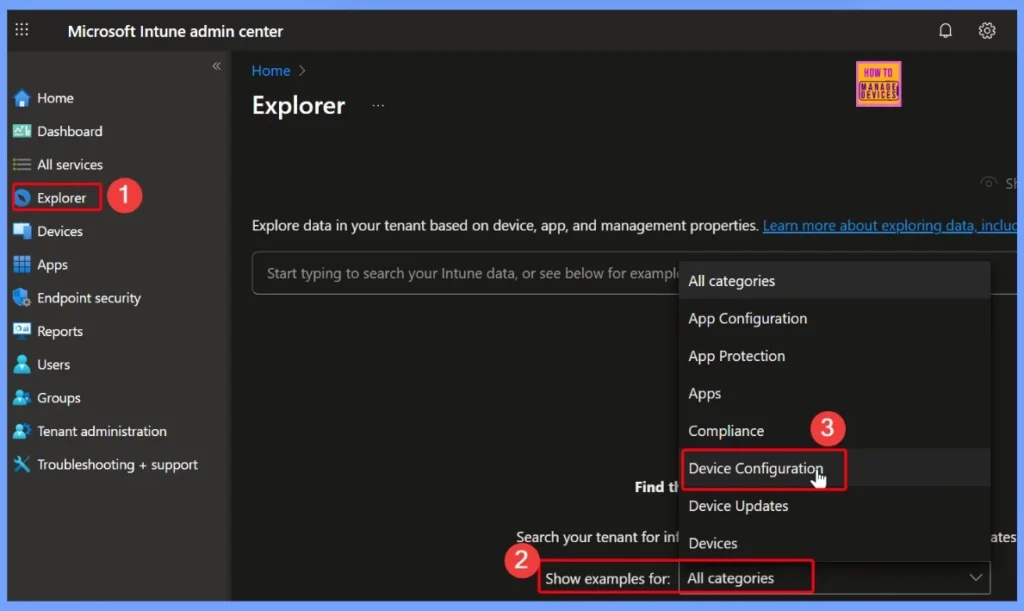
- In the Intune admin center, open Explorer. Under the All categories section, choose Device Configuration to view related options.
- Simple Way to Add iOS to Apple Business Manager and Manage in Intune – Part 2
- Simple Way to Add iOS to Apple Business Manager and Manage in Intune Part 3
- How to Get All Managed App Installation Results for User using Intune Explorer with Security Copilot
- How to Get Device Enrollment Details by User in Intune Explorer with Security Copilot
Different Device Configuration Options in Intune Explorer
Device configuration in Intune refers to the settings and policies that IT admins create and apply to manage how devices behave in an organization. These configurations cover a wide range of areas. Instead of manually setting up each device, admins can push these configurations centrally from Intune so that every managed device follows the same standards.
- Select the “Get device configuration policies that are of the type device configuration policy type name” quey from Device configuration.
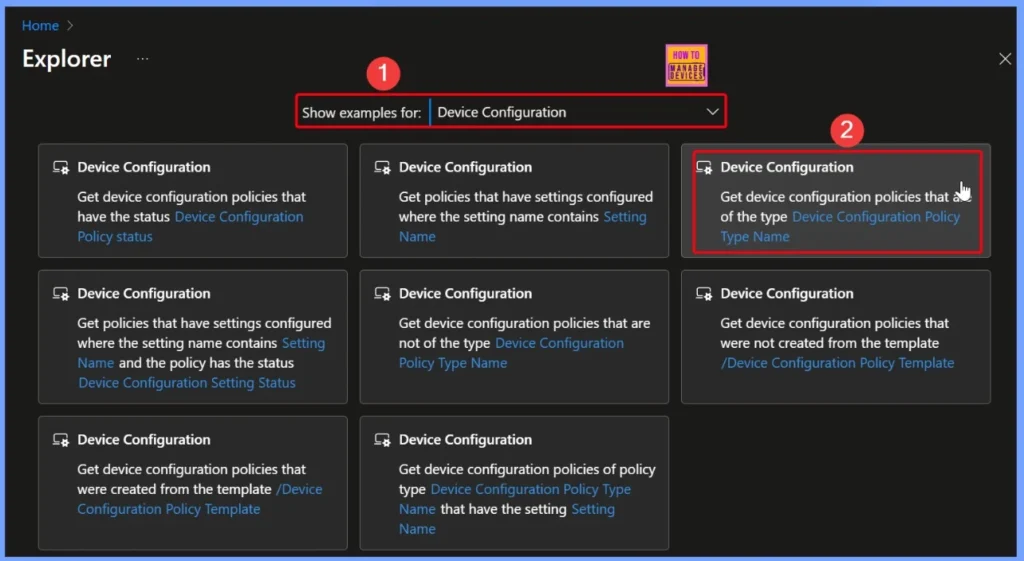
Device Configuration Policy Type Name
In the query, the Device Configuration Policy Type Name is a required field that needs to be filled. When you select this field, it shows a list of available options for iOS devices. These include settings like iOS custom configuration, iOS derived credential authentication configuration, iOS device features configuration, iOS EAS email profile configuration, iOS education device configuration, iOS enterprise Wi-Fi configuration, iOS expedited check-in configuration, and iOS general device configuration.
- Each option represents a different type of policy that IT admins can use to manage and control how iPhones and iPads are set up and used in the organization.
- Here we select the option that iOS device features configuration
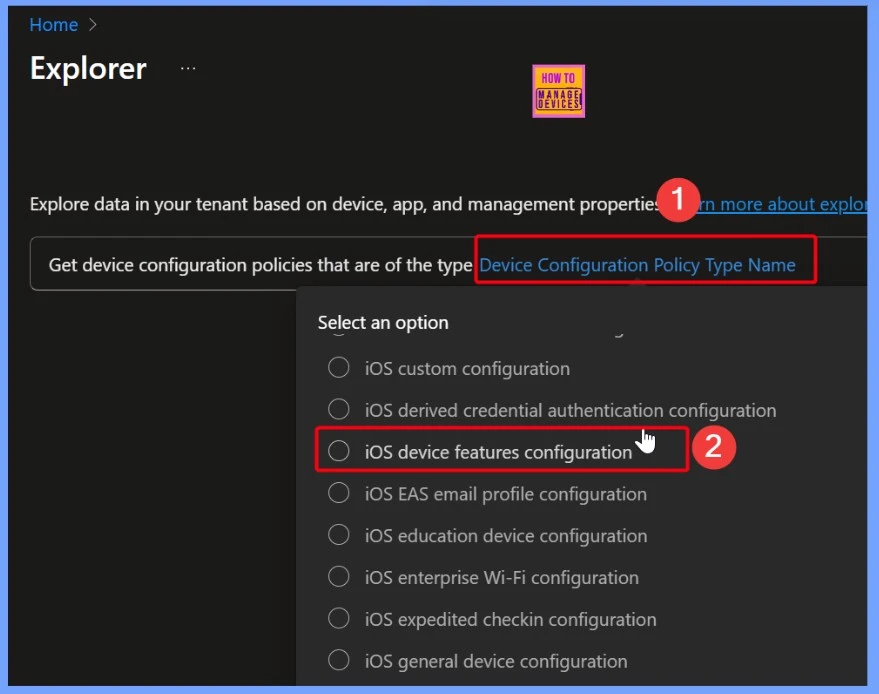
Get Device Configuration Policies that are of the Type iOS Device Features Configuration
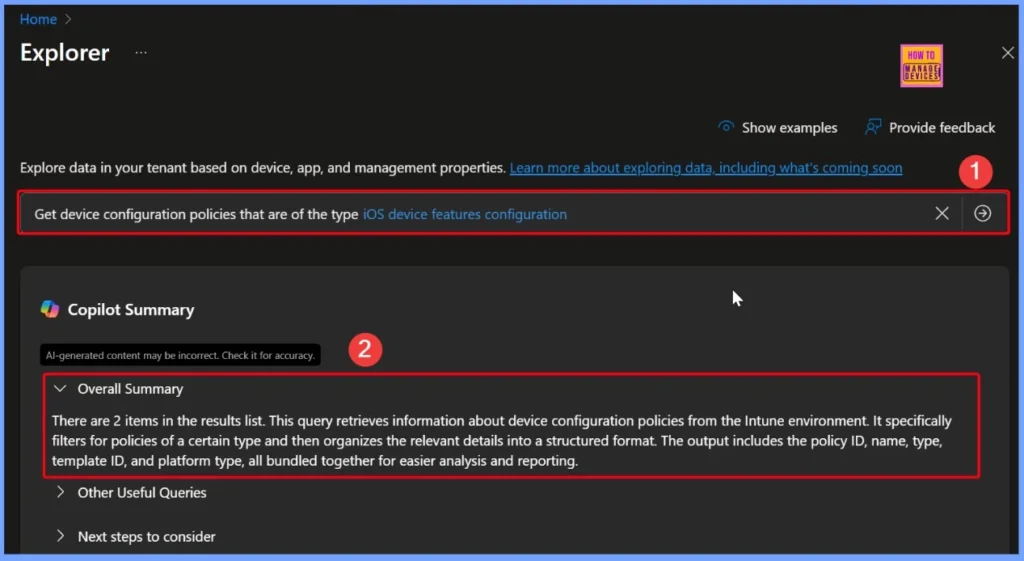
After filling in the required field, click the arrow next to the query. Copilot will then process the query and display the results, showing that there are 2 items in the results list. This query pulls information about device configuration policies from the Intune environment, filtering specifically for the selected policy type.
The results are neatly organized in a structured format and include key details such as the policy ID, name, type, template ID, and platform type. This makes it much easier for IT admins to review, analyze, and report on the policies without needing to search through the Intune portal manually.
Queries for Tracking App Deployment and Compliance in Intune
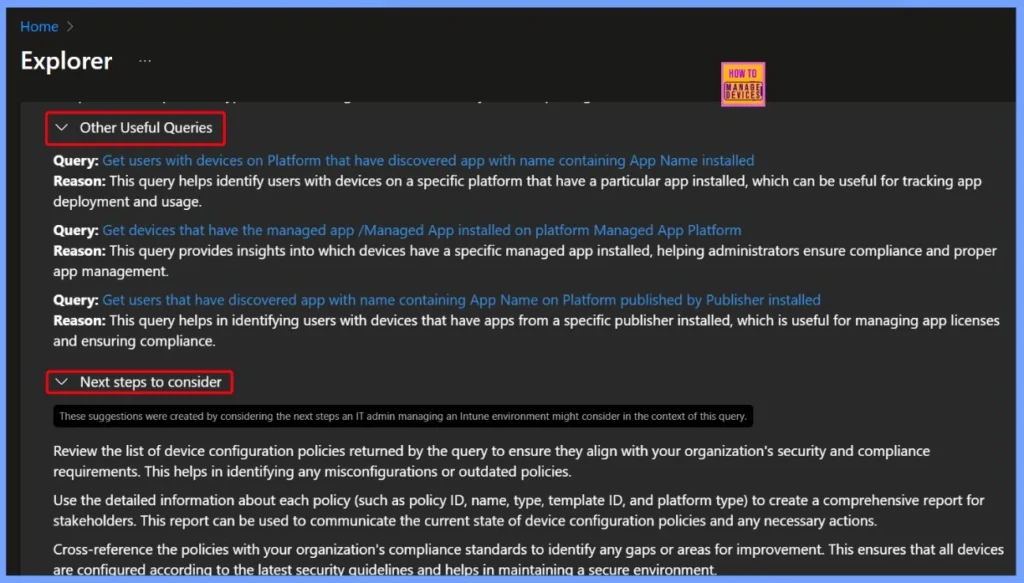
These queries in Intune Explorer help IT admins track and manage app usage across the organization. The table below highlights some other useful queries along with the next steps to take, making it easier to check app deployments, ensure compliance, and plan further actions.
| Other Useful Queries | Next steps to consider |
|---|---|
| Query: Get users with devices on Platform that have discovered app with name containing App Name installed Reason: This query helps identify users with devices on a specific platform that have a particular app installed, which can be useful for tracking app deployment and usage. | These suggestions were created by considering the next steps an IT admin managing an Intune environment might consider in the context of this query. Review the list of device configuration policies returned by the query to ensure they align with your organization’s security and compliance requirements. This helps in identifying any misconfigurations or outdated policies. |
| Query: Get devices that have the managed app /Managed App installed on platform Managed App PlatformReason: This query provides insights into which devices have a specific managed app installed, helping administrators ensure compliance and proper app management. | Use the detailed information about each policy (such as policy ID, name, type, template ID, and platform type) to create a comprehensive report for stakeholders. This report can be used to communicate the current state of device configuration policies and any necessary actions. |
| Query: Get users that have discovered app with name containing App Name on Platform published by Publisher installed Reason: This query helps in identifying users with devices that have apps from a specific publisher installed, which is useful for managing app licenses and ensuring compliance. | Cross-reference the policies with your organization’s compliance standards to identify any gaps or areas for improvement. This ensures that all devices are configured according to the latest security guidelines and helps in maintaining a secure environment. |
- How to use Intune Explorer with Security Copilot to Access Devices Users Apps Compliance and Update Details
- How to use Intune Explorer with Security Copilot to Find Windows and MacOS Device Data across your Tenant
- How to View Managed App Types Details with Intune Explorer and Security Copilot
End Results
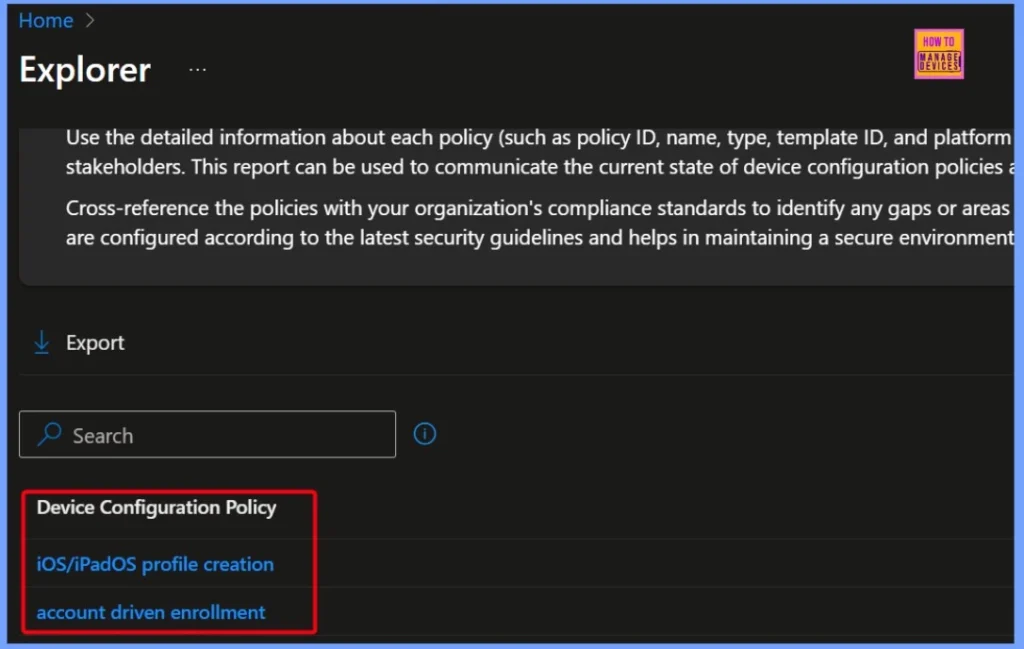
To get iOS Device Features Configuration Policies using Intune Explorer and Security Copilot, you can run a query that filters specifically for this policy type. In this case, the results show 2 items: one for iOS/iPadOS profile creation and another for account-driven enrollment. This output helps IT admins clearly see which iOS feature configuration policies are active, making it easier to review, analyze, and confirm that the right settings are applied across devices.
| End Results |
|---|
| iOS/iPadOS profile creation |
| Account-driven enrollment |
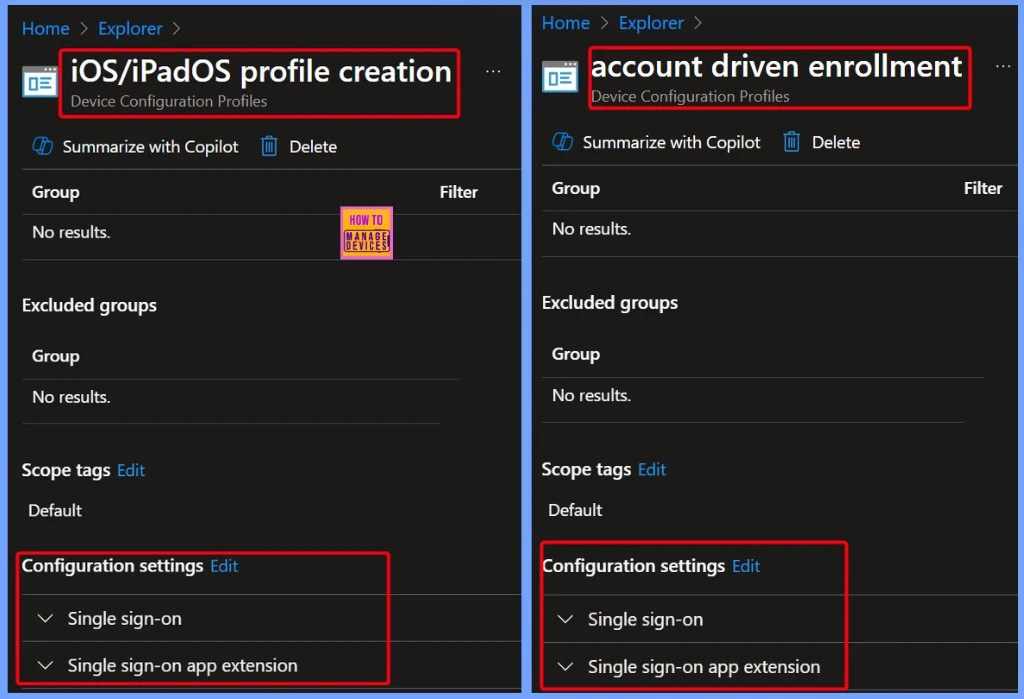
Single Sign-On Settings in iOS/iPadOS Profile Creation and Account-Driven Enrollment
Both these device policies iOS/iPadOS profile creation and account-driven enrollment, show configuration settings related to Single Sign-On (SSO) and Single Sign-On app extensions. These settings make it easier for users to access multiple apps and services with just one login, without having to enter their username and password again and again.
Need Further Assistance or Have Technical Questions?
Join the LinkedIn Page and Telegram group to get the latest step-by-step guides and news updates. Join our Meetup Page to participate in User group meetings. Also, join the WhatsApp Community to get the latest news on Microsoft Technologies. We are there on Reddit as well.
Author
Anoop C Nair has been Microsoft MVP for 10 consecutive years from 2015 onwards. He is a Workplace Solution Architect with more than 22+ years of experience in Workplace technologies. He is a Blogger, Speaker, and Local User Group Community leader. His primary focus is on Device Management technologies like SCCM and Intune. He writes about technologies like Intune, SCCM, Windows, Cloud PC, Windows, Entra, Microsoft Security, Career, etc.


Discussion