






How to Fix Issue on Windows Update Deployment using Intune for No Logged-in Users
Let’s discuss How to Fix Issue on Windows Update Deployment using Intune for No Logged-in Users. Here is an issue addressing which occurred in Microsoft Intune Windows Devices. The Admin keep the newly imaged laptops for about 3-4 weeks on their shelf before hand over to a new user.
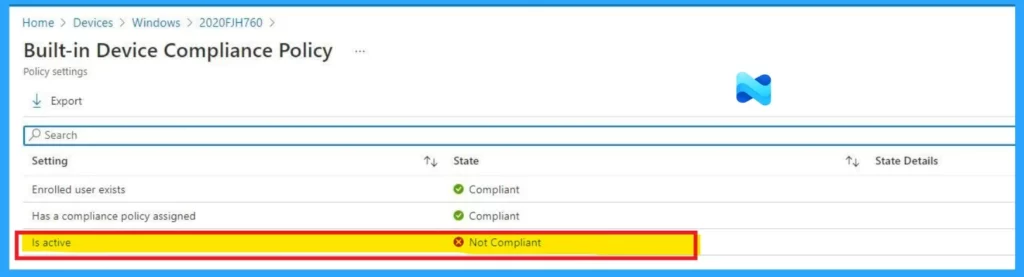
Because of that during that time those devices report to Intune as non-compliant due to Windows OS version. The IT Admin trying to resolve this issue with Windows Update in Intune without depending logged in user.
As you know that, Microsoft Intune is capable of enforcing Windows updates through system-level actions, rather than relying on user activity. That’s why Microsoft Intune Admins try to initiate Windows Update for non-complaint devices.
Due to this issue, conditional access policies will be blocked in non-complaint devices. In this blog post, I would like to discuss more about non-complaint issue occurred on this particular case. Also I will discuss about reasons, workarounds of this issue.

Table of Contents
How to Deploy Windows Updates in Intune Without Depending Logged in User
In this case, issue occurred due to the Admin keep the Devices in shelf. Devices left idle after imaging sometimes for weeks don’t receive timely Windows updates. There are many reasons behind this issue. The below table shows the reasons.
| Reasons |
|---|
| For Policy enforcement and update reporting, Intune depends on Check-ins |
| Devices need to be powered on, connected to a network, and not asleep but login is not technically required. |
| The system’s can’t push updates without scheduled power cycles or proactive update mechanisms. |
- Automate Microsoft Intune Device Non-Compliance Report using PowerShell Script
- How to Create Secure Boot Compliance Policy with Intune
- New Company Portal Experience Monitor App Installation Progress and Compliance Status Reporting
How Windows Update Helps to Resolve this Issue
In this case, the Admin know that Initiating Windows update the resolution for this issue. Windows Update in Intune helps to resolve non-complaint devices without depending logged in users. Let’s look at the table below.
| How it Works |
|---|
| For devices sitting on shelves, BIOS settings or Wake-on-LAN can help auto-power them periodically. |
| This allows updates to run at regular intervals even before the device is handed over to the end user. |
Workaround
As a resolution for this issue, some Admins suggested some workarounds. Mr. dilanmic suggests some methods which are included here. It includes Proactive Remediation Scripts, Scheduled Power-On and Network Connectivity, Expedite Updates via Update Rings (Limited).
Proactive Remediation Scripts
In Intune you can use Proactive Remediation Scripts to push PowerShell Scripts. It detects missing critical updates and triggers the update installation, independent of user presence. These scripts run under the SYSTEM context, so updates can be installed even with no logged-in user as long as the device is powered on and connected to the internet.
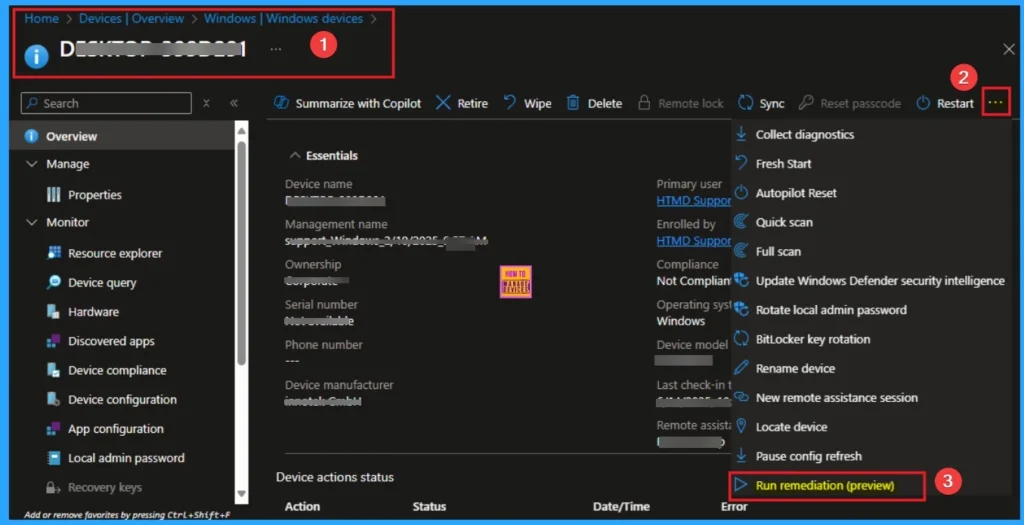
Read More – Run Remediation Script on-demand for Windows Devices using Intune
Scheduled Power-On and Network Connectivity
To initiate Proactive Remediation Script, you should ensure that the laptops are powered on and connected to the network periodically while on the shelf. If the devices are off, Intune cannot communicate.
Expedite Updates via Update Rings (Limited)
If the laptops are powered on, you can use the Expedite updates option in Windows Update for Business policies set through Intune.
Need Further Assistance or Have Technical Questions?
Join the LinkedIn Page and Telegram group to get the Expedite Updates via Update Rings (Limited)step-by-step guides and news updates. Join our Meetup Page to participate in User group meetings. Also, join the WhatsApp Community to get the latest news on Microsoft Technologies. We are there on Reddit as well.
Author
Anoop C Nair has been Microsoft MVP for 10 consecutive years from 2015 onwards. He is a Workplace Solution Architect with more than 22+ years of experience in Workplace technologies. He is a Blogger, Speaker, and Local User Group Community leader. His primary focus is on Device Management technologies like SCCM and Intune. He writes about technologies like Intune, SCCM, Windows, Cloud PC, Windows, Entra, Microsoft Security, Career, etc.


Discussion