






Latest SCCM 2103 Hotfix List | ConfigMgr | Configuration Manager
Microsoft released two hotfixes for SCCM 2103. This post provides details about the SCCM 2103 Hotfix List. The Configuration Manager 2103 version was released and made available globally available in April 2021.
I have more detailed posts about the Top 5 features of ConfigMgr 2103 and the upgrade of the ConfigMgr 2103 primary server. The above posts provide more details about all the prerequisites, ADK version requirements, etc.
While writing this post, Microsoft released two KB articles. I will try to keep this SCCM 2103 Hotfix list up to date whenever Microsoft releases a new hotfix for 2103.
Also, please use the comment section at the bottom of this post to update the list of hotfixes if we missed any.

Table of Contents
SCCM 2103 Hotfix List
I have updated the list of ConfigMgr 2103 known issues in the previous post. That post also notes more details about the current known issues and a list of hotfixes.
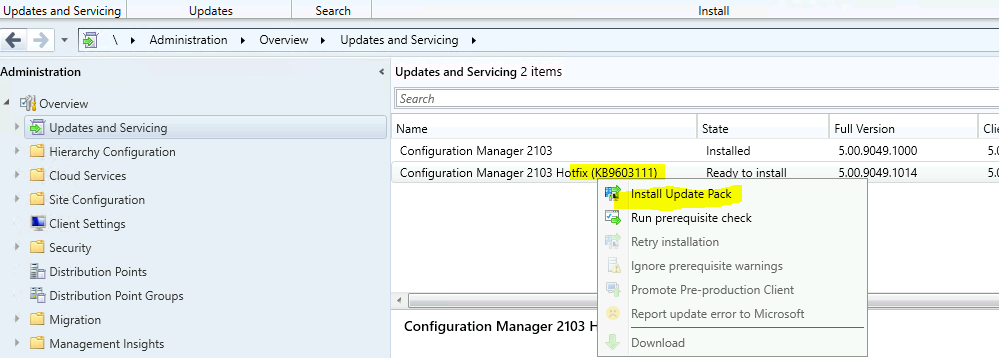
- First KB released for SCCM 2103 is KB9603111 (available in console) – Only for the early ring version of 2103.
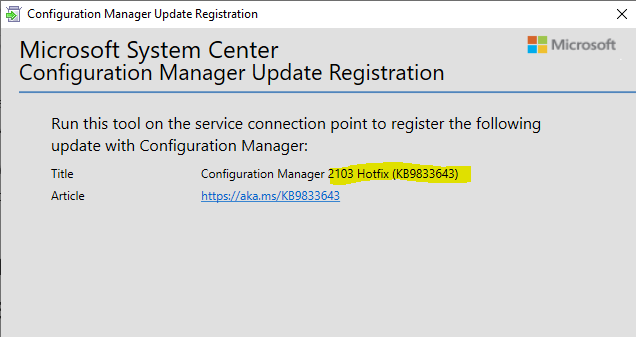
- 2nd KB KB9833643 for ConfigMgr 2103 (Out of Band hotfix) – Only for the early ring version of 2103.
There is no hotfix released for the slow-ring version (without using the PowerShell command)
What is Out of Band hotfix?
KB 9833643 is an out-of-band hotfix for the 2103 version of the Configuration Manager. It won’t be available in the Updates and Servicing node. However, you must download the EXE and complete the Microsoft System Center Configuration Manager Update Registration wizard to make the out-of-band hotfix available in the SCCM console.
More details about the SCCM out-of-band hotfix installation process are explained in the previous post. The troubleshooting issues related to of band hotfix registration process would also be helpful for you all. The above is the latest – SCCM 2103 Hotfix List.
Issues fixed with the ConfigMgr 2103 Hotfix
The following is the list of fixes available with the above two KB articles (KB9603111 & KB9833643). In the comments section, let me know whether this type of list of fixes is useful or not. The above is the latest SCCM 2103 Hotfix List.
- Task sequences/task sequence steps created before installation of the version 2103 update fail to import. The Import Task Sequence Wizard displays the following error –
- If one or more errors occur, the result may be incomplete.
- No data is shown in the Windows 10 servicing dashboard, even after completing the troubleshooting steps listed in the following support article. The Windows 10 servicing dashboard shows no data
- The New-CMBootableMedia PowerShell cmdlet returns an error. After updating to version 2103, I could not find the SCCM UI installation directory.
- SCCM Azure Active Directory (AAD) joined clients that are also using PKI-issued certs can experience high CPU utilization, which impacts the end-user. This occurs because of an issue with the SMS Agent Host (ccmexec.exe) attempting to continually renew the “self-prove” token with the Management Point (MP).
- Clients cannot evaluate policy or communicate via the notification channel during reassignment from one site to another. Errors resembling the following are recorded in the ccmexec.log file.
- Error registering hosted class ‘{Class_GUID}’. Code 0x80040111.
- The report Compliance 4 – Updates by vendor month year does not contain expected data.
- App usage data is stale or unavailable for devices in the Desktop Analytics portal in the Microsoft Endpoint Manager admin center. This only affects notebook computers that run for multiple days without restarting. An error resembling the following is recorded in the SensorManagedProvider.log file on affected devices.
- Another exception is that the value was too large or too small for an Int32.
- After updating to SCCM’s current branch, version 2103, a backlog of MEP (machine-extended policy) files occurred in the PolicyPV inbox on the site server. This backlog also causes delays in processing site reassignment data.
- Devices upgrade to the 2103 version of the SCCM client faster than expected after promoting the upgrade from pre-production. In addition, the WebView 2 client component is installed repeatedly.
- State message processing hangs when encountering a corrupt file instead of discarding the file as expected. Errors resembling the following are recorded in the statesys.log file. –
- Thread ‘State Message Processing Thread #0″ id:14888 terminated abnormally.
- State message processing fails for some cloud management gateway (CMG) messages. Errors resembling the following are recorded in the statesys.log file.
- SQL MESSAGE: dbo.spProcessStateReport – Error: Record 1 returned an ‘invalid record’ return code and failed processing with error 8115.
- A new SCCM console extension created for the community hub for version 2103 will fail to load if a prior console extension modifies the same node with the same action.
- The SQL Server move process fails after a highly available site is failed over to the passive site server. This occurs due to a certificate problem that resembled the following in the ConfigMgrSetup.log file.
- ERROR: Failed to decrypt SQL Server machine serialized pfx certificate (LastError=0)
- The Wake on LAN feature does not function as expected after removing a central administration site (CAS) due to a missing site control property value.
- The SMS Agent Host service may terminate unexpectedly due to a policy agent issue.
- CMPivot queries do not run on computers configured with the Japanese system locale.
- When a central administration site is removed, packages are distributed to all distribution points (DP) when added to a new DP.
- Failover from an active to a passive site fails in an environment with many orphaned package status data records.
KB9833643 is Not Visible in the Console
Well, if KB9833643 is not visible in the console, I think you need to make sure that you have installed the hotfix KB9603111 before trying to register the out-of-band KB (KB9833643) before the Microsoft System Center Configuration Manager Update Registration wizard.
To apply out-of-band KB (KB9833643) for the 2103 version, you must have SCCM version 2103 installed in addition to the following KB, KB9603111. Previous posts provide more details about the installation of the hotfix
The above section has the latest – SCCM 2103 Hotfix List.
Resources
- Use the Update Registration Tool to import hotfixes to Configuration Manager
- Download this hotfix KB9833643
We are on WhatsApp. To get the latest step-by-step guides and news updates, Join our Channel. Click here –HTMD WhatsApp.
Author
Anoop C Nair has been Microsoft MVP for 10 consecutive years from 2015 onwards. He is a Workplace Solution Architect with more than 22+ years of experience in Workplace technologies. He is a Blogger, Speaker, and Local User Group Community leader. His primary focus is on Device Management technologies like SCCM and Intune. He writes about technologies like Intune, SCCM, Windows, Cloud PC, Windows, Entra, Microsoft Security, Career, etc.




Discussion