






ConfigMgr 2105 Technical Preview New Features | SCCM
This post will show the features released in ConfigMgr 2105 Technical Preview. Microsoft released the latest technical preview, version 2105 of Configuration Manager. The technical preview introduces new functionality that Microsoft is working on and features that aren’t yet included in the current branch of Configuration Manager.
Features in a previous version of the technical preview remain available in later versions. Similarly, features added to the Configuration Manager Production Version 2103 remain available in the technical preview branch.
2103 is the latest baseline version of Configuration Manager (a.k.a SCCM) Supported for the production environment. Starting this year, the current branch version names will be 2103, 2107, and 2111 to better align with other releases within Microsoft Endpoint Manager. They will still be released every four months at the same time of year.
Let’s try out all the exciting added features, help the Configuration Manager product team, and continuously work for us to provide them with your valuable feedback about the new features in the technical preview before the Microsoft product team finalizes them.

Important: The technical preview branch of Configuration Manager is not supported for use in a production environment. It is licensed for use only in a lab environment.
Table of Contents
Download Technical Preview
When you install a new technical preview site, use the latest baseline version. After installing a baseline version, use in-console updates to update your installation with the most recent Technical preview version 2105.
ConfigMgr Technical Preview builds installation is active for 90 days before it becomes inactive. You need to install the available new technical preview updates within 90 days before the technical preview build expires. Typically, new versions of the technical preview are available each month.
The latest version of Configuration Manager Technical Preview is baseline version 2103. Download the latest ConfigMgr Technical Preview Baseline Build – Microsoft Endpoint Manager Configuration Manager Technical Preview
Let’s check how to build Microsoft Endpoint Configuration Manager aka MECM Technical Preview LAB – How to Build Configuration Manager Technical Preview LAB | SCCM
- ConfigMgr 2105.2 Technical Preview New Features | SCCM
- Fix ConfigMgr Console Feature Update Task Retry Operation Error | SCCM | Configuration Manager
- How to Fix SCCM Application Package Download Issue Configuration Manager ConfigMgr
ConfigMgr 2105 Technical Preview Features
Enhanced Code Editor
Building on improvements in Configuration Manager 2010 for syntax highlighting and code folding, you can now edit scripts in an enhanced editor. The new editor supports syntax highlighting, code folding, word wrap, line numbers, and find and replace. The new editor is available in the console, wherever scripts and queries can be viewed or edited.
The new code editor supports the following features:
- Editor mode with syntax highlighting and plain text toggle
- Toggle word wrap and line numbers
- Code folding
- Language selection
- Find, Find and Replace, and Go To line number
- Font type and size selection
- Zoom using buttons or with the Ctrl + mouse wheel.
- The information bar at the bottom displays:
- Number of lines and characters in the script
- Cursor position
- If the script is read-only
- Persistent settings across instances for the code window, such as code folding, word wrap, and window size.

Select VM size for CMG
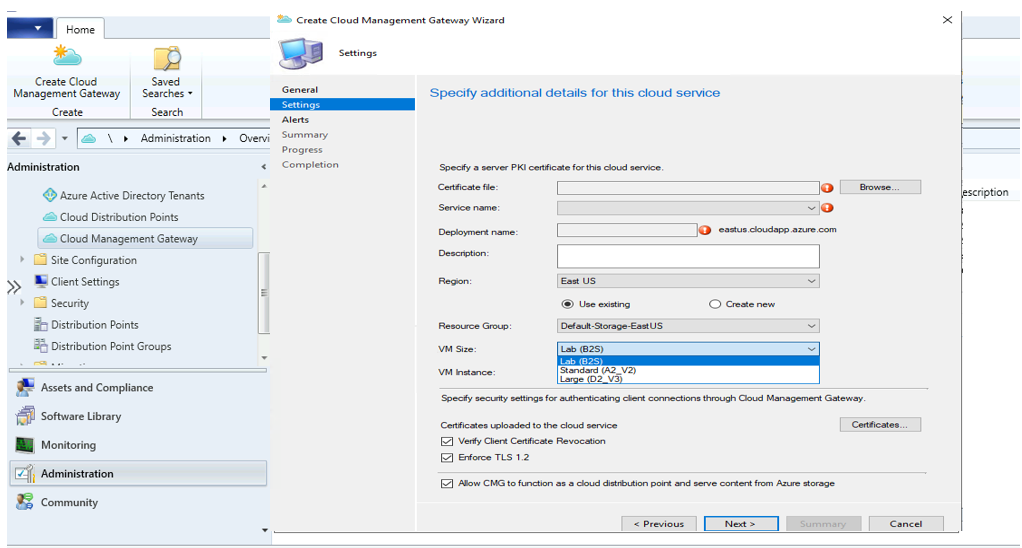
When you deploy a cloud management gateway (CMG) with a virtual machine scale set, you can choose the virtual machine (VM) size. The following three options are available:
- Lab: B2s
- Standard: A2_v2. This option continues to be the default setting.
- Large: D2_v3
This control gives you greater flexibility with your CMG deployment. You can adjust the size for test labs or if you support large environments.
- Set up a CMG with a virtual machine scale set.
- On the Settings page of the wizard, change the VM Size to Lab (B2s). By default, the CMG deploys with the Standard (A2_V2) size.
- Complete the wizard.
Support Center dark and light themes
The Support Center tools now offer dark and light modes. You can choose to use the system default color scheme or override it by selecting either the dark or light theme.
Set theme for OneTrace
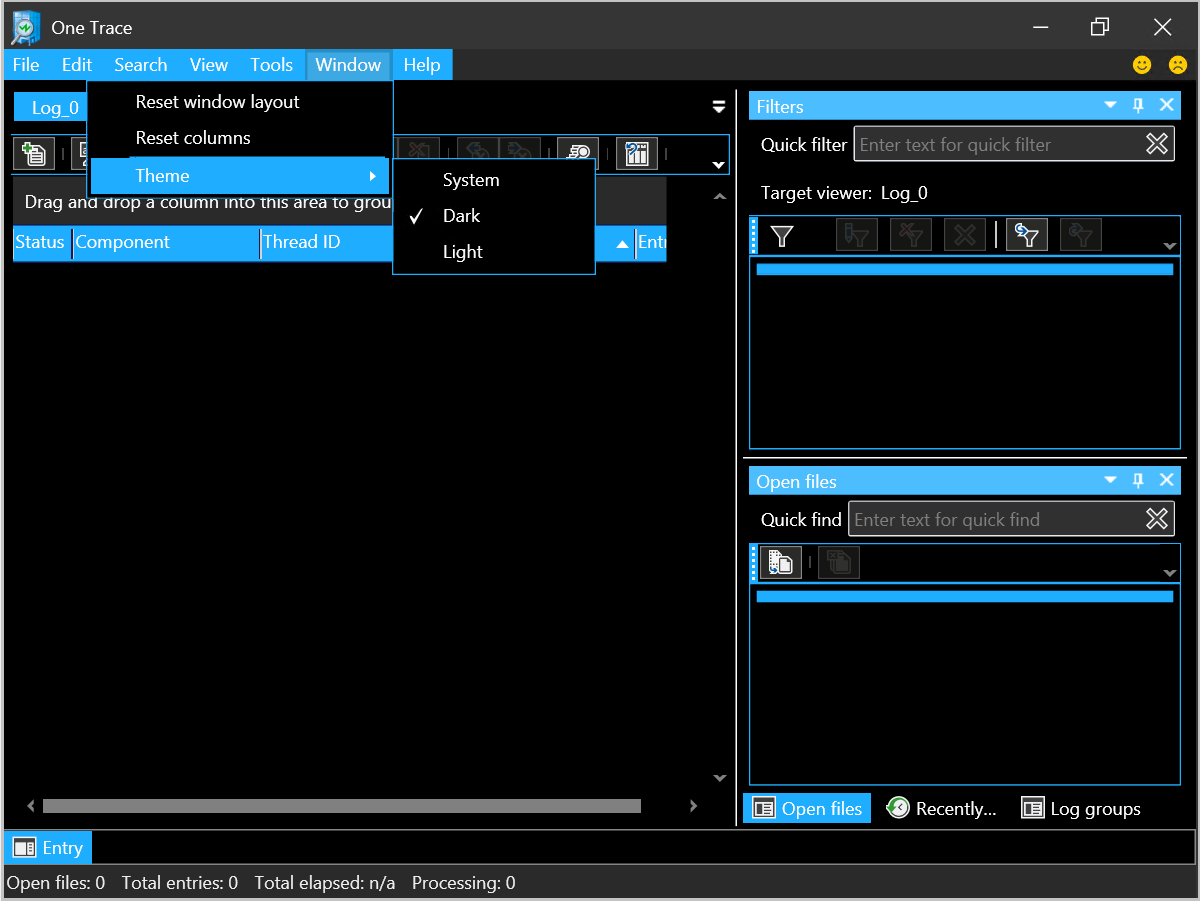
OneTrace is the log viewer with Support Center. It works similarly to CMTrace, with many improvements. To set the theme for OneTrace, follow the steps below :
- Open Support Center OneTrace.
- Select Window then Theme.
- Choose either the System, Dark, or Light theme.
Set theme for all other Support Center applications
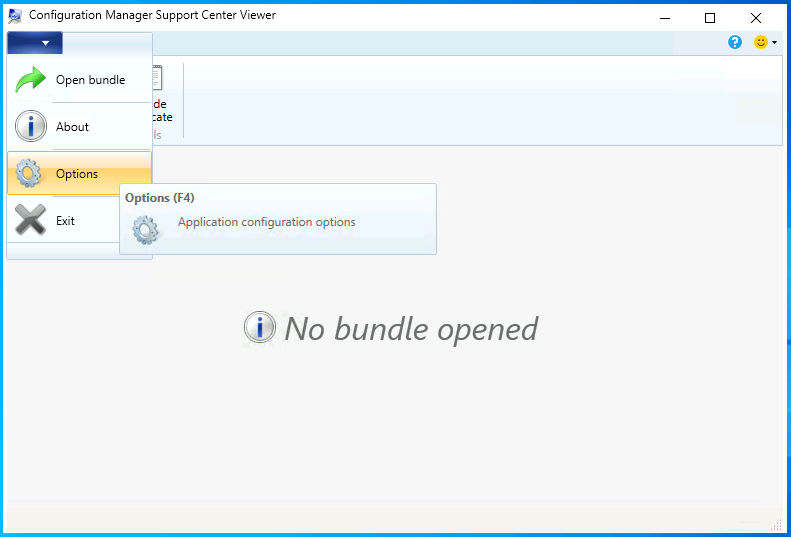
To set dark and light theme is available for the following Support Center applications, Open one of the following applications -

Support Center Client Tools
Support Center Client Data Collector
Support Center Viewer
Support Center Log File Viewer- In the upper left corner, select the arrow in the blue box to open the window menu and choose Options.
- F4 is the keyboard shortcut to the Options menu.
- Select the System, Dark, or Light theme in the Theme section.
- Select Apply.
RBAViewer location change
RBAViewer has moved from <installdir>\tools\servertools\rbaviewer.exe. It’s now located in the Configuration Manager console directory.
After you install the console, RBAViewer.exe will be in the same directory. The default location is C:\Program Files (x86)\Microsoft Endpoint Manager\AdminConsole\bin\rbaviewer.exe.
Updated SCCM Client Deployment Prerequisite
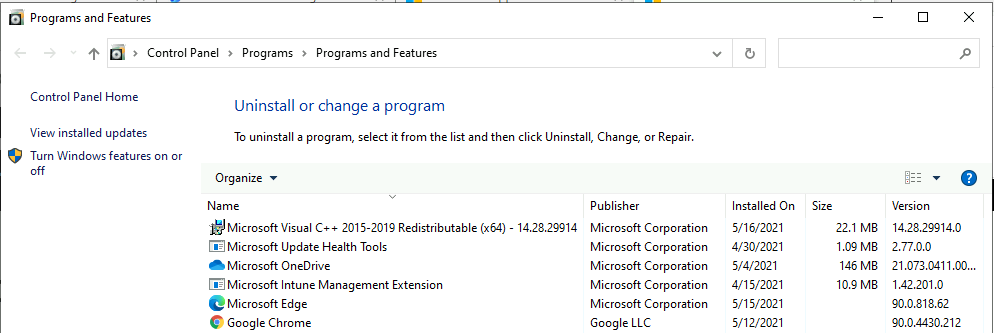
The Configuration Manager client requires the Microsoft Visual C++ Redistributable component (vcredist_x*.exe). When you install the client, it automatically installs this component if it doesn’t already exist. Starting in this release, it now uses the Microsoft Visual C++ 2015-2019 Redistributable version 14.28.29914.0. This version improves stability in Configuration Manager client operations.
Change to Internet Access Requirements
To simplify the internet access requirements for Configuration Manager updates and servicing, this technical preview branch release downloads from configmgrbits.azureedge.net. This endpoint is already required, so it should be allowed through internet filters. With this change, the existing internet endpoint for technical preview releases is no longer required: cmupdatepackppe.blob.core.windows.net.
Use the HTMD Forum the one-stop shop for all your device management queries related to ConfigMgr (a.k.a SCCM), Intune, and more!
Resources
- Features in Configuration Manager technical preview version 2105
- How to Build Configuration Manager Technical Preview LAB
Author
Jitesh, Microsoft MVP, has over six years of working experience in the IT Industry. He writes about and shares his experiences related to Microsoft device management technologies and IT infrastructure management. His primary focus is Windows 10/11 Deployment solution with Configuration Manager, Microsoft Deployment Toolkit (MDT), and Microsoft Intune.




Thanks for sharing new features in TP2105. I wanted to try the same at home lab. I never had any issue with TP install before. With this TP2105, I am getting this error when, I try to download the preview.
ERROR – Failed to download AdminUI content payload with exception. The underlying connection was closed. An unexpected error occured on a send.
Failed to call AdminUIContentDownload error = 2146233079
This error is from dmpdownloader.log file.
Appreciate, if you can help me.
StaffHello Ram, It’s a generic error. Could you please validate whether all these ports are allowed?
Most of the issues are resolved by allowing the firewall to inspect the traffic to initiate the connection on behalf of the Configuration Manager server using TLS 1.2.
Reference link – https://docs.microsoft.com/en-us/windows-server/administration/windows-server-update-services/deploy/2-configure-wsus#211-connection-from-the-wsus-server-to-the-internet
You can post your queries to HTMDForum.com as well with logs and your observation!
Thanks to your reply. This is home lab environment. All firewall disabled. I tried the following – still same error.
Uninstalled TP2104
Restarted and Installed TP2103 Base Version
Ran check updates – still same error.
If there a way to manually download the update and continue with the install like, we would do for Current Branch early release?