






Let’s discuss AIOps – Digital Transformation Powered by AIOps. Artificial Intelligence (AI) has been a buzzword for a few years. All modern applications are developed using AI, and this digital transformation raises the need for Artificial Intelligence for IT Operations. This post will provide more details about AI IT Operational platforms.
I don’t know; maybe the SCCM operations team is using AIOps platforms without really knowing about it. SCCM Desktop analytics and management insights are some examples of SCCM AIOps.
How about the Intune Ops team? Yeah, I’m sure they are using AIOps platforms! Everything related to Intune is based on big data and AI with Digital Transformation. What do you think?
Intune collects a lot of device data that can help IT and helpdesk admins find and fix the root cause of these issues. The Security Copilot feature in Intune is changing the role of IT admin operations. In this blog post, I will help you learn more about AIOps.

What is AIOps?
Artificial Intelligence IT Operations and Digital Transformation refer to multi-layered technology platforms that empower IT operations (IT Pros – Digital Transformation) using:
>Analytics and Machine learning to analyze big data collected from various telemetry data
>Automatic remediation of issues in real-time
| Index |
|---|
| AIOps – Digital Trasformation |
| White Paper – Digital Transformation Powered by AIOps |
AIOps – Digital Trasformation
AIOps (Artificial Intelligence for IT Operations) is an incredible technological advancement that enables organizations to leverage AI techniques to manage their IT infrastructure more efficiently. By automating critical operational tasks such as performance monitoring, workload scheduling, and data backups, AIOps helps IT teams focus on more strategic initiatives that can drive business growth and improve customer satisfaction.
The growth in AI-based applications opened up a new market for IT operations powered by AI. AI Ops is another buzzword that will help organizations perform Digital Transformation.
As AIOps is new to the IT world, there is a learning curve to build processes around operational practices in the real world. Organizations are trying to develop operational best practices based on Artificial Intelligence for IT Operations. You need to develop all the practices ground up for AIOps.
So, there is exponential growth in the Artificial Intelligence Operations platforms and the process of Digital Transformation.
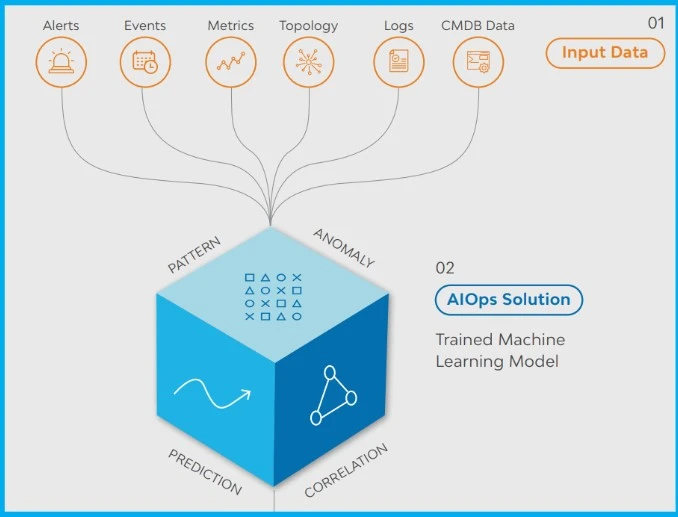
White Paper – Digital Transformation Powered by AIOps
IT Industry is helping IT adopt AIOps best practices with the AIOps white paper. Digital Transformation powered by AIOps whitepaper breaks the implementation down into a modular project to ensure that value is shown as early as possible.
AIOps platforms use big data, machine learning, and other advanced analytics technologies to enhance IT operations. Download the AIOps Whitepaper and learn six (6) simple steps to deploy an AIOps solution and transform your IT Operations successfully.
In the coming days, we will use Generative AI and Microsoft Copilot to perform more AI Ops-driven digital transformation.
We are on WhatsApp. To get the latest step-by-step guides and news updates, Join our Channel. Click here –HTMD WhatsApp.


Discussion