






Line Numbering in Word for the Web Automatically Adding Incrementing Numbers
Today, I want to discuss about the Line Numbering in Word for the Web Automatically Adding Incrementing Numbers. These changes give you more options and make the web version more similar to the desktop version. Line numbering is a feature in Word that adds numbers next to each line of a document.
Line Numbering makes it easier to reference specific lines. It is helpful for many documents that need clear organization, such as legal papers, academic essays, technical manuals, scripts, and documents that multiple people edit together.
Users often switch between the desktop versions of Word for Windows and Mac, and the web version while working on documents. Recent updates to line numbering in Word for the web make this process smooth and easy.
The above mentioned improvements are now available to all Word for the web users. In this blog post, I will explain the improvements to line numbering in Word and the Web, and how it affects our day-to-day work experience. Let’s start.


Table of Contents
What is Line Numbering in MS Word?
Give an Example of Line Numbering?
For example: Line number 15.35 refers to page 15, line 35.
Line Numbering in Word for the Web Automatically Adding Incrementing Numbers
Line numbering is a feature in Word that automatically adds numbers to the margin of your document, next to each line of text. This helps keep your document organized and makes it easier to reference specific parts. It benefits legal documents, academic papers, technical manuals, scripts, screenplays, and documents involving multiple contributors.
Let’s check How it Works
To check how the line numbering feature works in a Word document, open the document where you want to add line numbers.
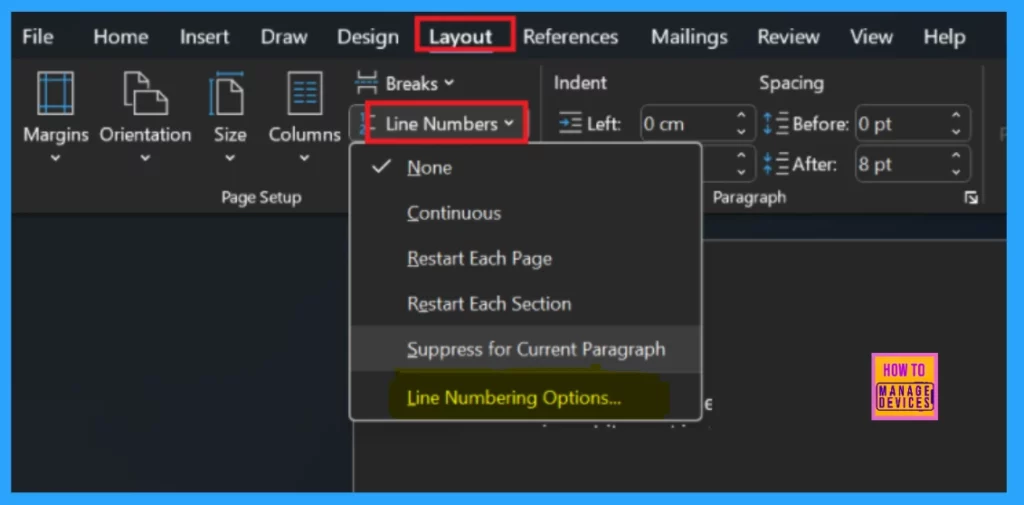
- Select Line Numbers from the Layout tab.
- Choose options from the dropdown menu or click on Line Numbering Options for more customization.
- Top 83 Windows 11 Desktop Admin Interview Questions
- Easy Steps To Convert Word Documents Into PDF Format
- How to Change Size of Desktop Icon in Windows 11
When you choose Line Numbering Options, you can adjust several settings which is showed in the below table.
| Line Numbering Options |
|---|
| Margins |
| Paper |
| Layout |
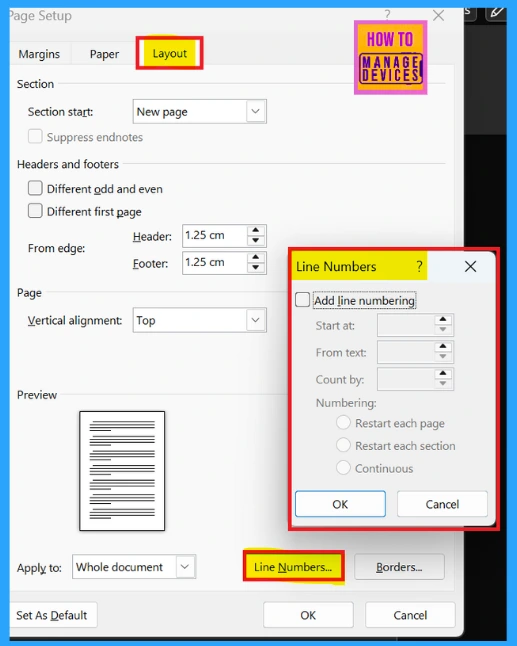
You should select Layout Settings here. Under Layout, click on Line Numbers, and a pop-up window will appear. Now you can change several settings.
- First, you can pick which page to start numbering from.
- You can also change the space between the numbers and the text.
- Next, you can set how much the numbers increase by, known as the Count by option.
Finally, you can decide if you want the numbering to restart after each page, each section, or continue through the entire document. Then hit to OK.
Need Further Assistance or Have Technical Questions?
Join the LinkedIn Page and Telegram group to get the latest step-by-step guides and news updates. Join our Meetup Page to participate in User group meetings. Also, Join the WhatsApp Community to get the latest news on Microsoft Technologies. We are there on Reddit as well.
Author
Anoop C Nair has been Microsoft MVP for 10 consecutive years from 2015 onwards. He is a Workplace Solution Architect with more than 22+ years of experience in Workplace technologies. He is a Blogger, Speaker, and Local User Group Community leader. His primary focus is on Device Management technologies like SCCM and Intune. He writes about technologies like Intune, SCCM, Windows, Cloud PC, Windows, Entra, Microsoft Security, Career, etc.




Discussion