






Maximum Number of Apps Supported by Intune MEM | Hard Limit Error Details
Let’s understand the maximum number of Apps supported by Intune. In this post, we will see whether there is any limit when creating apps and what is the upper limit for each type of application in Intune. There is an excellent Twitter thread by Scott McAllister on this topic and more details are below.
There are different kinds of applications in Intune, and those application types support major device platforms such as Windows, iOS, Android, macOS, and Linux (coming soon). Each platform supports many application types; hence it’s important to understand the maximum number of apps supported by Intune.
The Intune-supported application types include Apple, Windows, and iOS store apps. These types of apps can grow pretty fast in the coming years. The application maintenance and life cycle management SOP must be in place to keep control of app deployment.
We have not heard about any hard limit on the maximum number of apps supported by SCCM (aka ConfigMgr). We will see more details on the upper limit on the number of applications that can be created in Intune in the below section.

Intune Application Types
Intune supports all the major device platforms, as mentioned above, and each device platform supports various application types. So the upper limit or the maximum number of apps supported is important.
Intune keeps adding support to new app deployment types now and then. The main app deployment types are MSI, MSIX, APPX, IntuneWin, etc. Let’s quickly look at the following list of supported Intune app deployment types.
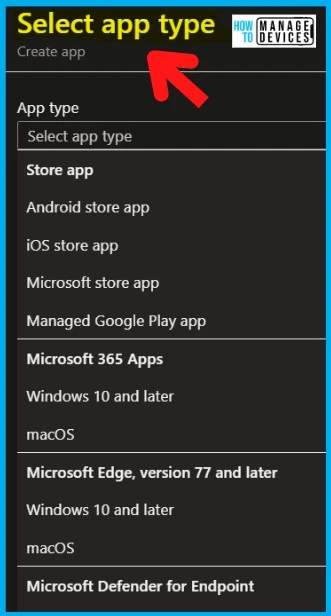
There are 4 (four) types of store applications that are supported by Intune. You can sync store applications to Intune MEM Admin center using the connector. For example, if you sync 5 applications from Microsft Store for Business (MSfB), the sync creates 5 new apps in Intune.
- Store App
- a) Android Store App
- b) Microsoft Store App
- c) iOS Store App
- d) Managed Google Play App
The following are very specific application types for Microsoft 365 apps, Microsoft Edge, and Microsoft Defender for Endpoint (MDE).
- Microsoft 365 Apps
a) Windows 10 and Later
b) macOS - Microsoft Edge, version 77 and later
a) Windows 10 and Later
b) macOS - Microsoft Defender for Endpoint (MDE)
a) Windows 10 and Later
b) macOS
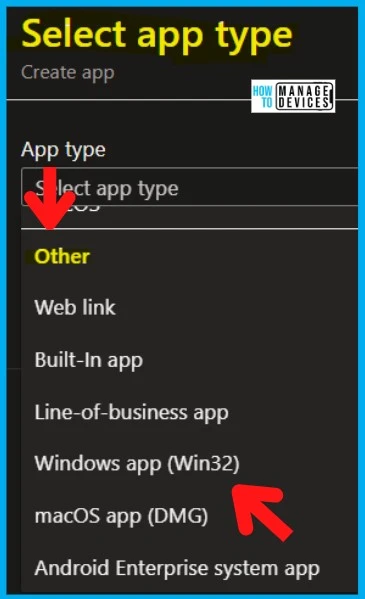
The following are the rich application for each platform, such as Windows, iOS, macOS, etc. In my experience, these are the most common applications used in Intune. I see IntuneWin (Win32) apps will be the maximum number of applications created in Intune.
- 3. Other Options
- a) Web link
- b) Built-in app
- c) Line of Business app (.MSI, .MSIX, .APPX, APK, IPA, .PKG, .intuneMac, etc.)
- d) Windows app (IntuneWin – Win32)
- e) macOS app (.DMG, .APP)
- f) Android Enterprise System App
Maximum Number of Apps Supported by Intune MEM
Yes, there is a hard limit on the maximum number of apps supported by Intune. These maximum numbers are confirmed by Intune Support team on Twitter. The upper limit on the supported number of apps is an aggregated number of all the applications created in Intune.
The aggregated numbers mean the total number, including all the apps created within Intune tenant. The Store Apps, Defender, Edge, Office, and Other types are included in the total number of apps.
Scott McAllister confirmed a hard limit on the maximum number of apps supported by Intune. As per his testing, 10034 is the maximum number of apps allowed in Intune.
Updated on 5:30 PM UTC 1st Sep 2022 – Scott published a blog post also on his experience – Hitting the max application limit in Intune | ScotScottMcA.
| License | Maximum Number of Apps? | Remarks |
|---|---|---|
| Trial License | 500 | This limit is applicable only for the trial version of Intune |
| Production License (Paid) | 10000 | 10034 is the total number of apps that can be created in Intune |
Microsoft confirmed that Synced applications (iOS VPP, MSfB) don’t count toward the limit. However, Scott tested and confirmed that the syncs apps are also counted towards the limit.
Hard Limit on Error During Intune App Creation Process
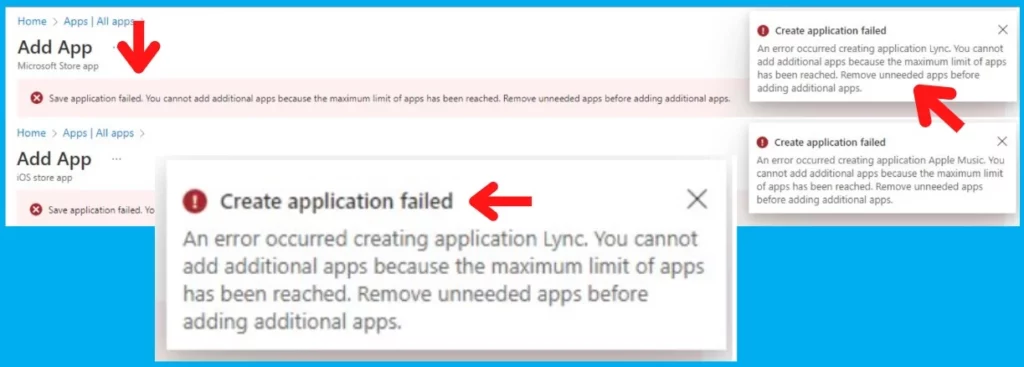
There is a hard limit on the maximum supported Intune apps you can create for a paid trial tenant. Let’s check the error messages when you create more than 10034 apps in Intune.
Save application Failed – You cannot add additional apps because the maximum limit of apps has been reached. Remove unneeded apps before adding additional apps.
Create Application Failed – An Error occurred creating the application “Store app name.” You cannot add additional apps because the maximum limit of apps has been reached. Remove unneeded apps before adding additional apps.
Author
Anoop C Nair is Microsoft MVP! He is a Device Management Admin with more than 20 years of experience (calculation done in 2021) in IT. He is Blogger, Speaker, and Local User Group HTMD Community leader. His main focus is on Device Management technologies like SCCM 2012, Current Branch, and Intune. He writes about ConfigMgr, Windows 11, Windows 10, Azure AD, Microsoft Intune, Windows 365, AVD, etc.


Discussion