Skip to content
Maximum Size Cap for Intune Win32 App is Increased Now

Maximum Size Cap for Intune Win32 App is Increased Now

Written By Gopika S Nair
Last Updated January 19, 2024
Posted In Intune
SHARE

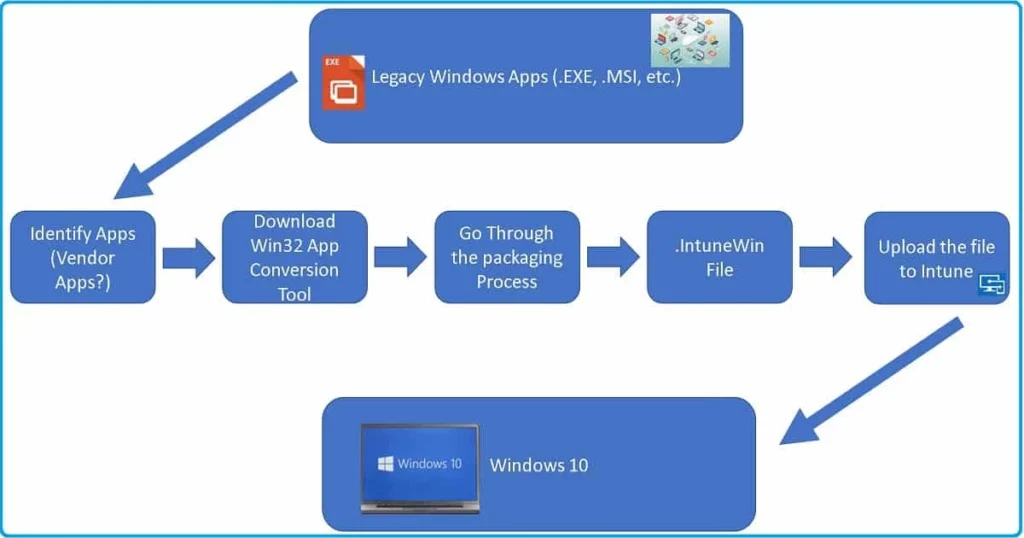
Exciting News! The maximum size cap for the Intune Win32 App has increased now. Microsoft allows users to deploy larger applications to their Windows devices. Win32 is the 32-bit application programming interface (API) for the 32-bit version of Windows.

The file size of the Win32 Apps is one of the significant problems affected by Users. Before last month, users could only add a maximum of 8GB of file size for the Intune Win32 App. This was the major limitation of the Intune Win32 App.

Now, users can add more significant files than 8GB because Microsoft increased the Maximum Size Cap for the Intune Win32 app from 8GB to 30 GB. It is excellent news for users and is used to deploy a large Win32 app to Microsoft Intune.

Many Prerequisites are needed Before adding a Win32 App in Microsoft Intune. Windows application size must not be greater than 30GB per app. This blog post will help you learn more about the Intune Win32 App.

Patch My PC
Maximum Size Cap for Intune Win32 App is Increased Now - Fig.1
Maximum Size Cap for Intune Win32 App is Increased Now – Fig.1

Maximum Size Cap for Intune Win32 App is Increased Now

Microsoft Intune now allows users to deploy a 30GB size app. You must follow the prerequisites for the Win32 app up to 30GB. The following are the prerequisites of Win32 app management.

Prerequisites for the Win32 App
Admins must use Windows 10 version 1607 or later (Enterprise. Pro, or Education editions)
You can use Microsoft Entra registered for enrollment
Microsoft Entra joined
The device must be enrolled in Intune
Maximum Size Cap for Intune Win32 App is Increased Now – Table.1
Maximum Size Cap for Intune Win32 App is Increased Now - Fig.2
Maximum Size Cap for Intune Win32 App is Increased Now – Fig.2

We are on WhatsApp. To get the latest step-by-step guides and news updates, Join our Channel. Click here – HTMD WhatsApp.

Author

Gopika S Nair is a computer enthusiast. She loves writing on Windows 11 and related technologies. She is here to share quick tips and tricks with Windows 11 or Windows 10 users. She is Post Graduate Diploma Holder in Computer Science.

Written by

Gopika S Nair is a computer enthusiast. She loves writing on Windows 11 and related technologies. She is here to share quick tips and tricks with Windows 11 or Windows 10 users. She is Post Graduate Diploma Holder in Computers Science.

Discussion

Join the discussion

Your email address will not be published. Required fields are marked *

Related guides

Intune

Simplify Windows Devices to Run Only the Required Applications using Intune

Key Takeaways Hey, let’s learn about Simplify Windows Devices to Run Only the Required Applications using Intune. This policy lets administrators replace the default windows shell with a custom or lightweight shell. it improves performance by using system resources and is useful for devices that run a dedicated application. If the policy is disabled or […]

AC Anoop C Nair 8 min read
Intune

Enhance macOS Compliance with Custom Security and Compliance Checks to Improve Device Security using Microsoft Intune

Key Takeaways In this post we are discussing about Enhance macOS Compliance with Custom Security and Compliance Checks to Improve Device Security using Microsoft Intune. Microsoft has announced the general availability of Custom Compliance Settings for macOS in Microsoft Intune. The feature helps organizations strengthen security controls while supporting many types of macOS management scenarios. […]

AC Anoop C Nair 4 min read
Intune

Manage Samsung Galaxy Firmware Versions to Improve Security and Compliance using Microsoft Intune

Key Takeaways In this post we are discussing Manage Samsung Galaxy Firmware Versions to Improve Security and Compliance using Microsoft Intune. Microsoft Intune has received a new update that expands firmware management capabilities for Samsung Galaxy devices through Firmware Versionsintegration. This enhancement gives IT administrators more control over firmware and operating system updates, helping them […]

AC Anoop C Nair 4 min read
Intune

MS Intune Adds Windows Registry Data Collection to Device Inventory for Single Values All Key Values and Subkeys

Key Takeaways Microsoft Intune 2607 introduces Windows Registry Data collection in Device Inventory, allowing IT admins to verify actual device configurations without relying on custom discovery or remediation scripts. Using the Properties Catalog, admins can collect registry information through Single Value, All Values Under a Key (Non-Recursive), or Same Value Across Subkeys. MS Intune Adds […]

AC Anoop C Nair 5 min read