






Microsoft 365 Copilot BizChat AI Assistant Work and Web Model
Today, I will explain Microsoft 365 Copilot BizChat. Microsoft 365 Copilot uses AI to help you get more creative, productive, and skilled in a chat-based experience with your work data and apps.
Business Chat (BizChat) is the core of Microsoft 365 Copilot. It combines all your work – chats, emails, and files. You can use it in the Microsoft 365 app, Microsoft Teams, and Outlook. It’s flexible and pulls in both web and work data.
Copilot uses a large language model that imitates natural language based on patterns from extensive training data. The model is enhanced for conversation using Reinforcement Learning with Human Feedback (RLHF). When you type something into Copilot, it suggests what should follow. It’s based on a domain-specific language (DSL) that lets you specify the information you want from your Microsoft 365 data or the web.
AI is a new and exciting technology that is still in early development. Microsoft is working to improve its features. Sometimes, Copilot makes mistakes, so reviewing the content it generates is important.


What are the Differences Between the Work and the Web Model in BizChat?
In Work Mode: When you use Copilot in work mode, it responds based on work-related data. Through the Microsoft Graph, Copilot can help you access organisational resources or content, like documents in OneDrive, emails, and other data. This mode allows you to handle tasks such as drafting emails, creating documents, managing your calendar, and collaborating with colleagues.
In Web Mode: When in web mode, Copilot selects data from the public web in the Bing search index. This mode combines the power of generative AI with the latest web information, making it great for research, finding resources, and keeping up with the latest news and trends.
How to Log On to the Copilot BizChat
You can log on to the BizChat experience in various ways, including in web, mobile, and desktop versions of the Microsoft 365 app, Microsoft Teams, and Outlook. You can also access it at Microsoft365.com/copilot.
- Microsoft Announces Major Microsoft 365 Pricing And Packaging Changes Coming In Mid-2026
- What is Copilot in Windows 11 | Features Advantages Disadvantages
- Most Asked 54 Windows 365 Cloud PC Interview Questions and Answers
- Top 83 Windows 11 Desktop Admin Interview Questions
Functionalities of BizChat
The following are the functionalities of the Copilot BizChat:
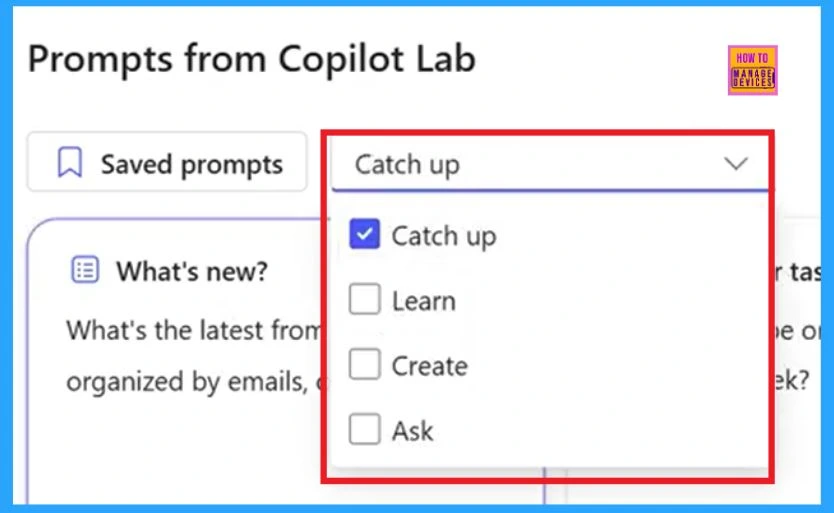
Catch Up on Things
Business Chat (BizChat) lets you quickly get summaries and catch up on important information. It can provide brief overviews of projects, meetings, email messages, chats, etc. It helps you find due projects, get project updates, or quickly locate recent communications from a colleague or manager.
Quickly Generate Ideas and Draft Content
Copilot can help you generate ideas and draft content based on various materials, such as storyboards, scripts, agendas, or executive summaries. You can start by including the source material in your prompt.
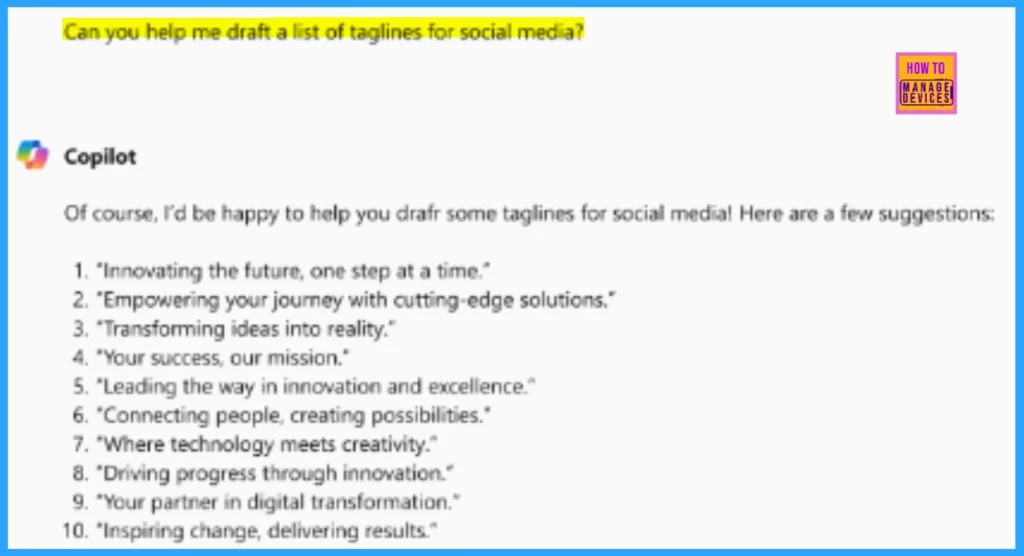
Get Quick Answers
Copilot allows you to become a search engine for specific files and messages or find information you know is out there but can’t remember where it’s stored. In such situations, you can ask questions and get answers using Business Chat. It finds the answers from files, meetings, chats, emails, the web, and your enterprise.
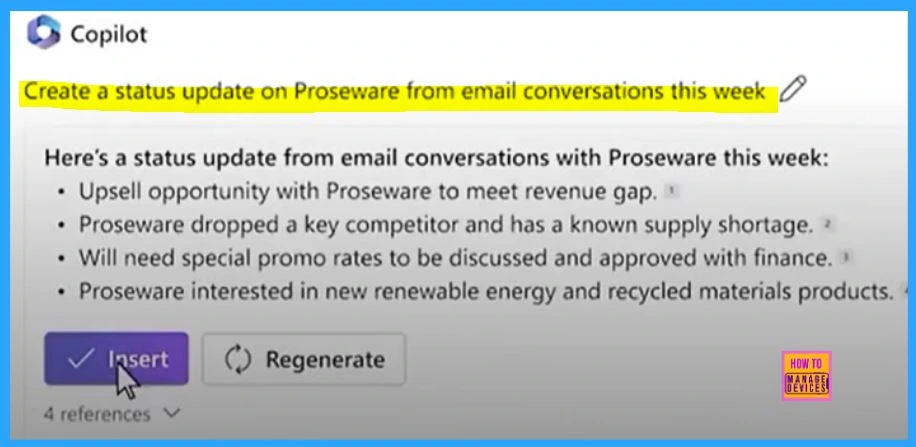
Prompt and Iterate
Creating a well-crafted prompt with clear instructions and specific factors is important to achieve better results. Increase the value with Copilot by being clear, concise, and specific about your requirements. Don’t settle for the first result you get. Keep refining and experimenting until you achieve the best possible outcome.
A prompt is your guide to Copilot. It includes
| Keys Points | How to be a guide |
|---|---|
| Goals | What you want to achieve. |
| Context | Relevant information. |
| Details | Specific instructions. |
| Data | Any input data you provide |
Tip: When you give Copilot instructions, just use the forward-slash (“/”) followed by the name of a file, person, or meeting. If you don’t mention a specific file, person, or meeting, Copilot will figure out the best data to use for its response, including all your work content.
Join the LinkedIn Page and Telegram group to get the latest step-by-step guides and news updates. Join our Meetup Page to participate in User group meetings. Also, Join the WhatsApp Community to get the latest news on Microsoft Technologies. We are there on Reddit as well.
Author
Anoop C Nair has been Microsoft MVP for 10 consecutive years from 2015 onwards. He is a Workplace Solution Architect with more than 22+ years of experience in Workplace technologies. He is a Blogger, Speaker, and Local User Group Community leader. His primary focus is on Device Management technologies like SCCM and Intune. He writes about technologies like Intune, SCCM, Windows, Cloud PC, Windows, Entra, Microsoft Security, Career, etc.



Discussion