






How to Use Microsoft Entra External ID for Security Operations
Let’s discuss How to Use How to Use Microsoft Entra External ID for Security Operations. Microsoft introduced Entra External ID (EEID) to manage external identities. It is a part of the Customer Identity and Access Management (CIAM) solution. It is generally available from May 15, 2024.
As we know, there are many threats and attacks faced by users in your organisation. Most of us are using Microsoft Edge, and many attacks are faced. This new platform helps you to mitigate edge-based attacks such as bot abuse, credential stuffing, and account takeovers.
This platform helps organisations to secure their organisation with a Customizable sign-in experience, native authentication, and advanced fraud protection with Microsoft Entra. And Entra External IDs is a rebrand of Azure AD B2C.
Entra External ID provide defence strategies to avoid commonly exploited Edge-based attacks. In this blog post I would like to help you to know more about how to use Microsoft Entra External ID (EEID) for Security Operations. With this blog post you can efficiently deploy Microsoft Entra External ID.

Table of Contents
How to Use Microsoft Entra External ID for Security Operations
Entra External Id deployment helps safeguard the sign-up and sign-in journeys from automated fraud, including credential stuffing and International Revenue Share Fraud (IRSF). It provides essential actions such as monitoring and alerting, continuous validation, usage tracking, and anomaly detection for early threat detection and response.
- 12 New Identity Secure Score Recommendations in MS Entra Strengthen Certificate Templates Entra Connect Accounts and More
- How Transport Layer Security TLS Inspection Works in Microsoft Entra Internet Access to Empower Security
- How to use Microsoft Entra Conditional Access in Edge for Business to Restrict Access to Compliant Devices
Features of Microsoft Entra External ID
Microsoft Entra External ID provide many features for you. It gives a customizable identity experience for your external identities, like customers, partners, and citizens. The following table shows the features.
| Features |
|---|
| Protection against DDoS and bot attacks |
| Layered defense model |
| WAF capabilities |
| Bot Defense |
| Credential Hygiene |
| Token Management |
| Geography-based access control |
Tenant Protection from DDoS and Bot Attacks
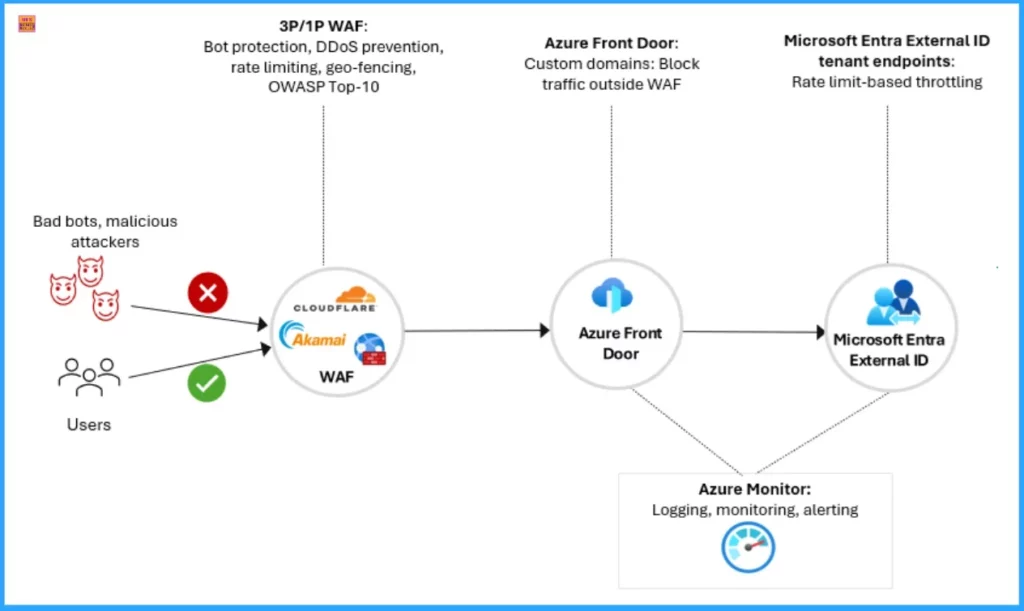
EEI helps to protect your tenant by providing a layered edge protection strategy. It includes sign-in and sign-up pages, which are exposed publicly and vulnerable to DDoS attacks and malicious bot activity.
- Anonymous End Points – Example (ciamlogin.com) are especially exposed to volumetric attacks and fraud, like credential stuffing.
- EEI Integration with Third Party WAF and Bot Mitigation – EEI integrate with third-party WAF and Bot mitigation and filters out bad traffic before it hits the authentication layer.
Web Application Firewall (WAF) Integration
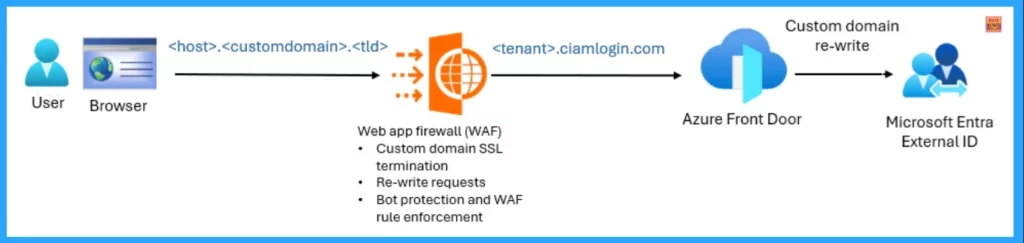
Web Application Firewall (WAF) Integration helps to avoid exposing public endpoints for sign-up and sign-in in Microsoft Entra External ID. The Primary targets are DDoS attacks, Credential stuffing and Bot-driven fraud. The following table shows the security controls and their descriptions in WAF.
| Security Control | Details |
|---|---|
| Rate limiting and adaptive throttling | It acts against volumetric and low-and-slow attacks. |
| DDoS protection | This control ensures built-in defence against Network-layer (Layer 3) and Application-layer (Layer 7) DDoS attacks. |
| Bot protection | It helps to help detect and prevent automated attacks using a range of enforcement options, from silent blocking to interactive challenges such as CAPTCHA or reCAPTCHA. |
| Geography (Geo)-fencing | Restricts traffic from high-risk or irrelevant regions. |
Need Further Assistance or Have Technical Questions?
Join the LinkedIn Page and Telegram group to get the latest step-by-step guides and news updates. Join our Meetup Page to participate in User group meetings. Also, join the WhatsApp Community to get the latest news on Microsoft Technologies. We are there on Reddit as well.
Resource
Microsoft Entra External ID deployment guide for security operations
Author
Anoop C Nair has been Microsoft MVP for 10 consecutive years from 2015 onwards. He is a Workplace Solution Architect with more than 22+ years of experience in Workplace technologies. He is a Blogger, Speaker, and Local User Group Community leader. His primary focus is on Device Management technologies like SCCM and Intune. He writes about technologies like Intune, SCCM, Windows, Cloud PC, Windows, Entra, Microsoft Security, Career, etc.




Discussion