





4 Powerful IT Operations in Microsoft Intune Admin Tasks Dashboard
Key Takeaways
- Microsoft Intune Admin Tasks Dashboard
- Handles elevation requests with granular controls (publisher, file hash, command-line).
- It includes EPM requests, Defender security tasks, Multi Admin Approval, and Device Offboarding tasks.
- It improves security, compliance, and audit tracking.
- It prepares organizations for AI-powered operations with proper admin control.
In this post we are discussing the,4 Powerful IT Operations in Microsoft Intune Admin Tasks Dashboard. Microsoft Intune has now made Admin Tasks available for everyone. This new feature brings all important admin work into one simple and easy dashboard. Instead of moving between different tools and portals, IT admins can now see and manage everything in one central place.
Table of Contents
4 Powerful IT Operations in Microsoft Intune Admin Tasks Dashboard
With this update, Microsoft is also getting ready for AI powered IT management. Even though automation and AI help make work faster, admins are still in control. Admin Tasks makes sure every important action is properly reviewed before it is completed.
- Software Update Patching Options With Intune Setup Guide
- Enable Automatic Updates For MacOS Devices Using Intune
- How to Block OS Updates on iOS Devices using Intune
| Four ways to IT operations with admin tasks |
|---|
| Endpoint Privilege Management (EPM) |
| Defender for Endpoint (MDE) Security Tasks |
| Device Offboarding Agent (Preview) |
| Multi Admin Approval (MAA) |
Endpoint Privilege Management
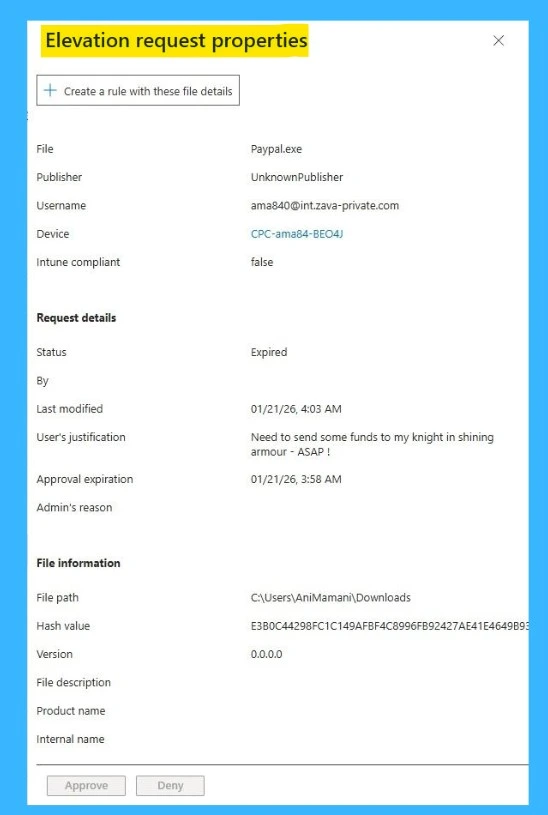
Endpoint Privilege Management allows standard users to run approved apps with elevated permissions without giving permanent admin rights. These elevation requests now appear directly inside Admin Tasks. Admins can approve or deny requests, create reusable rules, and define detailed controls based on file information. This reduces security risks while keeping users productive.
Defender for Endpoint Security Tasks
Defender for Endpoint (MDE) remediation requests generate security tasks that appear in the Intune admin center whenever threats or configuration issues are detected on devices. From this unified queue, admins can track, review.

| What MDE Security Tasks in Intune Enable | Info |
|---|---|
| Unified Task Management | Admins can view, track, and act on remediation tasks in the same queue used for other IT decisions. |
| Recommended endpoint security profiles | Supports new configurations for Endpoint Detection and Response (EDR) and Antivirus exclusions on Linux devices. |
| Audit and Compliance | Logs all task activities for visibility, reporting, and compliance. |
| Integrated Security Settings Management | Security tasks can recommend configuration changes and Admins can manage antivirus and EDR settings directly in Intune. |
Device Offboarding Agent for Cleaning Up Old Devices
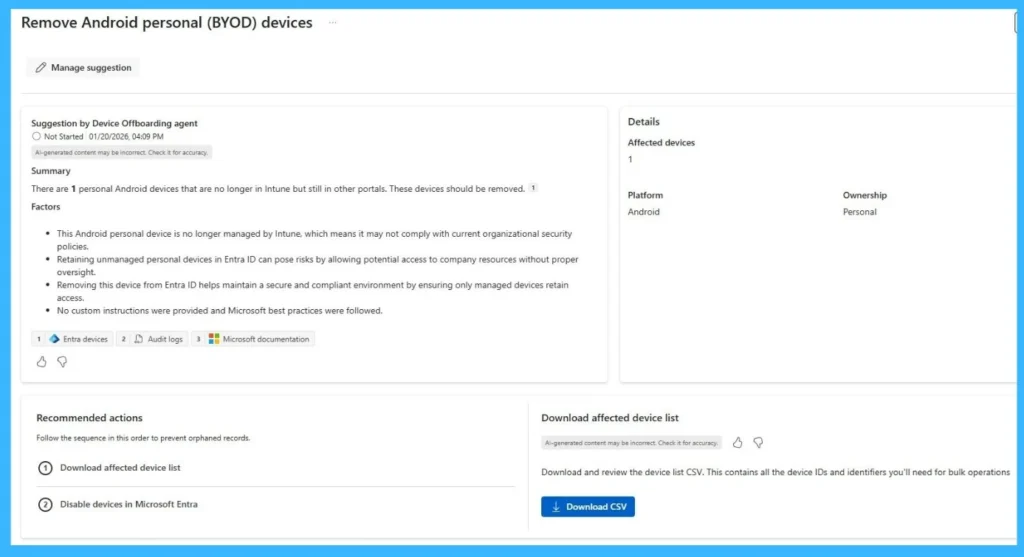
The Device Offboarding Agent, currently in preview, helps identify unused or outdated devices that may create security risks. It uses signals from Intune and Microsoft Entra ID to detect stale devices. Admins can review recommendations, download device lists, and disable identity objects if needed. This reduces the organization’s attack surface and keeps the device inventory clean and secure.
Need Further Assistance or Have Technical Questions?
Join the LinkedIn Page and Telegram group to get the step-by-step guides and news updates. Join our Meetup Page to participate in User group meetings. Also, Join the WhatsApp Community and WhatsApp Channel to get the latest news on Microsoft Technologies. We are there on Reddit as well.
Author
Anoop C Nair has been Microsoft MVP for 10 consecutive years from 2015 onwards. He is a Workplace Solution Architect with more than 22+ years of experience in Workplace technologies. He is a Blogger, Speaker, and Local User Group Community leader. His primary focus is on Device Management technologies like SCCM and Intune. He writes about technologies like Intune, SCCM, Windows, Cloud PC, Windows, Entra, Microsoft Security, Career, etc.


Discussion