Skip to content
How Color Coded Priority Levels Improve Threat Identification in Microsoft Defender

How Color Coded Priority Levels Improve Threat Identification in Microsoft Defender

Written By Anoop C Nair
Last Updated February 18, 2026
SHARE

Key Takeaways

  • SOC Efficiency with AI Driven Incident Ranking
  • AI powered incident prioritization is now available in public preview.
  • Each incident receives a score from 0 to 100.
  • The system explains why an incident is ranked at a certain level.

Today we are discussing How Color Coded Priority Levels Improve Threat Identification in Microsoft Defender. On January 8, 2026, Microsoft announced that AI powered incident prioritization is now available in public preview for all Microsoft Defender customers. The feature was first introduced at Microsoft Ignite last November. It helps security operations center (SOC)teams to handle alerts more easily.

Table of Contents

How Color Coded Priority Levels Improve Threat Identification in Microsoft Defender

You know the SOC is the one who monitoring, detecting, analyzing and responding to cybersecurity incidents across an organization. SOC analysts often deal with too many alerts at the same time. Many of these alerts look equally serious, even though they come from different tools or systems. When everything seems urgent, it becomes confusing to decide which issue should be checked first. This can slow down response time and add more stress to the team.

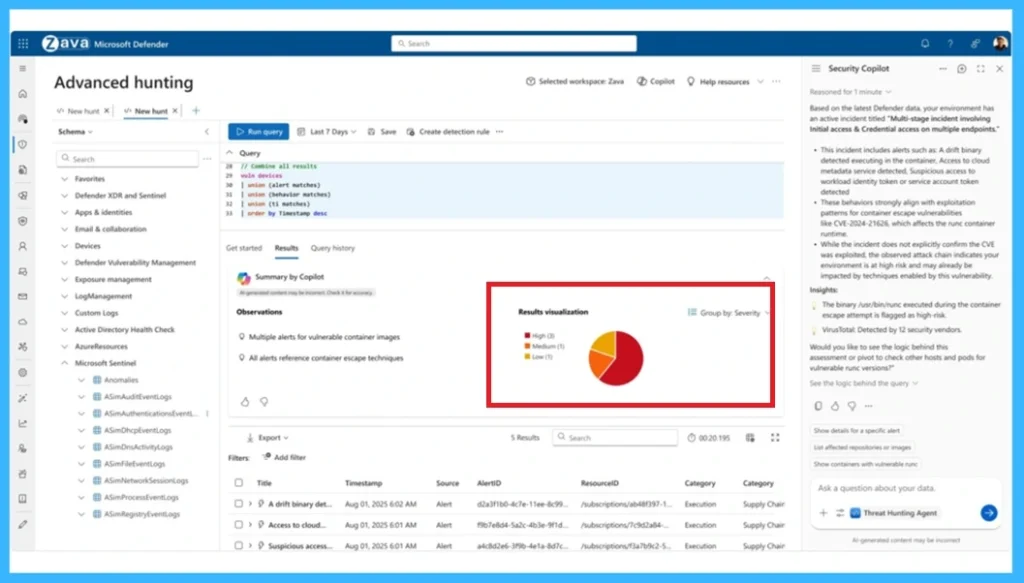
How Color Coded Priority Levels Improve Threat Identification in Microsoft Defender -Fig.1 Creds to MS

New Capability to Solve the Issue

To fix this Issue, Microsoft Defender now uses artificial intelligence to solve and rank incidents by importance. Instead of checking every alert one by one, analysts can quickly see which issues need immediate attention. This makes their work easier and faster.

  • Microsoft Defender now includes AI-powered incident prioritization, available in public preview.
  • The AI system assigns every incident a score between 0 and 100.
  • A higher score means the incident is more important and should be handled first.
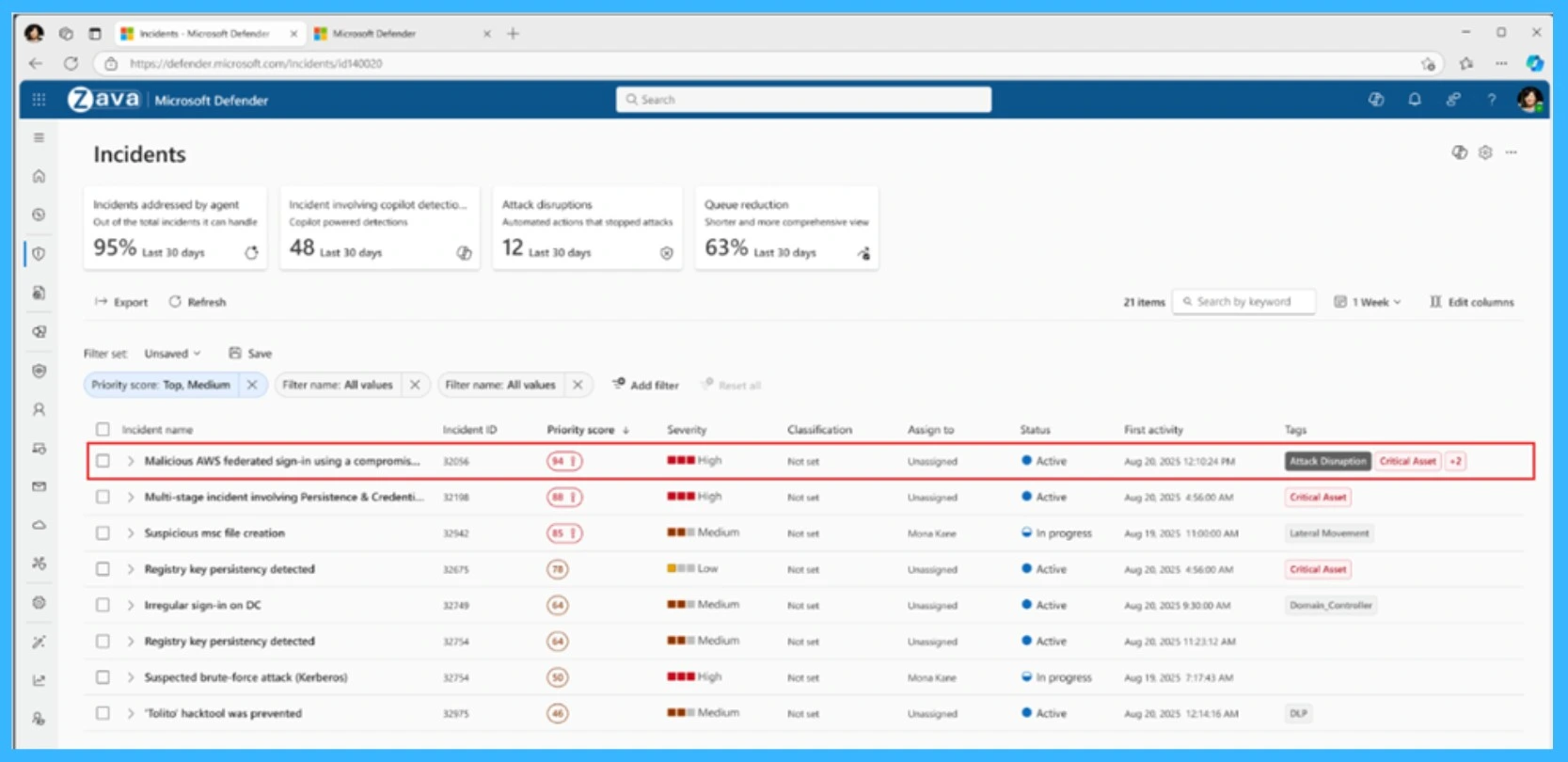
  • To make things even easier, the scores are color coded.
  • This color coed allows analysts to immediately focus on the most critical incidents while still keeping medium and low priority incidents visible
Color Coded Priority LevelsInfo
Red Top priority (> 85%)
OrangeMedium priority (15–85%)
GreyLow priority (< 15%)
How Color Coded Priority Levels Improve Threat Identification in Microsoft Defender- Table .1
How Color Coded Priority Levels Improve Threat Identification in Microsoft Defender -Fig.2 Creds to MS

Need Further Assistance or Have Technical Questions?

Join the LinkedIn Page and Telegram group to get the step-by-step guides and news updates. Join our Meetup Page to participate in User group meetings. Also, Join the WhatsApp Community  and WhatsApp Channel to get the latest news on Microsoft Technologies. We are there on Reddit as well.

Patch My PC

Author

Anoop C Nair has been Microsoft MVP for 10 consecutive years from 2015 onwards. He is a Workplace Solution Architect with more than 22+ years of experience in Workplace technologies. He is a Blogger, Speaker, and Local User Group Community leader. His primary focus is on Device Management technologies like SCCM and Intune. He writes about technologies like Intune, SCCM,  Windows,  Cloud PC,  Windows, Entra, Microsoft Security, Career, etc.

Written by

Anoop C Nair is Workplace Technology solution architect with 25+ years of experience in global enterprise organizations such as JP Morgan, Capgemini, etc. Microsoft Certified Trainer. Microsoft MVP from 2015 onwards for consecutive 11+ years! He also conducts Intune and modern workplace tech training for enterprise organizations. He is Blogger, Speaker, and Founder of HTMD Community and HTMD Conference. His main focus is on Device Management technologies like Intune, Windows, Cloud PC. He writes about technologies like Intune, SCCM, Windows, Cloud PC, Windows, Entra, Microsoft Security.

Discussion

Join the discussion

Your email address will not be published. Required fields are marked *

Related guides

Microsoft Defender for Endpoint

Microsoft Defender for Endpoint EDR Updates are now Separate from Monthly Windows Security Updates for Faster Protection

Key Takeaways In this post, we are discussing how Microsoft Defender for Endpoint EDR Updates Will Be Delivered Through Microsoft Update. Microsoft has introduced a new update model for Microsoft Defender for Endpoint Detection and Response (EDR) security updates. Previously, these updates were included with the monthly Windows security updates. This change enables Microsoft to […]

AC Anoop C Nair 5 min read
Microsoft Defender for Endpoint

Microsoft Defender Custom Data Collection Lets You Collect Custom Endpoint Logs Without Extra Agents

Key Takeaways: Let’s discuss about Microsoft Defender Custom Data Collection to Streamlined Telemetry without Extra Agent. Microsoft announced the general availability of Microsoft Defender Custom Data Collection. This feature is simplified collection of logging through the Defender agent itself. Microsoft Defender Custom Data Collection to Streamlined Telemetry without Extra Agent Admins can define which events […]

AC Anoop C Nair 3 min read
Intune

Manage Offline Security Updates for Linux using Microsoft Defender and Intune

Key Takeaways Manage Offline Security Updates for Linux using Microsoft Defender and Intune! Microsoft now allows admins to manage offline security intelligence updates for Linux devices directly from the Defender and Intune portals. Admins can configure how Linux devices receive Defender security updates without using manual command-line configurations on each device. Configure Offline Security Intelligence […]

AC Anoop C Nair 3 min read
Microsoft Defender for Endpoint

New Selective Response Actions Improve Safer Device Onboarding in Microsoft Defender for Endpoint

Key Takeaways Selective Response Actions is a new Preview feature in Microsoft Defender for Endpoint that gives organizations better control over security response actions during device onboarding. It helps IT and security teams apply high-impact actions more carefully on Tier-0 systems and other important devices, improving protection while maintaining operational stability. New Selective Response Actions […]

AC Anoop C Nair 3 min read