






Exciting News! Microsoft Intune has Enhanced Template Import Functionality. The latest update, released in February 2024, introduces significant enhancements to this functionality.
With this update, administrators can easily import up to 20 custom ADMX and ADML Administrative Templates, simplifying policy management and ensuring consistency across devices and users.
With these improvements, Microsoft Intune has expanded its capabilities in managing administrative templates (ADMX and ADML files). This update allows IT admins to import ADMX and ADML administrative templates more effectively and flexibly.
These templates are crucial for configuring policy settings for Windows devices. You can easily import third-party ADMX and ADML templates into the Intune admin center.

After importing the ADMX and ADML templates, you can easily create configuration policies using these settings. You can also assign them to your managed devices; this policy now applies to Windows 10 and 11.
The Administrative Templates offer an efficient way to manage policies in Microsoft Intune. This feature enhances the customization and control of policies for Windows devices managed through Intune.
- Disable Saving Passwords in Google Chrome using ADMX Templates Intune
- Add New PowerToys ADMX Group Policies to Windows Central Store | Download ADMX and ADML Files
- ADMX Group Policy Templates for Office 365 All Office Versions
Microsoft Intune has Enhanced Template Import Functionality
We previously published more about this ADMX and ADML Administrative Templates feature. In the 2402 update, a significant improvement was made to this feature, and Microsoft Intune has enhanced the ADMX File Upload Limit to 20. Previously, IT admins could only upload 10 files.
See More: Import Custom ADMX Administrative Templates in Intune MEM Portal
| Num | Limitations of Importing Custom ADMX Administrative Templates |
|---|---|
| 1 | You can upload a maximum of 20 ADMX files |
| 2 | Each file must be 1 MB or smaller |
| 3 | For each ADMX file, only one ADML file can be uploaded. |
| 4 | Currently, only en-us ADML files are supported for localization |
| 5 | Each ADMX file supports one language |
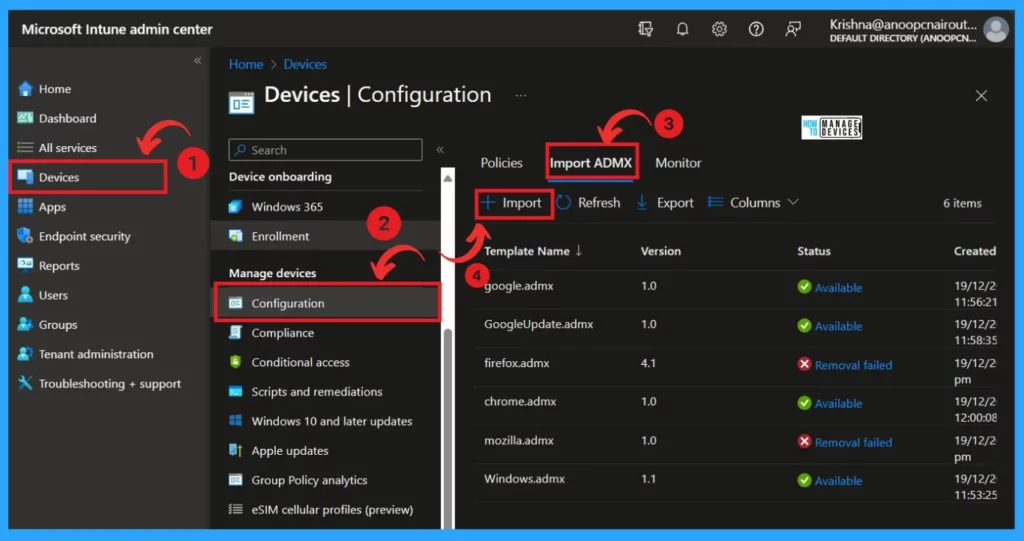
You can import custom and third-party ADMX and ADML templates into the Intune admin center to create device configuration policies. You must Sign in to the Microsoft Intune admin center to do this.
- Select Devices > Configuration profiles > Import ADMX > click Import
- FIX Intune Admx File Upload Error Referenced not found NamespaceMissing
- Manage Zoom Settings using Intune Administrative Templates
- Download Microsoft Edge ADMX Group Policy Templates
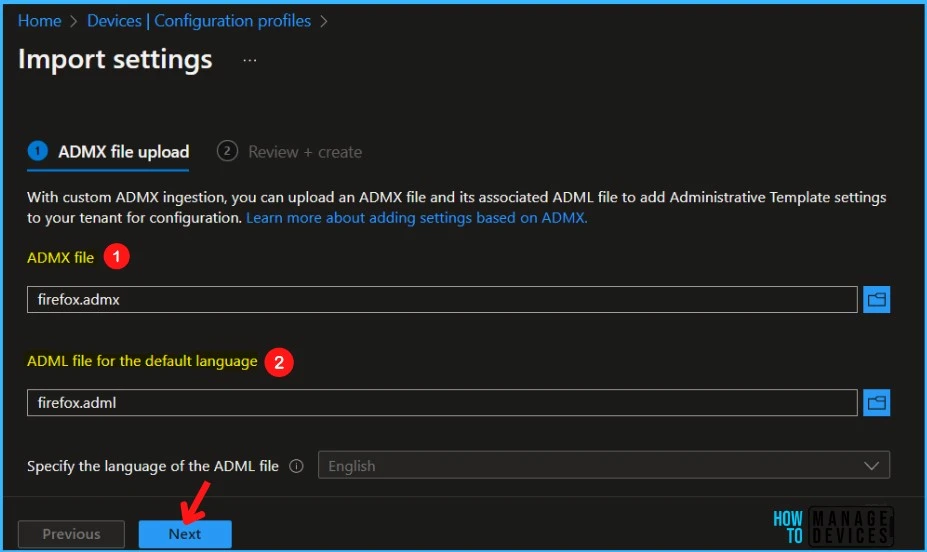
After Clicking on Import, you will get another window where you can Import settings. With custom ADMX ingestion, you can upload an ADMX file and its associated ADML file to add Administrative Template settings to your tenant for configuration.
- Select ADMX file ( Now you can upload 20 ADMX Files, and each 1 MB or smaller can be uploaded)
- Choose the ADMXL file for the default language
- Click on the Next
Read More: Microsoft Intune 2402 New Features February Update
Note: Each ADMX file supports one language
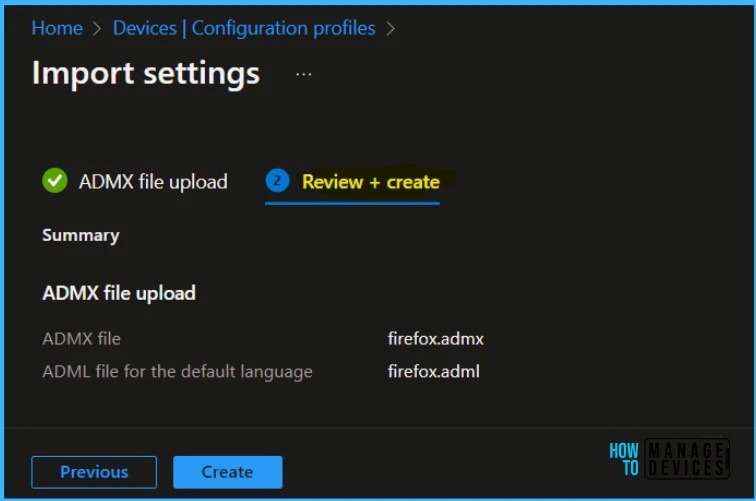
After importing, you can get a Review+ create window and create a profile; in this step, you can verify the files you added. When everything is fine, you can click Create to import the files.
Reference
What’s new in Microsoft Intune
Import custom ADMX and ADML administrative templates into Microsoft Intune (public preview)
We are on WhatsApp. To get the latest step-by-step guides and news updates, Join our Channel. Click here –HTMD WhatsApp.
Author
Krishna. R is a computer enthusiast. She loves writing about Windows 11 and Intune-related technologies and sharing her knowledge, quick tips, and tricks about Windows 11 or 10 with the community.


Discussion