






Microsoft Offering Ultra High Speed Backup and Recovery for OneDrive SharePoint and Exchange Data
Let’s discuss Microsoft 365 Backup and 365 Storage, which are generally Available. Microsoft is offering ultra-high-speed backup and recovery for OneDrive SharePoint and Exchange Data.
Microsoft announced that Microsoft 365 Backup and the underlying developer-focused Microsoft 365 Backup Storage platform enhance users’ self-service recovery capabilities.
The General Availability (Worldwide) of Microsoft 365 Backup and 365 Storage will begin rolling out on July 31st, 2024, and is expected to be completed by mid-August 2024. Over many years, Microsoft 365 users have faced ransomware attacks and the increasing scale of impacted data.
So, customers wish to get enhanced self-service capabilities over extended periods. Finally, Microsoft introduced Microsoft 365 Backup and 365 Storage, delivering capabilities to help you address these growing challenges.

As you all know, Microsoft 365 is designed to ensure high availability, disaster recovery, security, and data privacy. By introducing Microsoft 365 Backup and Microsoft 365 Backup Storage, they offer ultra-high-speed recovery of your OneDrive, SharePoint, and Exchange data and restore Microsoft 365 data at scale.

Microsoft Offering Ultra High Speed Backup and Recovery for OneDrive SharePoint and Exchange Data
Microsoft 365 Backup and 365 Storage enhance users’ experience and increase productivity. Microsoft 365 Backup is being rolled out in all commercial cloud environments. These 2 platforms will help users to protect their data and ensure privacy.
| Microsoft 365 New Features | Details |
|---|---|
| Microsoft 365 Backup | Provides performant backup and recovery for your critical active data to maintain business continuity at speeds orders of magnitude faster than with traditional migration-based backup methodologies. |
| Microsoft 365 Backup Storage | It gives third-party backup developers a way to provide you with the same benefits of the native Microsoft 365 Backup solution through their own integrated application. |
- Significant Impact Accessing Microsoft 365 Apps and Windows 365 Services
- Organizational Messages Now Available on Microsoft 365 Admin Center
- Simplified Troubleshooting with Microsoft 365 App Remote Diagnostics in Intune
- Microsoft Introducing Multi-Tenant Organization Capabilities in Microsoft 365
Microsoft 365 Backup
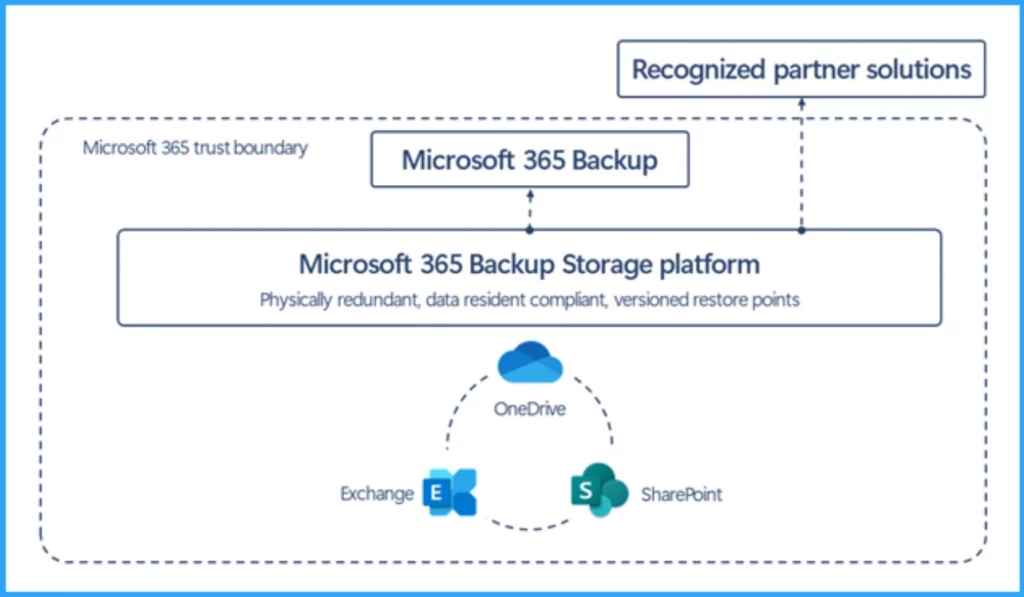
Microsoft 365 Backup provides ultra-high-speed recovery of your OneDrive, SharePoint, and Exchange data. Because this backup is kept within the Microsoft 365 trust boundary, security breach surfaces, and excessive application data access is limited.
- It offers fast backup with frequent recovery points and low average recovery times at a mass scale.
- It is 20 times faster than traditional backup methods
- It is sold as a standalone pay-as-you-go (PAYGO) solution with no additional license requirements.
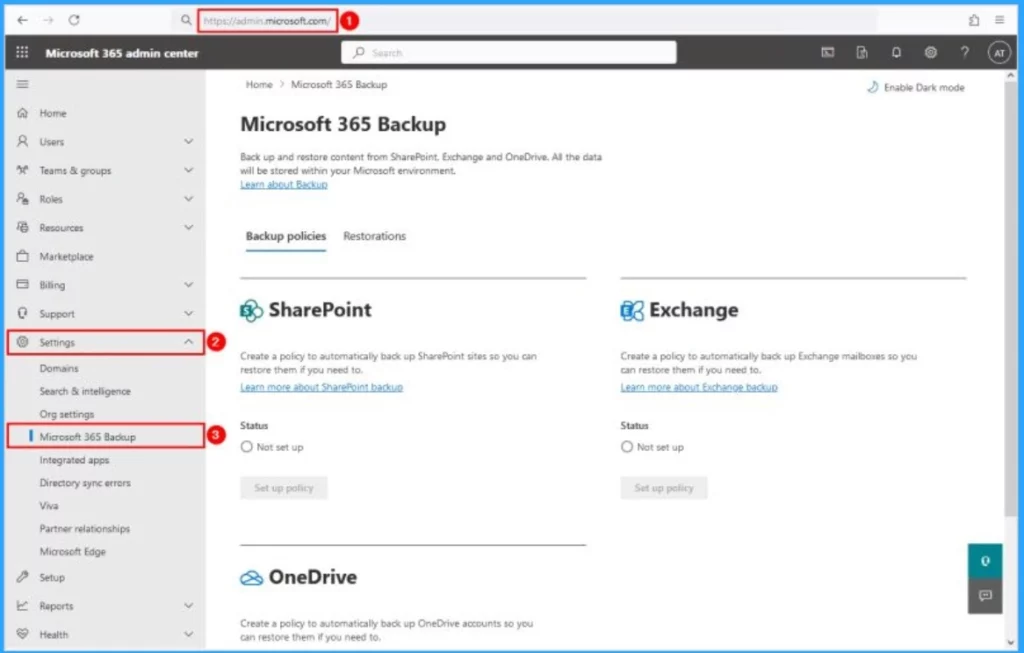
- Microsoft 365 Backup can be accessed on the Microsoft 365 admin center
- Expand Settings
- Click on Microsoft 365 Backup
Microsoft 365 Backup Storage
Microsoft Recommends that users prefer the Microsoft 365 Backup Storage platform for backing up and restoring Microsoft 365 data at scale. This platform allows independent software vendors (ISVs) to build applications using the Microsoft 365 Backup Storage APIs.
- Microsoft 365 Backup Storage will be the best choice for storing and recovering a healthy state of end customer data to restore business continuity as quickly as possible after an attack.
Partner Solutions
Microsoft 365 partners offer robust and integrated solutions that combine Microsoft 365 with other data sources, all within one interface.
Using Microsoft 365 Backup Storage, these partner applications ensure fast backup and restore operations. The partners are AvePoint, Cohesity, Commvault, Rubrik, Veeam, Veritas, and more to come.
How This Will Affect Your Organization
These features will bring many changes to your organization, especially improvements in Speed, security, and privacy. The following list shows the details.
- Speed – It has quick restore and allows users to recover healthy state of their data in hours instead of weeks or months.
- Privacy and Security – As I mentioned above, Microsoft 365 Backup data is stored in the Microsoft 365 trust boundary.
- The Microsoft 365 Backup storage API platform limits its scope to just backup and restore operations. You do not have to grant an application overly permissive access to all of your private data.
- Create Sensitivity Labels in Microsoft 365 to Protect Corporate Data
- Unable to download multiple files from SharePoint and OneDrive
- Outlook Teams OneDrive Outage Windows IIS DOS Attempt because of Cisco Meraki Issue?
What You Need to Do to Prepare?
There is no preparation needed for this. The rollout will automatically occur, with no admin action required. You may want to notify your users about this change and update any relevant documentation as appropriate.
We are on WhatsApp now. To get the latest step-by-step guides, news, and updates, Join our Channel. Click here. HTMD WhatsApp.
Author
Anoop C Nair has been Microsoft MVP from 2015 onwards for 10 consecutive years! He is a Workplace Solution Architect with more than 22+ years of experience in Workplace technologies. He is also a Blogger, Speaker, and leader of the Local User Group Community. His main focus is on Device Management technologies like SCCM and Intune. He writes about technologies like Intune, SCCM, Windows, Cloud PC, Windows, Entra, Microsoft Security, Career, etc..




Discussion