






Recently I faced a Microsoft Teams Meeting Disconnection CoreError Layout Loading Chung 7520 Failed after upgrading to a new Microsoft Teams Client. I have not seen this error before, so I thought of having a quick documentation and solution.
The new MS Teams clients come up with unique architecture and components. The new Teams client is based on Fluent (Web Client), React (Web Client), Client Data Layer (Web Client), and WebView2 (Host).
As per Microsoft, the New Microsoft Teams client is 2X Faster and has 50% fewer resources. Also, Microsoft claims that it uses 50% less memory and 70% less disk space.
Microsoft also plans to release the new Teams client version to other platforms. The optimized Teams client will soon be available for Mac, VDI, EDU, and web platforms.

CoreError Layout Loading Chung 7520 Failed Issue
I got disconnected from the Teams meeting, and the disconnection received the following error in the MS Teams meeting window. In normal with the legacy Teams client, this kind of meeting disconnection error is handled a bit differently.
The legacy client normally tries to reconnect to Teams services more times than the New Teams Client, as per my experience. It’s the preview version of the New Teams client; hence these can happen.
ERROR: We’ve run into an issue. Oops, something went wrong! [CoreError Layout_Error][Error:Loading chunk 7520 failed after 1 tries.
- Configure log files for monitoring and troubleshooting in Teams – Microsoft Teams | Microsoft Learn and Browser logs and tracing for Teams – Microsoft Teams | Microsoft Learn
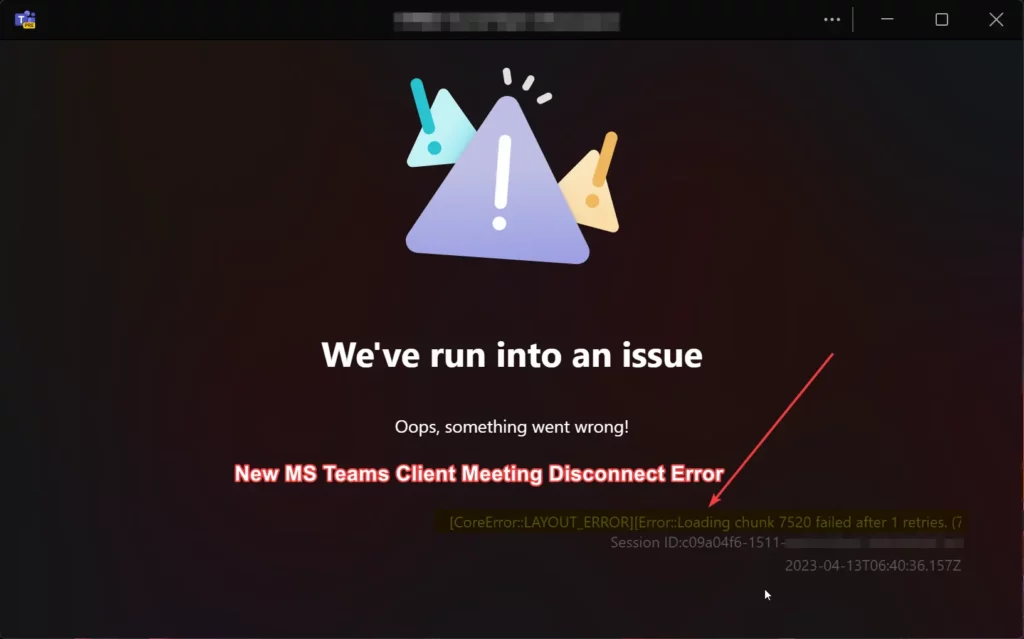
FIX Microsoft Teams Meeting Disconnection Issue
I know the cause of the Microsoft Teams Meeting Disconnection CoreError Layout Loading Chung 7520 Failed error. This error is because of a sudden internet and external monitor connection failure. But as I mentioned above, this experience differs from the legacy Teams client.
The New Teams client gave me the error CoreError Layout Loading Chung 7520 Failed after the first retry. I expected more retries before just showing me the above error message.
Video – New Teams Client Rollout options
From the following video, let’s learn more about New Microsoft Teams Client Experience Teams Admin Center Policy for New Client Rollout.
It’s worth waiting for the General availability of new clients to improve the client’s stability and resolve the issues such as Microsoft Teams Meeting Disconnection. As per Microsoft, A high-performing, more secure Microsoft Teams was invented after Years of research, benchmarking, and prototypes helped us find the right modern tech to deliver a high-performing Teams app that’s also more secure and easier to manage.
In the new Teams, users can switch between apps, respond to chat messages, join meetings and call more quickly while using less battery and memory. They improved meeting quality and craft for more efficient meetings—partial data model to enhance screen rendering.
Hardened security, including Trusted Types and a stronger Content Security Policy, that better protects against the latest attacks is one of the other key features that Microsoft is betting on with the new Teams client. However, we still face issues similar to Microsoft Teams Meeting Disconnection.
Author
Vidya is a computer enthusiast. She is here to share quick tips and tricks with Windows 11 or Windows 10 users. She loves writing on Windows 11 and related technologies. She is also keen to find solutions and write about day-to-day tech problems.




Discussion