






Monitor ConfigMgr Client Status from SCCM Console | Online | Offline
Let’s monitor the ConfigMgr Client Status from the admin console. This shall help the SCCM admin to understand the Configuration Manager client on Windows 10 devices. The following techniques can be used to monitor health from the SCCM console.
Categorizing clients based on their relationship with your business using client status can significantly enhance your client management capabilities. This allows you to filter clients by status effectively, create targeted marketing campaigns, and more.
The SCCM Client Versions section provides information on the number of computers running specific Configuration Manager versions, while the SCCM Client Health Status section presents counts of clients flagged as healthy or in error by Configuration Manager.
The online status icon indicates that the device is online, while the offline status icon signifies that the device is offline. The unknown status icon indicates that the client’s online status is unknown, and the client’s absence is denoted by the “client isn’t installed” icon on the device.

| Index |
|---|
| Online Offline Time Check |
| Online Status Icon |
| Offline Status Icon |
| Unknown Status Icon |
| The client is NOT Installed |
| Resources |
Let’s learn in detail about all the following icons of SCCM clients using the SCCM console.
- Online status icon for clients the Device is online.
- The offline status icon for clients of the device is offline.
- Unknown status icon for clients Online status is unknown.
- The client is not installed Client isn’t installed on the device.
Online Offline Time Check
You can get them online and offline time indications from the console.
- Last Online Time: Indicates when the client’s online status changed to online
- Last Offline Time indicates when the status changed to offline

Online Status Icon
The SCCM site and console consider a Windows 10 device as online if it’s connected to its assigned management point.
- It indicates that the client is online and sends ping-like messages (not PING) to the management point.

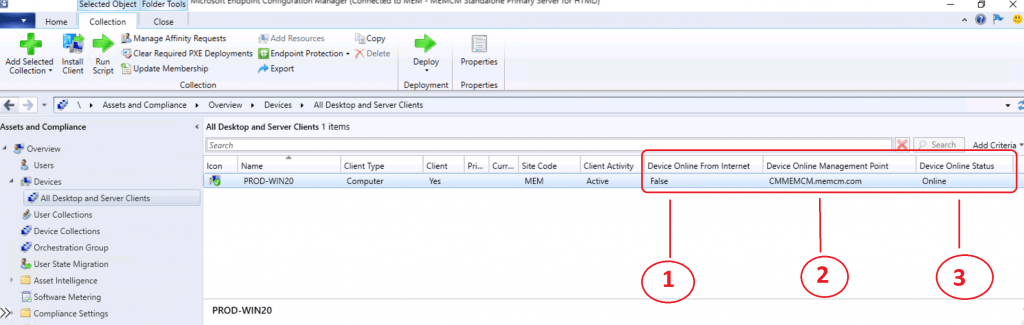
If you have trouble making clients ONLINE, let’s check the troubleshooting Overview of Client Online Status in the SCCM Console. There are three types of Client Online indication in the ConfigMgr Console for all Windows 10 clients.
- Device Online From Internet – Only for CMG connected device?
- Device Online Management Point – Internal MP connected Windows 10 device
- Device Online Status – Overall online status of Windows 10 client.
Offline Status Icon
The SCCM site and console consider a Windows 10 device as OFFLINE if it’s NOT connected to its assigned management point.
- To indicate that the client is OFFLINE, it sends ping-like messages (not PING) to the management point.
- If the management point doesn’t receive a message in five minutes (5), the site considers the client as offline.
- In lab environments, I have seen scenarios where the client status changes to offline within 1 minute or so.

There are three SCCM Client Online indication types in the Admin Console for all Windows 10 clients.
- Device Online From Internet – Only for CMG-connected devices? OFFLINE for offline devices.
- Device Online Management Point – Internal MP connected Windows 10 device – Name of the MP.
- Device Online Status – Overall online status of Windows 10 client – OFFLINE for offline devices.

Unknown Status Icon
The ConfigMgr client status is shown as unknown, which means the site server (or MP) cannot connect to the client via the fast channel. There could be several reasons for the unknown status, including the communication between client and server not being in place.

If you want to understand why ConfigMgr clients are in unknown status, let’s check the troubleshooting Troubleshoot SCCM Fast Channel Push Notification Issues.
The client is NOT Installed
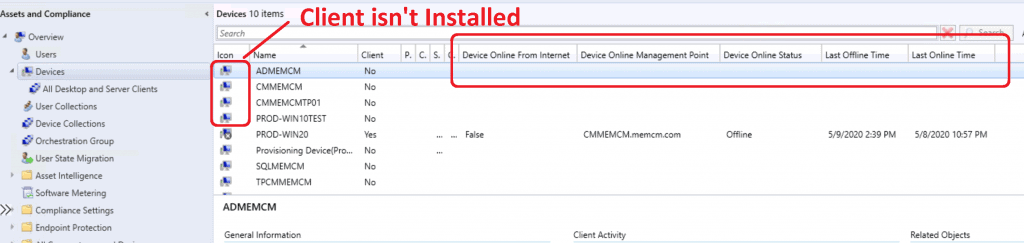
The following icon indicates that the client is not installed on these devices. These devices are discovered in your SCCM environment, and Device records are created. However, the SCCM client is not installed on these devices.

You can install the client on these devices using any of the methods explained in the following blog post. For more details, see Install SCCM Client Manually Using Command-Line.
Resources – ConfigMgr Client Status
- Install SCCM Client Manually Using Command-Line
- Troubleshoot SCCM Fast Channel Push Notification Issues
We are on WhatsApp. To get the latest step-by-step guides and news updates, Join our Channel. Click here –HTMD WhatsApp.
Author
Anoop C Nair is Microsoft MVP! He is a Device Management Admin with more than 20 years of experience (calculation done in 2021) in IT. He is a Blogger, Speaker, and Local User Group HTMD Community leader. His main focus is on Device Management technologies like SCCM 2012, Current Branch, and Intune. He writes about ConfigMgr, Windows 11, Windows 10, Azure AD, Microsoft Intune, Windows 365, AVD, etc.




Hello Anoopcnair, thank you for the post. I have a situation where the client version column shows the current version, but the client column says no and the icon is not installed. When accessing the device, you can see the Configuration Manager in the control panel and the version is the same as the one shown in the client version column. What could be causing this situation? Have you ever seen anything similar?
what about “SCCM shows client checked passed/active”