






Console Connections | Admins Recently Connected ConfigMgr Console | SCCM | FIX
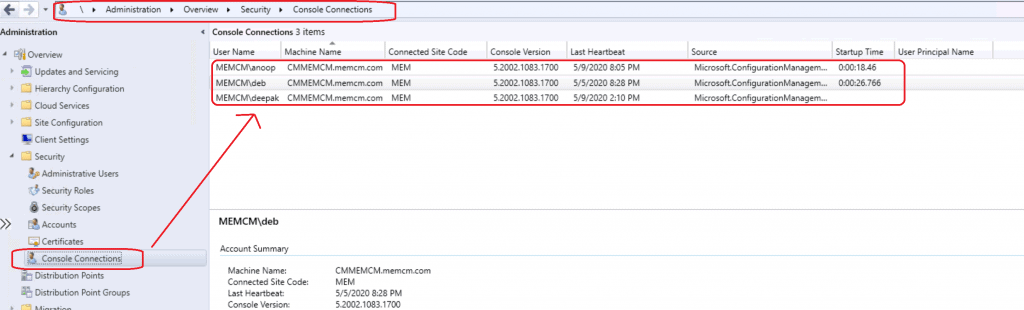
Let’s learn how many admins are connected to the ConfigMgr console (Console Connections). Microsoft introduced the view recently connected consoles feature with the SCCM 1902 version.
You can navigate to the SCCM console via \Administration\Overview\Security\Console Connections and view recently connected consoles. You know about Windows 10 startup time. Do you have any clue what the ConfigMgr console startup time is?
The Configuration Manager console can connect to your central administration site server or your primary site servers. However, it is important to note that it cannot connect to a secondary site. When installing the console, be sure to specify the fully qualified domain name (FQDN) of the site server to which the console should connect.
| Index |
|---|
| Requirements |
| ConfigMgr Console Startup Time Performance |
| Background Process via Logs – Console Connections |
| SQL Query |
| Troubleshooting |
| Resources |
NOTE: I know most of your organization’s SCCM consoles don’t show this information under Console Connections. I will help you find out more details about this issue in this post.

Requirements
- Configuration Manager version 1902 or later.
- Enable Windows server role Web Server (IIS).
- All the firewall ports should be opened for Administrative Services. More details https://docs.microsoft.com/en-us/mem/configmgr/develop/adminservice/overview
- Install the .NET Framework version 4.5 or later.
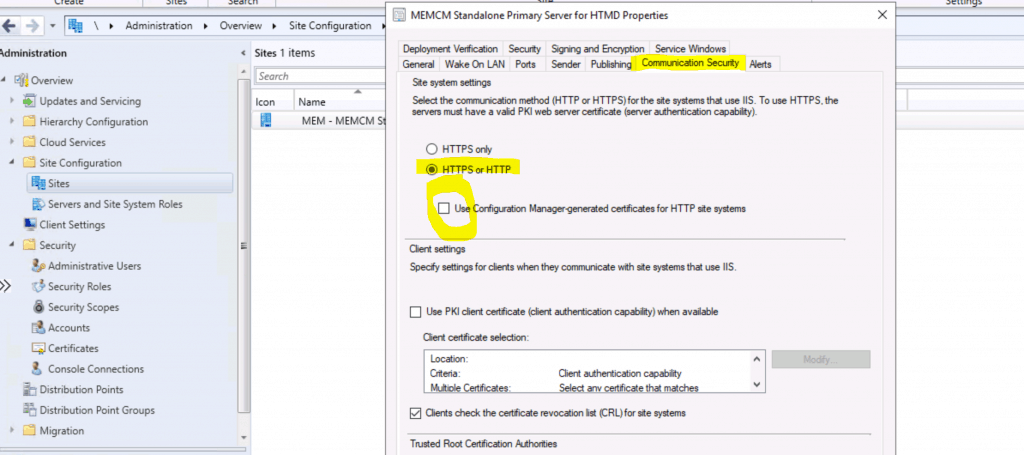
- Enable the SMS Provider to use a certificate. Use one of the following options:
- Manually bind a PKI-based certificate to port 443 in IIS on the server that hosts the SMS Provider role.
- Enable secure HTTPS communication (EHTTP) with a trusted certificate. For more information, see Enable secure HTTPS communication.
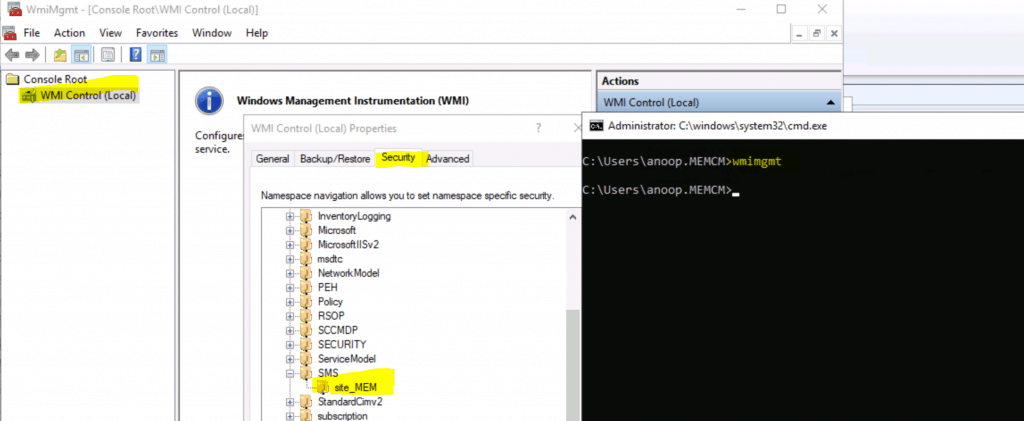
- The admin account needs to have the Read permission on the SMS_Site object.
NOTE – If you want to view the recently connected console when configuring CMG, you need to have an Azure Active Directory (Azure AD) account.
ConfigMgr Console Startup Time Performance
With the view recently connected consoles feature, you might be able to analyze the performance of the ConfigMgr console. The recently connected admin console option provides the console’s startup time.
This shall help to analyze the console’s performance along with the right client tools etc. The following are the supported columns available with the ConfigMgr 2002 version:
- User name.
- Machine name.
- Connected site code.
- Console version.
- Source (application – console or some other connections).
- Last Heartbeat: When the user last opened the console.
- Startup Time – Load Time for SCCM Console.
Background Process via Logs – Console Connections
Let’s look at the following logs to troubleshoot issues with the view recently connected ConfigMgr Console:
- AdminService.log
- SMS_REST_PROVIDER.log
- SmsAdminUI.log (\AdminConsole\AdminUILog)
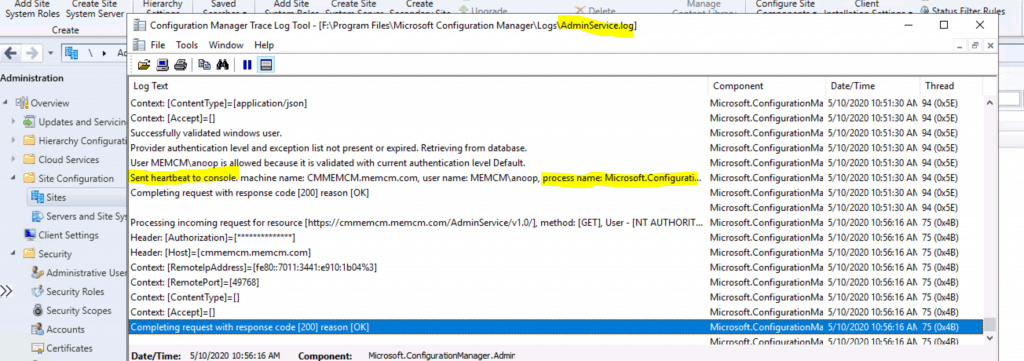
AdminService.log
Created logging middleware.
Processing incoming request for resource [https://cmmemcm.memcm.com/AdminService/v1.0/%24metadata], method: [GET], User - [MEMCM\deb]
Header: [SMSAppName]=[Configuration Manager Administrator console]
Header: [MachineName]=[CMMEMCM.memcm.com]
Header: [UserName]=[MEMCM\deb]
Header: [ObjectLockContext]=[fe214b72-73d7-4e32-a8b5-c173f15a5313]
Header: [ApplicationName]=[Microsoft.ConfigurationManagement.exe]
Header: [ApplicationVersion]=[5.2002.1056.1000]
Header: [LocaleID]=[MS\0x409]
Header: [Authorization]=[]
Header: [Host]=[cmmemcm.memcm.com]
Context: [RemoteIpAddress]=[fe80::7011:3441:e910:1b04%3]
Context: [RemotePort]=[50060]
Context: [ContentType]=[]
Context: [Accept]=[]
Completing request with response code [200] reason [OK]
AdminService.log
Processing incoming request for resource [https://cmmemcm.memcm.com/AdminService/v1.0/ConsoleUsageData/AdminService.UpdateConsoleHeartbeat], method: [POST], User - [MEMCM\Deepak]
Header: [SMSAppName]=[Configuration Manager Administrator console]
Sent heartbeat to console. machine name: CMMEMCM.memcm.com, user name: MEMCM\deepak, process name: Microsoft.ConfigurationManagement
SQL Query
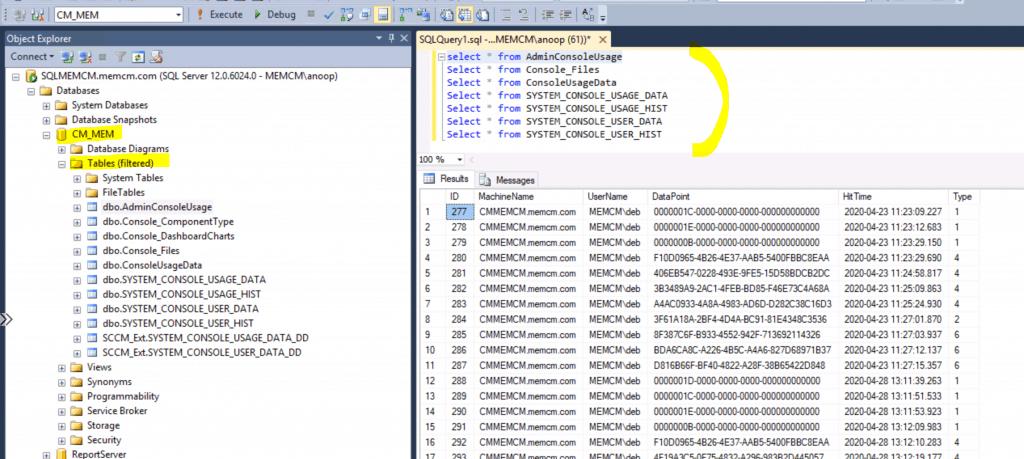
If you like to look at SQL DB to check the details of the console connection details, you can do this using the following query:
select * from AdminConsoleUsage
Select * from Console_Files
Select * from ConsoleUsageData
Select * from SYSTEM_CONSOLE_USAGE_DATA
Select * from SYSTEM_CONSOLE_USAGE_HIST
Select * from SYSTEM_CONSOLE_USER_DATA
Select * from SYSTEM_CONSOLE_USER_HIST
Troubleshooting
Log files are your best friend to analyze, as I mentioned in the above section called background process.
- AdminService.log
- SMS_REST_PROVIDER.log
- SmsAdminUI.log (\AdminConsole\AdminUILog)
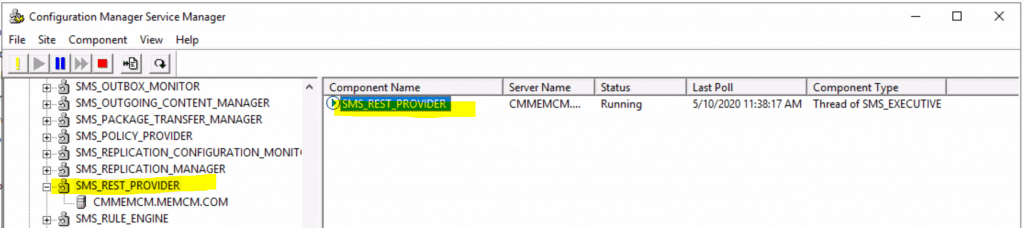
Another option is to launch component status under Monitoring > System Status > Component Status and check whether SMS_Rest_Provider is running.
Where is Tools ConfigMgr Service Manager Option in SCCM Console? Check out https://www.anoopcnair.com/configmgr-service-manager-option-in-sccm-console/
Resources
- View recently connected consoles – https://docs.microsoft.com/en-us/mem/configmgr/core/servers/manage/admin-console#bkmk_viewconnected
- What is the administration service in the Configuration Manager?
We are on WhatsApp. To get the latest step-by-step guides and news updates, Join our Channel. Click here –HTMD WhatsApp.
Author
Anoop C Nair is Microsoft MVP! He is a Device Management Admin with more than 20 years of experience (calculation done in 2021) in IT. He is a Blogger, Speaker, and Local User Group HTMD Community leader. His main focus is on Device Management technologies like SCCM 2012, Current Branch, and Intune. He writes about ConfigMgr, Windows 11, Windows 10, Azure AD, Microsoft Intune, Windows 365, AVD, etc.




In version 1902 , in console. I am not able to see source, start up time and user principal tabs under ‘console connection’
StaffTry to connect https://forum.howtomanagedevices.com
Hello Anoop,
Thank you for your wonderful blog. it always help us to understand SCCM concept in deeply.
Is it prereq to checked administration services check box in site hierarchy setting in SCCM 2002 . Because i have able to saw connected console without enable administration services. I have read lot of blog about usages of administration services but not clear my doubt. it will be great if you write blog or make video about administration services deep dive like usages/ benefit/ automation/ Read rest API from scripting language etc.. Thank you in advance.
Thanks
Mohsin Husen.