






More Flatter Hierarchy with SCCM Some Smart Decisions Configuration Manager
Let’s discuss More Flatter Hierarchy with SCCM Some Smart Decisions Configuration Manager. Scaling the SCCM hierarchy is crucial in releasing the new SCCM Current Branch with SCCM and Windows 10 servicing options.
Planning and designing the infrastructure is essential to SCCM CB. We must carefully and smartly identify when to use additional distribution points or management points.
Most of us who have already used SCCM CAS or read about SCCM CAS-related advice from the community will avoid the installation of the CAS server. Instead, we will try to flatten the SCCM CB Infra with a stand-alone primary server.
With the increase in the number of clients supported, flattening the SCCM Infra is very much possible; an SCCM Current Branch stand-alone primary site supports the following number of devices: 175,000 total clients and devices.
Table of Contents

- Free SCCM Training 37 Hours of Latest Technical Content Lab Setup
- Free ConfigMgr Training Part 2 | 20 Hours of Technical | SCCM
- Free SCCM Training Part 1 | 17 Hours Of Latest Technical Content | ConfigMgr Lab HTMD Blog
- Free ConfigMgr Training Part 2 | 20 Hours Of Technical | SCCM HTMD Blog
- 63 Episodes Of Free Intune Training For Device Management Admins HTMD Blog
More Flatter Hierarchy with SCCM ConfigMgr CB Some Smart Decisions
SCCM Current Branch Scale-out options should be very dynamic at an enterprise level; for that, 3rd party SCCM add-on like the Adaptive One site will become very handy.
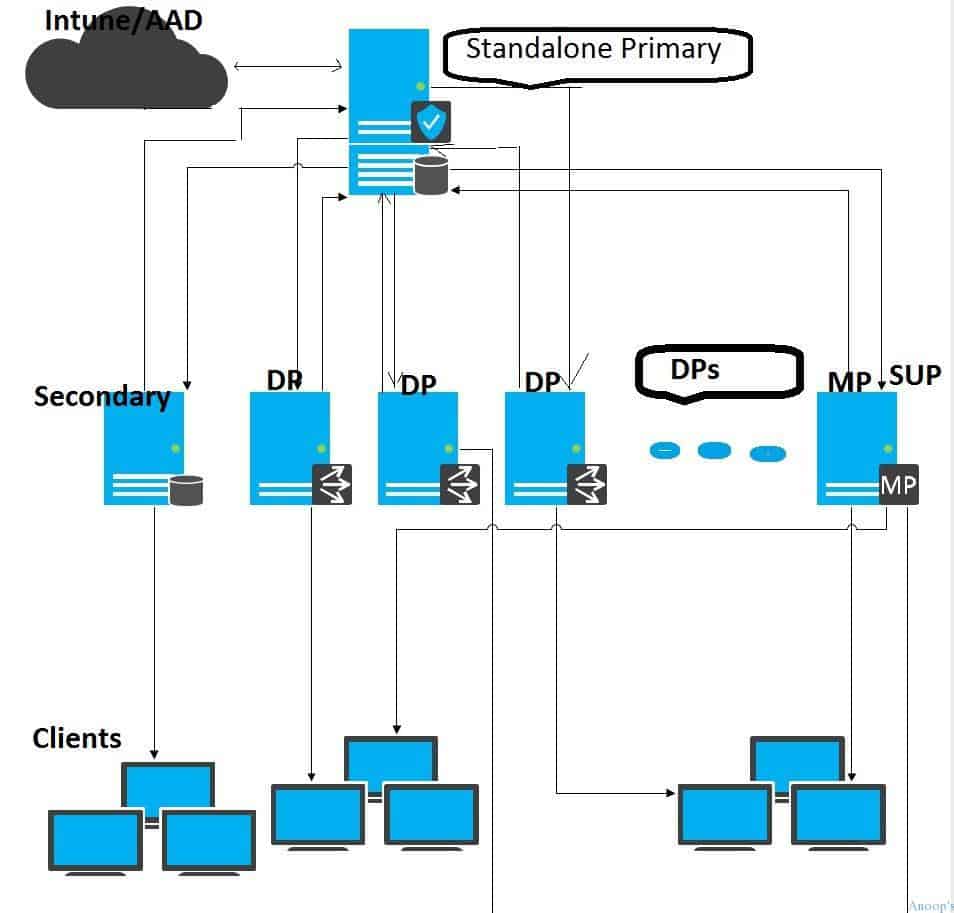
More Flatter Hierarchy
A standalone primary server can support 15 management points and 250 DPs. So, with a flatter infrastructure, we may have to deploy loads of DPs and MPs in the environment.
I’m not a big fan of secondary sites for low-bandwidth sites, mainly because of SQL DB replication. The following post, More Flatter Hierarchy with SCCM ConfigMgr CB Some Smart Decisions Configuration Manager, provides more details.
However, we may have trouble placing MPs/DPs in each remote office for large environments, mainly because SCCM CB can support only 15 MPs, 250 DPs, and 250 secondary sites. We can’t even consider operation teams overhead if we have hundreds of DPs and secondary sites in your SCCM CB infra.
TechNet documentation on SCCM’s current branch-supported sizing and scale numbers is here. To scale out your SCCM Current branch architecture and design, consider innovative scaling options like Adaptiva Onesite.
Adaptiva can dynamically handle remote offices without spanning hundreds of DPs across your WAN. More details about Adaptiva are here.
Resources
SCCM Related Posts Real World Experiences Of SCCM Admins
SCCM Video Tutorials For IT Pros – HTMD Blog #2
We are on WhatsApp now. To get the latest step-by-step guides, news, and updates, Join our Channel. Click here. HTMD WhatsApp.
Author
Anoop C Nair is Microsoft MVP! He is a Device Management Admin with more than 20 years of experience (calculation done in 2021) in IT. He is a Blogger, Speaker, and Local User Group HTMD Community leader. His main focus is on Device Management technologies like SCCM 2012, Current Branch, and Intune. He writes about ConfigMgr, Windows 11, Windows 10, Azure AD, Microsoft Intune, Windows 365, AVD, etc.


Discussion · 1 comment