






Explore New Device Report Filters in Microsoft Defender Vulnerability Management for Prioritize Remediation
Key Takeaways:
- New Reporting Filters in Defender Vulnerability Management
- Filters are designed to make it easier to identify high‑risk device
- Admins gain clearer insights into vulnerable devices, enabling more efficient troubleshooting and reporting
- Changes support better decision‑making by aligning vulnerability
Let’s discuss about Explore New Device Report Filters in Microsoft Defender Vulnerability Management for Prioritize Remediation. The public preview of Device Vulnerabilities report in Microsoft Defender Vulnerability Management is available now.
Table of Contents
Table of Contents
Explore New Device Report Filters in Microsoft Defender Vulnerability Management for Prioritize Remediation
Microsoft release the public preview of Device Vulnerabilities report in Microsoft Defender. With this public preview Vulnerable devices report now includes some changes and enhancements. These changes are not yet visible to government cloud customer and will be visible in late January 2026. The following table shows the new changes and enhancements.
| Changes and Enhancements |
|---|
| The Vulnerable devices by Windows 10/11 version over time section has been removed |
| The report’s filters have been simplified to only include the Device group filter |
| The report’s history is now limited to the last 30 days |
- 5 Methods to Enable or Disable Automatic Sample Submission for Microsoft Defender Antivirus in Windows Devices
- Monitoring Defender Updates using Intune Portal
- What is Microsoft Defender XDR?
How to Locate Vulnerability Management Section
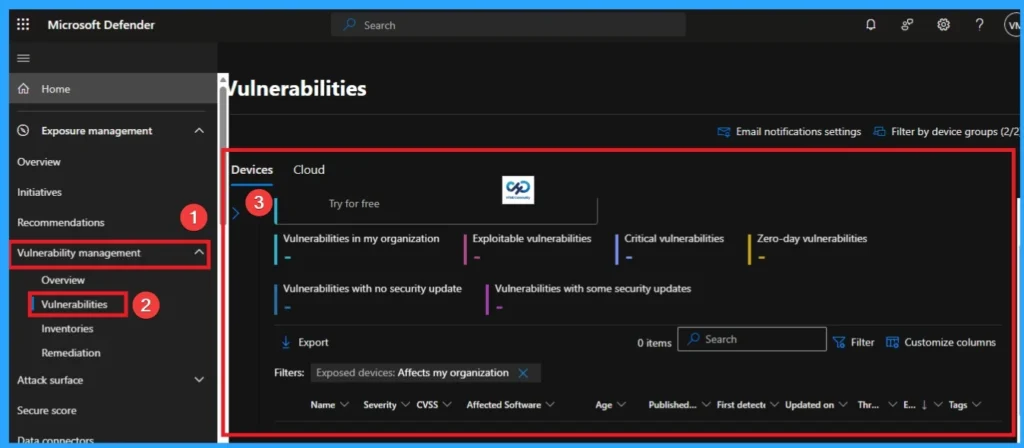
The Vulnerability Management section in the Microsoft Defender portal is now located under Exposure management. With this change, you can now consume and manage security exposure data and vulnerability data in a unified location, to enhance your existing Vulnerability Management features.
- Sign in to the Microsoft Defender portal.
- In the left navigation pane, go to Exposure management (previously called Threat & Vulnerability Management).
- Select Reports > Device vulnerabilities.
- The Device vulnerabilities report will open, showing
- Vulnerable devices by severity, exploit availability, and age.
- Filters for device groups, OS, and vulnerability categories.
- Trend charts to track remediation progress over time.
Columns and Filters on Vulnerable Devices Report
You can easily access the report in the Microsoft Defender portal by going to Reports > Vulnerable devices. There are 2 columns available on Vulnerable Devices Report which are trends and status. The trends can show data from the past 30 days up to six months. The Status shows the current status.

Severity Level Graphs
Each device is counted only once according to the most severe vulnerability found on that device. Look at the below screenshots.

Need Further Assistance or Have Technical Questions?
Join the LinkedIn Page and Telegram group to get the step-by-step guides and news updates. Join our Meetup Page to participate in User group meetings. Also, Join the WhatsApp Community and WhatsApp Channel to get the latest news on Microsoft Technologies. We are there on Reddit as well.
Author
Anoop C Nair has been Microsoft MVP for 10 consecutive years from 2015 onwards. He is a Workplace Solution Architect with more than 22+ years of experience in Workplace technologies. He is a Blogger, Speaker, and Local User Group Community leader. His primary focus is on Device Management technologies like SCCM and Intune. He writes about technologies like Intune, SCCM, Windows, Cloud PC, Windows, Entra, Microsoft Security, Career, etc.




Discussion