






New Entra Custom Authentication Extension | Enable Integration with Any Email Providers
Let’s discuss New Entra Custom Authentication Extension | Enable Integration with any Email Providers. Microsoft introduced New custom authentication extension for external-facing applications. This extensions enables the integration with any Microsoft and non-Microsoft email providers.
Microsoft is dedicated to create provide seamless end-user experiences and establishing end-user trust, and accelerating your business growth. With the New Custom Authentication Extension Microsoft aims to give seamless experiences for both admins and developers.
Entra Custom Authentication Extension avaialble in Public Preview. With this authentication extension you can choose any Microsoft and non-Microsoft email providers of your choice for one time passcode events triggered during sign-up, sign-in and forgot password flows.
In this blog post i will help you to know more about New Entra Custom Authentication Extension | Enable Integration with Any Email Providers. You can try this new feature in Entra and enhance the your authentication experience.

Table of Contents

New Entra Custom Authentication Extension | Enable Integration with Any Email Providers
As i mentioned above new Custom Authentication Extension is available in Public Preview. Microsoft added these customization options based on your feedback that you wanted more control over the experience for your users.
| Advantages of Custom OTP Email |
|---|
| Brand Customization |
| Improved User Experience |
| Flexibility |
| Enhanced Security |
| Scalability |
- Microsoft Moves Per-User Multifactor Authentication to Entra ID for Easier Management
- New Entra Phishing Resistant Passwordless Authentication | Zero-Trust Security Strategy | Explicit Verification
- Native Authentication for Microsoft Entra External ID | Complete Control Over Login Experience
Create an API Gateway to the Custom Email Provider
With this authentication you can create an Azure function App. Then, create an HTTP trigger function and update the function default value.
Configure EmailOtpSend Custom Authentication Extension
On the Microsoft Entra Admin Center you can configure EmailOtpSend custom authentication extension using the custom authentication extensions blade for your Tenant. You can register a new custom authentication extension, connect it to your application/s and assign a custom email provider to the application/s.
Basic Tab
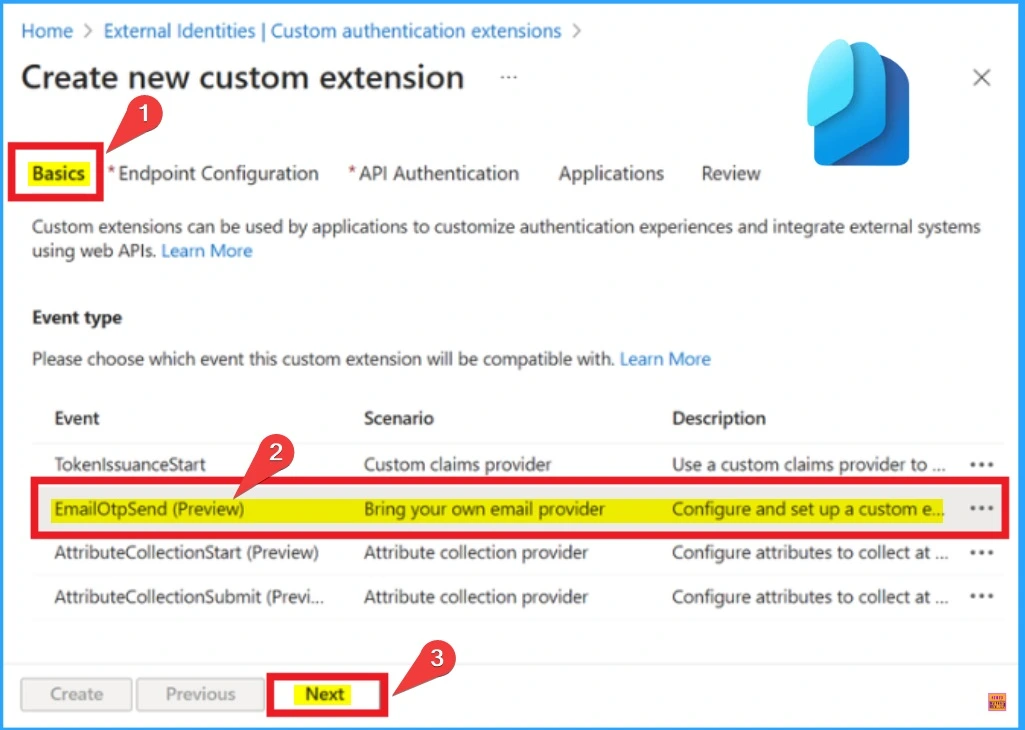
On the Basic Tab you can you to choose the EmailOtpSend event type. In this window you can see different Event its scenario, and description. Select EmailOtpSend(Preview) as shown in the below screenshot. Then click on the Next button.
Endpoint Configuration Tab
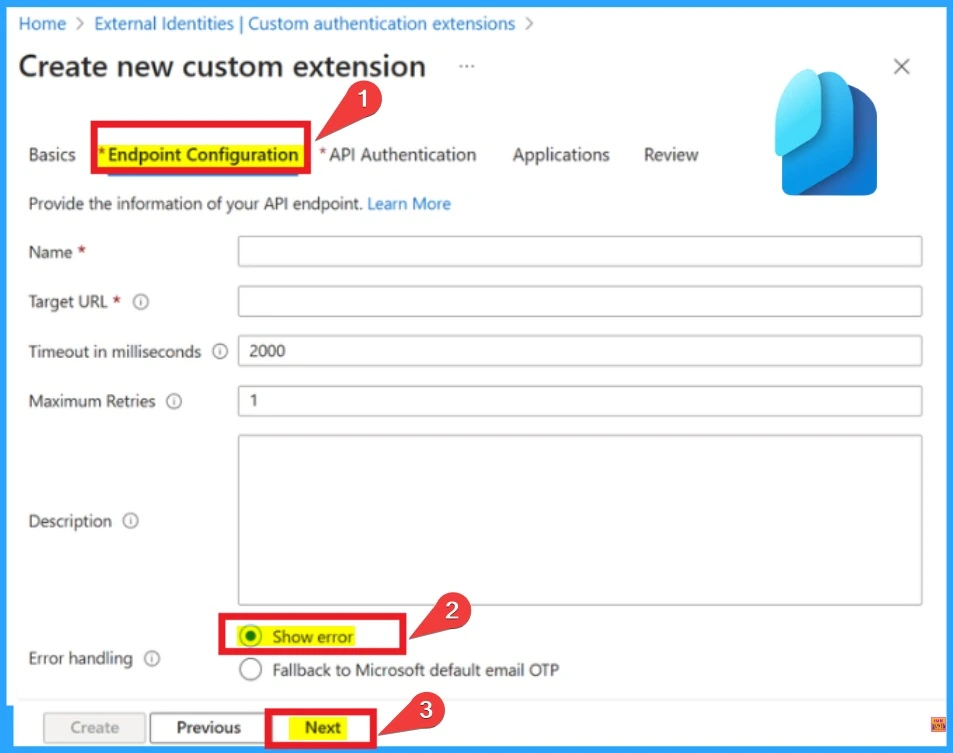
The Endpoint Configuration Tab helps you to set up your API endpoint. You can add Name, Targer URL, Timeout in milliseconds, Maximum Retries etc. On the Error Handling section you can see options such as Show error and Fallback to Microsoft default email OTP.
- Choose Show error option
- Click on the Next button
- Entra External ID Now Supports SMS as an MFA Option
- Retirement of Legacy Authentication Methods Management in Microsoft Entra ID
- Modernize MFA Authentication Policies in Entra ID
API Authentication
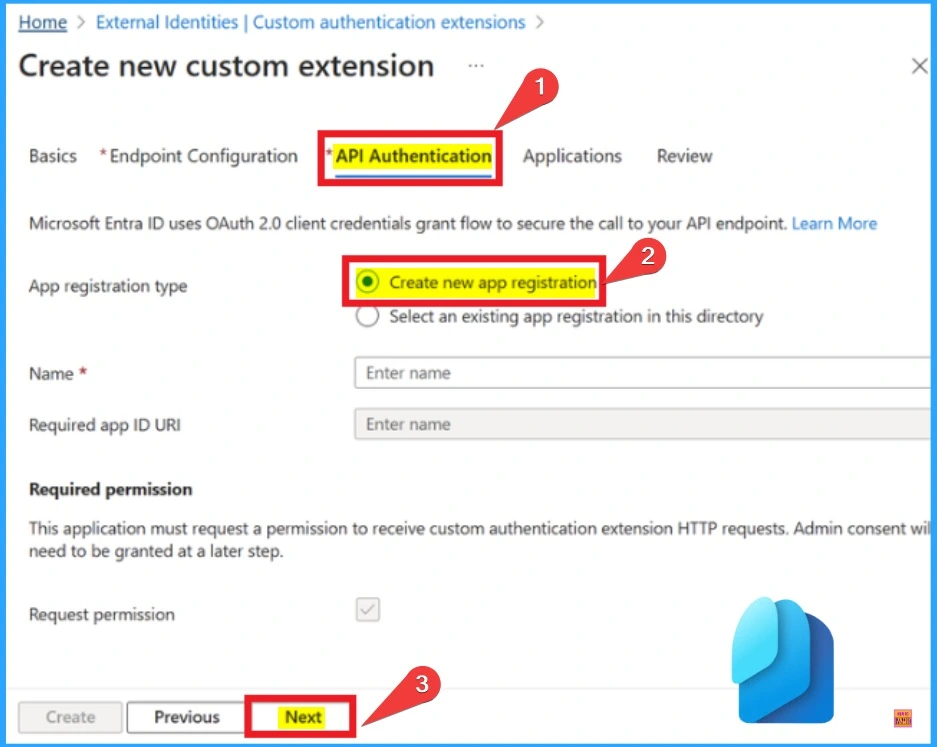
API Authentication grants flow to secure the call to your API endpoint. Microsoft Entra ID uses OAuth 2.0 client credentials grant flow to secure the cal to your API endpoint. In this window enable Create new app registration option from App registration type.
- Click on the Next button
Application
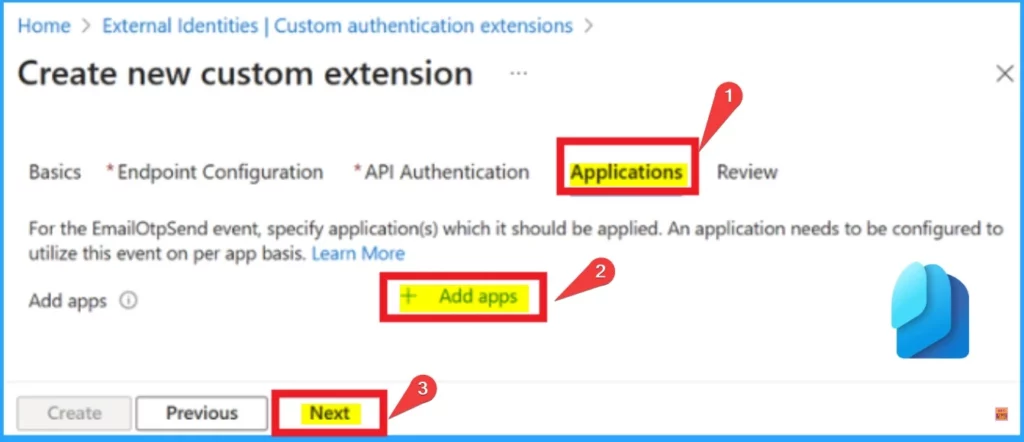
In this window you can add add application to applies the EmailOtpSend event to the application/s. An application needs to be configured to utilize this event on per app basis. Get started using EmailOtpSend custom authentication extensions by setting up Microsoft Entra External ID tenant.
Need Further Assistance or Have Technical Questions?
Join the LinkedIn Page and Telegram group to get the latest step-by-step guides and news updates. Join our Meetup Page to participate in User group meetings. Also, Join the WhatsApp Community to get the latest news on Microsoft Technologies. We are there on Reddit as well.
Resource
Enhance end-user experiences with Custom OTP Email Provider Support
Author
Anoop C Nair has been Microsoft MVP from 2015 onwards for 10 consecutive years! He is a Workplace Solution Architect with more than 22+ years of experience in Workplace technologies. He is also a Blogger, Speaker, and Local User Group Community leader. His primary focus is on Device Management technologies like SCCM and Intune. He writes about technologies like Intune, SCCM, Windows, Cloud PC, Windows, Entra, Microsoft Security, Career, etc.




Discussion