






New Features in SCCM 2301 Technical Preview
This post will give you an overview of the list of features added to the SCCM 2301 Technical Preview. The Configuration Manager 2301 is the first Technical Preview Version after announcing SCCM 2211 Production Version release.
In terms of features, in SCCM 2301 Technical Preview, You will experience the branding change to Microsoft Configuration Manager, and the Update to the default value of supersedence age in months for software updates.
Technical Previews are early pre-release builds, Features in a previous version of the technical preview remain in later versions. A technical preview installation never has the option to upgrade to a current branch installation. It also never receives updates from the current branch release.
The technical preview branch of Configuration Manager is not supported for use in a production environment. The technical preview is licensed for use only in a lab environment.

Download SCCM Technical Preview Baseline Version
When you install a new technical preview site, use the latest baseline version 2210. After installing a baseline version, use in-console updates to bring your installation up to date with the most recent SCCM Technical preview version 2301.
Update 2210 for Technical Preview Branch is available in the Microsoft Configuration Manager Technical Preview console. For new installations, the 2210 baseline version of the Microsoft Endpoint Configuration Manager Technical Preview Branch is available on the link: MECM2210TP-Baseline or from the Eval center.
Build SCCM Technical Preview LAB, How to Build Configuration Manager Technical Preview LAB | SCCM
New Features in SCCM 2301 Technical Preview Version
Let’s check the new features to try out in SCCM 2301 technical preview version. Starting with Configuration Manager version 2301, You will experience the addition of new features and improvements.
Microsoft Configuration Manager Product Branding
Starting with Configuration Manager version 2301 technical preview Microsoft Endpoint Configuration Manager is now Microsoft Configuration Manager.
Microsoft Configuration Manager is an integrated solution for managing all your devices. Microsoft brings together Configuration Manager and Intune, without a complex migration, and with simplified licensing. Continue to leverage your existing Configuration Manager investments, while taking advantage of the power of the Microsoft cloud at your own pace.
Most IT Pros still like to use SCCM, What SCCM ConfigMgr MEMCM MECM MEM | Survey | Poll. Check the voting initiated (Facebook Group SCCM – ConfigMgr Professionals Group with more than 19K members) on the acronym topics related to Configuration Manager back in 2020. The voting results were not surprising.
Update to the default value of supersedence age in months for software updates
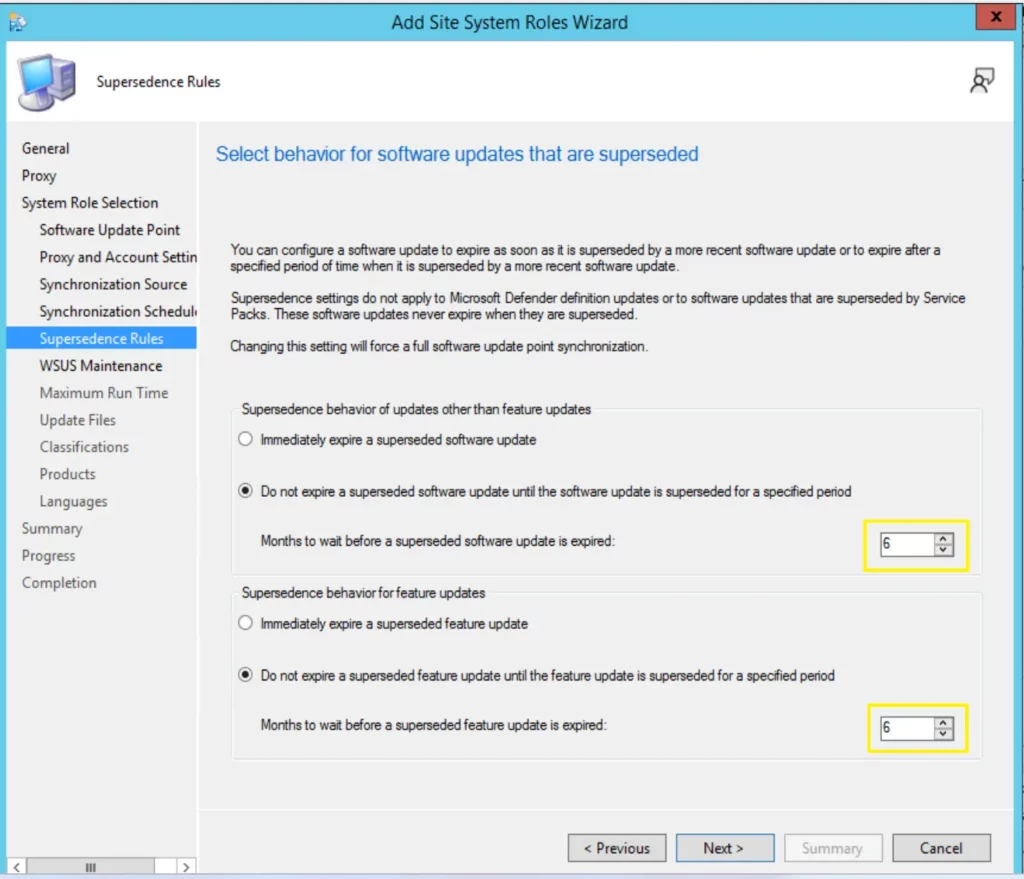
With Unified Update Platform (UUP) nearing general availability release, the feature update and non-feature update supersedence should be greater than 3.
For new software update role installations, Microsoft is updating this to 6, existing customers can review and update to 6 when the feature is released during general availability. Update to the default value of supersedence age in months for software updates.
Improvements to Cloud Sync (Collections to Azure Active Directory Group Synchronization) feature
Starting with SCCM 2301 technical preview release user/device-based sync status (success, failure, in-progress, failure reason if any) will be available in the dashboard for the chosen collection. Earlier with Configuration Manager version 2211, the scalability of this feature has been improved with better throttling and error handling.
Additionally, dedicated dashboards for user and device collections are added to the Monitoring workspace to show Cloud Sync status. The dashboard displays the Cloud Sync status per collection with the mapped Azure AD group, total member count, synced member count, status (success, failed, in progress) and last sync details.
Removing Microsoft Store for Business and Education new Config Capability
As part of the Microsoft Store for Business deprecation, Technical preview build making these changes to the customer experience by using this feature:
- Removing a user’s ability to create new Microsoft Store for Business in Configuration Manager.
- Display a warning message box when user triggers a sync from Microsoft Store for Business.
- Display a warning in the Create Application Wizard when user attempts to create a new app from Store license information.
Author
About Author – Jitesh, Microsoft MVP, has over six years of working experience in the IT Industry. He writes and shares his experiences related to Microsoft device management technologies and IT Infrastructure management. His primary focus is Windows 10/11 Deployment solution with Configuration Manager, Microsoft Deployment Toolkit (MDT), and Microsoft Intune.




Discussion