






Popular Misconception of Intune Check-ins Explained by Microsoft
Let’s discuss Popular Misconception of Intune Check-ins Explained by Microsoft. Maintenance check-ins also plays an important role in device management. Maintenance check-ins are very important for keeping your devices safe, updated, and working properly, even when no one is doing anything on the device.
Albert Cabello explained what Intune Maintenance Check-ins are and addressed common misconceptions about how they work for devices during the Technical Takeoff session. These check-ins happen in the background at regular times without needing any manual steps.
Maintenance check-ins help refresh the device’s compliance status to make sure it still follows your company’s rules and security settings. These check-ins also apply hidden updates like renewing certificates or updating the Intune client. Device check-ins are essential for how Intune manages and keeps control over your devices. They help devices stay secure, updated, and in sync with company policies. There are three main types of check-ins in Intune.
In this post, you will get all the details about what Intune Maintenance Check-ins are and some common misconceptions around how they work for devices. Many assume that check-ins only happen when users take action, but maintenance check-ins run regularly without any manual steps.

Table of Contents
Popular Misconception of Intune Check-ins Explained by Microsoft
The maintenance check-ins help keep everything running smoothly without extra work from admins or users. These check-ins also keep Intune’s reports up to date by sending the latest information about apps, settings, and device details.
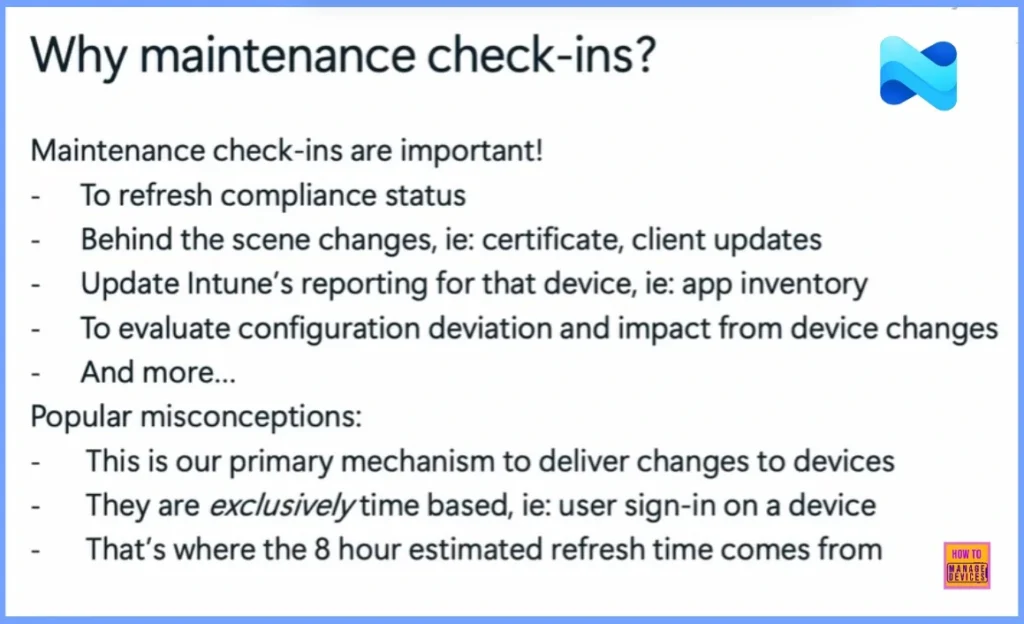
- Maintenance check-ins are important
- Behind the scene changes, ie: certificate, client updates
- Update Intune’s reporting for that device, ie: app inventory
- To evaluate configuration deviation and impact from device changes
- And more
- Popular misconceptions:
- This is our primary mechanism to deliver changes to devices
- They are exclusively time based, ie: user sign-in on a device
- That’s where the 8 hour estimated refresh time comes from
Misconceptions for Devices
Many people think that Intune Maintenance Check-ins are the main way updates and changes are sent to devices. But that’s not true. These check-ins mainly help keep devices updated in the background and are just one part of the bigger process.
Another common belief is that maintenance check-ins only happen at set times. While they usually follow a regular schedule of about 8 hours, this is just a general idea and not a fixed rule. Devices can still get updates in other ways too. Understanding this helps you know how Intune keeps your devices managed and updated.
Device Check-in Traffic
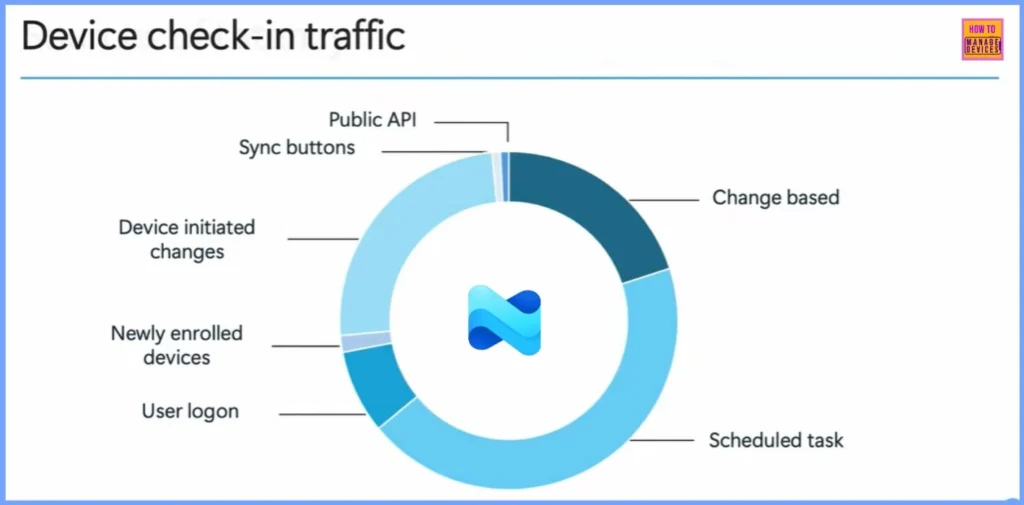
Let’s talk about the different types of check-in traffic in Intune. Device check-in traffic shows where the check-ins are coming from and what triggers them. A large part of the traffic comes from maintenance check-ins, which happen on a regular schedule in the background to keep devices updated.
About 15 to 20 percent of the traffic is from change-based check-ins, which happen when something changes, like a new policy or app being assigned. This means most check-ins are routine, while a smaller part happens in response to changes made in Intune.
| Check-in Source | Description |
|---|---|
| Change-Based | Change-Based Check-ins, also known as fast lane check-ins, are triggered when Intune detects changes like new policy assignments and ensures those updates are applied quickly. |
| Scheduled Task | Regular background check-ins (maintenance) to refresh compliance and updates. |
| User Logon | Occurs when a user signs into a device, prompting a check-in. |
| Newly Enrolled Devices | Triggered immediately after a device is enrolled into Intune. |
| Device-Initiated Changes | When the device itself makes a change that requires a sync. |
| Sync Buttons | Manually triggered by users or admins via the Intune portal or device settings. |
| Public API | Triggered through automated scripts or external systems using Intune’s API. |
Need Further Assistance or Have Technical Questions?
Join the LinkedIn Page and Telegram group to get the latest step-by-step guides and news updates. Join our Meetup Page to participate in User group meetings. Also, join the WhatsApp Community to get the latest news on Microsoft Technologies. We are there on Reddit as well.
Resources
Author
Anoop C Nair has been Microsoft MVP for 10 consecutive years from 2015 onwards. He is a Workplace Solution Architect with more than 22+ years of experience in Workplace technologies. He is a Blogger, Speaker, and Local User Group Community leader. His primary focus is on Device Management technologies like SCCM and Intune. He writes about technologies like Intune, SCCM, Windows, Cloud PC, Windows, Entra, Microsoft Security, Career, etc.


Discussion